Solved

Empty 200 response from API's while using OAuth2

  • February 28, 2022
  • 3 replies
  • 508 views

Hi, 
I am trying to make API calls with O Auth 2 Authentication but facing some issues, previously I used Authentication based on Cookie. So I followed the steps to create an O Auth 2 connection, create a client id, client secret with O Auth 2 Flow as ‘Resource Owner Password Credentials. The Bearer token is getting generated when I hit this access token URL “/identity/connect/token”. The issue is whenever I make an API call with the generated token I get a 200 response with No data (image attached).
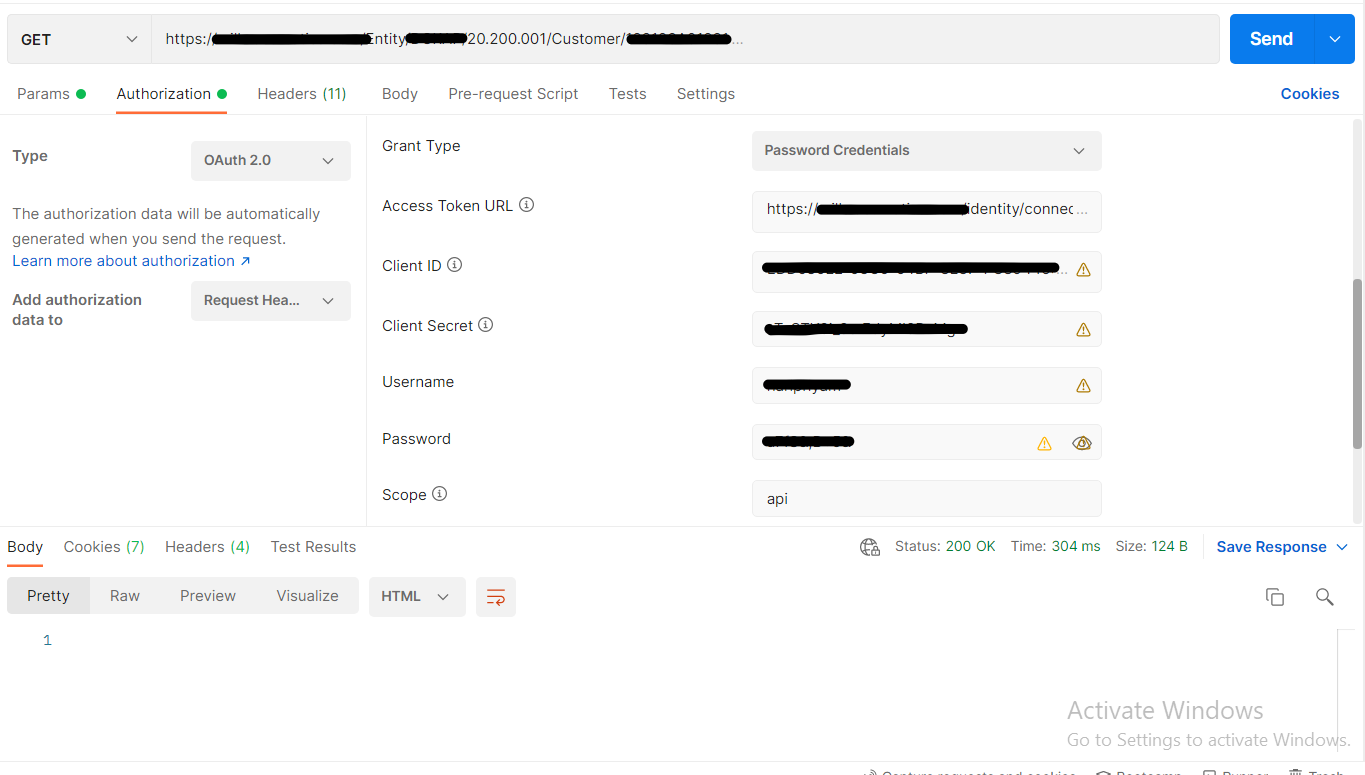


First I got a response something like this :
<script>
    window.open("/Main","_top");
</script>
So I passed the Accept and Content-Type in the header and then started getting an empty response. 
(Note: A bulk import is happening from Acumatica using APIs, so is this because of API usage limits? I am not sure about this)
I'm new to this system and wonder if I'm missing something. 

Thanks

 

Best answer by Nayan Vadher


(Note: A bulk import is happening from Acumatica using APIs, so is this because of API usage limits?


I don't think it is because of API usage as you are getting status code of 200 OK. Check in Request Profiler and see if anything shows up there that might give some clue.

3 replies

Nayan Vadher
Community Manager
Forum|alt.badge.img+2
  • Acumatica Developer Support
  • Answer
  • March 3, 2022


(Note: A bulk import is happening from Acumatica using APIs, so is this because of API usage limits?


I don't think it is because of API usage as you are getting status code of 200 OK. Check in Request Profiler and see if anything shows up there that might give some clue.


Chris Hackett
Community Manager
Forum|alt.badge.img
  • Acumatica Community Manager
  • April 25, 2022

Hi @RanjithKumar  were you ever able to resolve your issue? Thank you!


  • Freshman I
  • September 30, 2026

This appears to still be an issue with 2025 R2 (Build 25.201.0213).

I’m using PHP and Guzzle for the HTTP client.

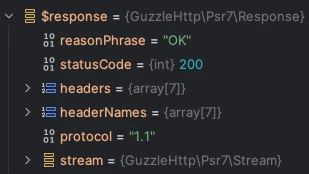
When using an access token with the “api” scope and not signing out, you can hit the API login limit. When this happens, Acumatica responds to the next request with the HTTP 200 status code…

Debugger output

...and the following HTML:

<!DOCTYPE html>
<html>

<head>
<meta charset="utf-8">
<meta name="viewport" content="width=device-width, initial-scale=1">
<link rel="icon" type="image/x-icon" href="../../Icons/site.ico" />
<script defer src="vendors.1482494b7989d7519074.bundle.js"></script><script defer src="app.ef125522ea17a8ee9cb9.bundle.js"></script></head>

<body aurelia-app="main">
</body>

</html>

The only indication that you’ve exceeded the login limit is found under the Request Profiler (if it’s active):

Request Profiler

With PHP/Guzzle, the only indication that this is an error is that either Guzzle throws an exception because the content-type of the response (“text/html”) doesn’t match the “Accept” header of the request (“application/json”), or, if the “Accept” header is not set, PHP fails to parse the HTML as JSON.

This is not ideal.

The solution seems to be to ensure that you sign out when you’re done interacting with the API.

You also need to make sure that the HTTP client you’re using manages cookies so that it can pass the session ID back to Acumatica when signing out. If you don’t, the sign out silently “fails” and you may run into the API login limit again.