Question

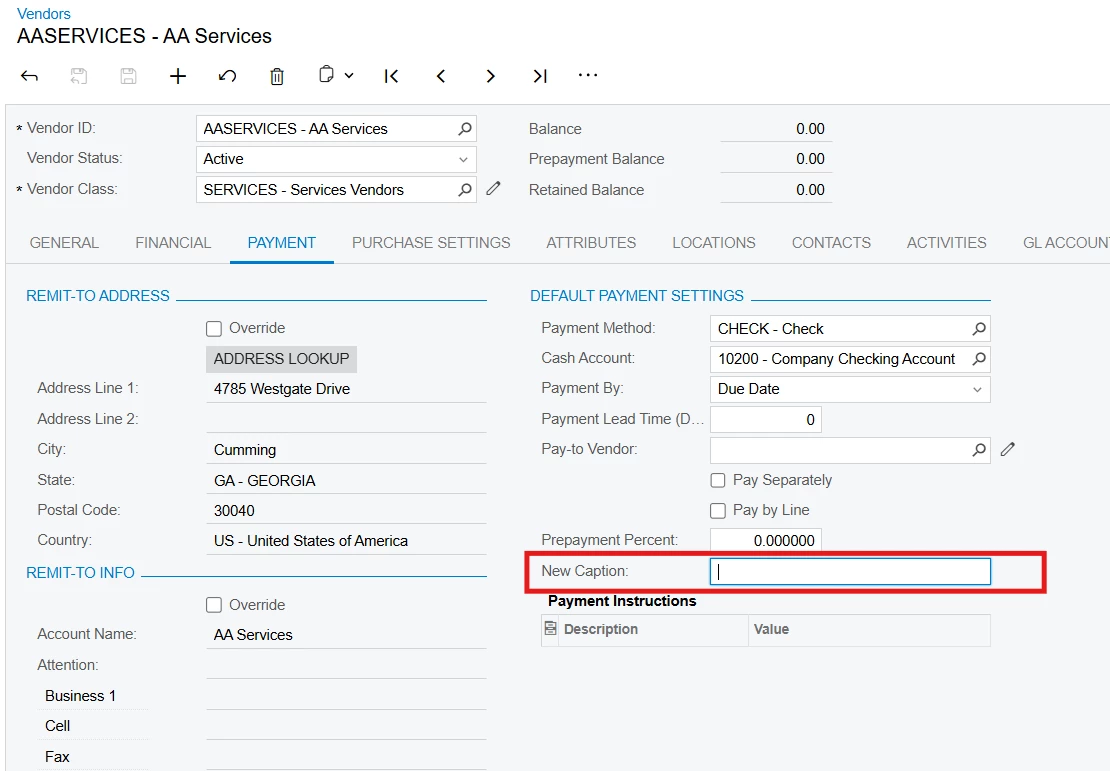
Dynamically change a field display name

  • May 31, 2026
  • 3 replies
  • 30 views

Forum|alt.badge.img+2

I'm trying to dynamically change the display name of a DAC extension field based on another field value in the same extension, but PXUIFieldAttribute.SetDisplayName() does not update the UI even though the code executes.

DAC Extension:

public class LocationExt : PXCacheExtension<PX.Objects.CR.Standalone.Location>
{
#region UsrGSTRegistration

[PXDBString(16)]
[PXUIField(DisplayName = "GST Registration")]
public virtual string UsrGSTRegistration { get; set; }

public abstract class usrGSTRegistration :
PX.Data.BQL.BqlString.Field<usrGSTRegistration> { }

#endregion
}

Inside RowSelected:

PXUIFieldAttribute.SetDisplayName<LocationExt.usrGSTRegistration>(
e.Cache,
displayName);

The code compiles correctly, the event hits during debugging, and displayName gets the expected value — but the label in the UI does not change.

As a workaround suggested in another post in this community, I tried creating an unbound field to act as a dynamic label:

#region UsrReadOnlyGSTRegistrationLabelName

[PXString(32)]
[PXUIField(DisplayName = "GST Registration Label Name")]
public virtual string UsrReadOnlyGSTRegistrationLabelName { get; set; }

public abstract class usrReadOnlyGSTRegistrationLabelName :
PX.Data.BQL.BqlString.Field<usrReadOnlyGSTRegistrationLabelName> { }

#endregion

Then I set its value conditionally and displayed it near the field while hiding the original label. Functionally it works, but the alignment and font styling differ because it is actually rendered as a value field, not a real label.

My questions:

  1. Why does PXUIFieldAttribute.SetDisplayName() not update the UI even though it is an inbuilt framework method?

  2. Is there a proper supported way to dynamically change a field display name in Acumatica?

Any guidance or recommended approach would be appreciated.
3 replies

Forum|alt.badge.img+3
  • Pro III
  • June 1, 2026

@PDharmasena10 

Could you share which screen this customization is on and which DAC's RowSelected event you're using?

Since PX.Objects.CR.Standalone.Location is a shared DAC used across multiple screens, the screen context may help determine whether the behavior is related to the DAC usage or the specific screen implementation. 


Jhon Reeve Penuela
Freshman II
Forum|alt.badge.img

Hi ​@PDharmasena10  

You're not doing anything wrong—this is actually a known limitation in Acumatica.

While PXUIFieldAttribute.SetDisplayName() compiles and executes, it does not reliably update the UI at runtime, especially in RowSelected. Display names are treated more like metadata and are not designed for dynamic refresh the same way as Enabled or Visible.

In practice, there are only a few workable approaches:

  • For static scenarios, use [PXUIField(DisplayName="...")], CacheAttached, or screen customization (recommended)
  • For dynamic scenarios, a common workaround is to use an unbound field as a label, set its value conditionally, and hide the original label

What you implemented as a workaround is actually the approach most developers end up using, even if it's not perfect in terms of styling.

So unfortunately, there isn’t a fully supported way to dynamically change a field’s display name in-place at runtime.


This is one of those cases where the framework behaves differently than expected, so your workaround is valid and commonly used.

Thanks.


  • Jr Varsity I
  • June 1, 2026

Adding to Jhon Reeve and SaiKrishnaV's points. We use PXUIFieldAttribute.SetDisplayName in production to dynamically rename a grid column header based on a parent configuration record, and it refreshes the UI reliably each time the parent row changes. Sharing the pattern in case it helps narrow down what is happening on your screen.

A couple of details that matter:

1. The DAC you extend must be the one actually bound to the rendered field. PX.Objects.CR.Standalone.Location is the lightweight non-projection variant. The actual maintenance graphs (CustomerLocationMaint, VendorLocationMaint, AccountLocationMaint) all derive from the abstract LocationMaint, which declares its primary view as PXSelect<Location, ...> resolving to PX.Objects.CR.Location (the projection with PXProjection + PXCacheName), not the Standalone variant. If your field shows up on one of those screens, the cache that renders it is the projection, so a SetDisplayName call on the Standalone cache will execute happily and never touch the form.

2. The cache passed to SetDisplayName must be the cache where the field lives. When you call it from the same DAC's RowSelected, e.Cache is correct. When you call it from a parent graph's RowSelected to rename a field that lives on a child DAC, you have to pass the child view's cache (not the parent's e.Cache). A working call shape from a parent RowSelected looks like:

PXUIFieldAttribute.SetDisplayName<MyDetailDAC.myField>(
    MyDetailView.Cache,
    computedLabel);

Calling with the parent's e.Cache when the field actually lives on a child DAC silently no-ops.

3. If both of the above check out and the label still does not refresh, FieldSelecting is a reliable fallback because it fires per render and bypasses cache-level metadata reuse. This same pattern is used inside Acumatica's own source (for example PX.Objects.CS.RMReportMaintPM and PX.Objects.Common.AttachedField both assign state.DisplayName on PXFieldState during FieldSelecting), so it is a fully supported approach:

protected virtual void _(Events.FieldSelecting<LocationExt.usrGSTRegistration> e)
{
    if (e.Row == null) return;
    var state = e.ReturnState as PXFieldState;
    if (state != null)
    {
        state.DisplayName = computedLabel;
    }
}

For your specific case, a quick diagnostic step: set a breakpoint inside RowSelected of LocationExt and confirm it actually fires when you open the screen where GST Registration is shown. If the event never hits, the screen is rendering a different Location cache than the one you extended. The Customer / Vendor / Account Locations screens load PX.Objects.CR.Location through LocationMaint, so both the field extension and the SetDisplayName call should target CR.Location rather than CR.Standalone.Location.

If the event does hit and the DAC binding is correct, the FieldSelecting fallback above should resolve it, because it sets the field state at render time and bypasses cache-attribute timing entirely.

One more thing worth ruling out quickly: confirm the customization has been republished after the latest change, and clear the Acumatica cache (in your tenant settings, or by recycling the application pool in dev). Stale published metadata sometimes presents exactly the same way as a SetDisplayName issue and can be eliminated in a few seconds before going deeper.