Question

Customize Document Dataview in viewBidding in Requisition

  • July 24, 2026
  • 5 replies
  • 34 views

Forum|alt.badge.img

        public new PXSelectJoin<RQRequisition,
        LeftJoinSingleTable<Customer,
            On<Customer.bAccountID, Equal<RQRequisition.customerID>>,
        LeftJoinSingleTable<Vendor,
            On<Vendor.bAccountID, Equal<RQRequisition.vendorID>>>>,
        Where2<
            Where<Customer.bAccountID, IsNull,
                Or<Match<Customer, Current<AccessInfo.userName>>>>,
            And2<
                Where<Vendor.bAccountID, IsNull,
                    Or<Match<Vendor, Current<AccessInfo.userName>>>>,
                And<
                    Where<
                        RQRequisition.status, Equal<RQRequisitionStatus.bidding>,
                        Or<RQRequisition.status, Equal<RQRequisitionStatusExt.Revived>,
                        Or<RQRequisition.status, Equal<RQRequisitionStatus.closed>,
                        Or<RQRequisition.status, Equal<RQRequisitionStatus.open>,
                        Or<RQRequisition.status, Equal<RQRequisitionStatus.pendingQuotation>,
                        Or<RQRequisition.status, Equal<RQRequisitionStatus.released>>>>>>>>>>> Document;

In requisition, I added one more status “Revived” when I change status to revived and click viewBidding cannot show up because of in BiddingProcess Document dataview limit by status. So I try to create customize dataview but not working. Please help me.


5 replies

Forum|alt.badge.img+3
  • Pro III
  • July 24, 2026

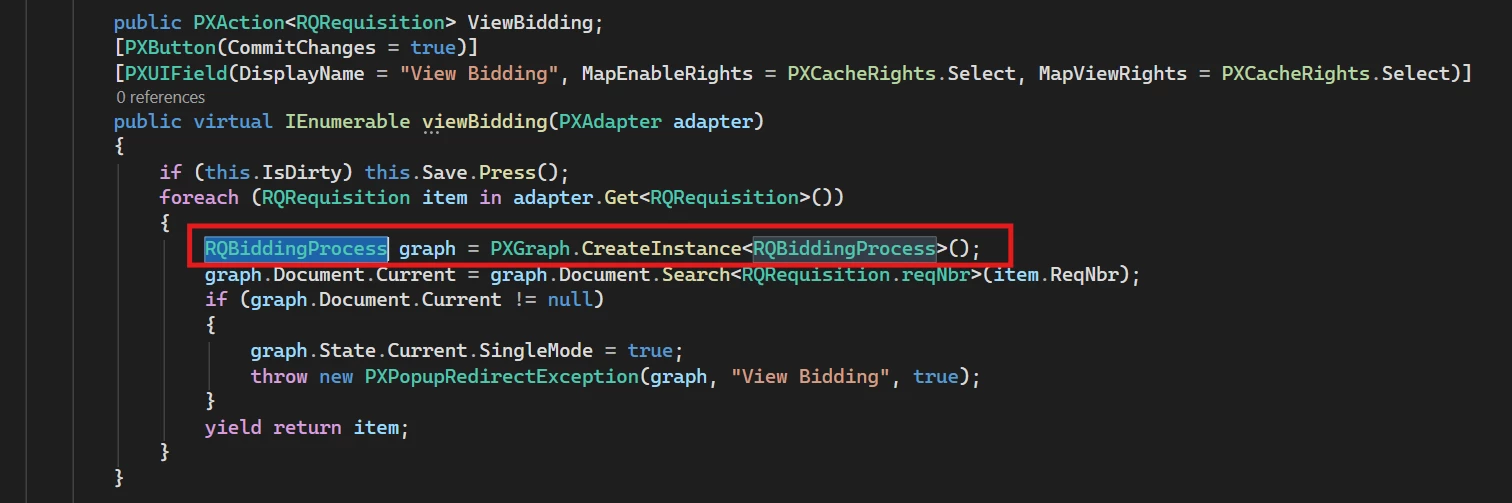
@vannakheng Have you also overridden the ViewBidding action? It creates a new instance of RQBiddingProcess and uses graph.Document.Search(). If you have only customized the Document view in a graph extension, that custom view may not be the one being used.


Forum|alt.badge.img+9
  • Captain II
  • July 24, 2026

@vannakheng 


If I am understanding correctly, I believe you just need to add the action to the workflow status.


To confirm, your issue is that the action does not come up in the ‘Revived’ status which is a custom status you added?


Forum|alt.badge.img
  • Author
  • Freshman II
  • July 24, 2026

@vannakheng 


If I am understanding correctly, I believe you just need to add the action to the workflow status.


To confirm, your issue is that the action does not come up in the ‘Revived’ status which is a custom status you added?

I already add action 

        protected virtual void _(Events.RowSelected<RQRequisition> e)
        {
            if (e.Row == null)
                return;

            bool showRevise = e.Row.Status == "E";

            Revise.SetVisible(showRevise);
        }

        public PXAction<RQRequisition> Revise;

        [PXButton(CommitChanges = true)]
        [PXUIField(DisplayName = "Revise", Visibility = PXUIVisibility.Invisible)]
        protected virtual IEnumerable revise(PXAdapter adapter)
        {
            var doc = Base.Document.Current;

            if (doc == null)
                return adapter.Get();
            doc.Status = "V";
            doc.VendorID = null;
            doc.VendorLocationID = null;
            doc.VendorRefNbr = null;
            Base.Document.Update(doc);
            return adapter.Get();
        }


Forum|alt.badge.img+9
  • Captain II
  • July 24, 2026

Not quite, you need to add the ‘ViewBidding’ action to the ‘Revived’ workflow status via the workflow engine.


Forum|alt.badge.img
  • Author
  • Freshman II
  • July 24, 2026

@vannakheng Have you also overridden the ViewBidding action? It creates a new instance of RQBiddingProcess and uses graph.Document.Search(). If you have only customized the Document view in a graph extension, that custom view may not be the one being used.


When override this do new query it can open. But when I go directly in complete bidding screen I cannot see my revived refNbr that why I try to replace exist dataview Document