

Answer

Customization Projects Validate and Publish, but Entire Site Crashes

  • April 17, 2025
  • 5 replies
  • 140 views

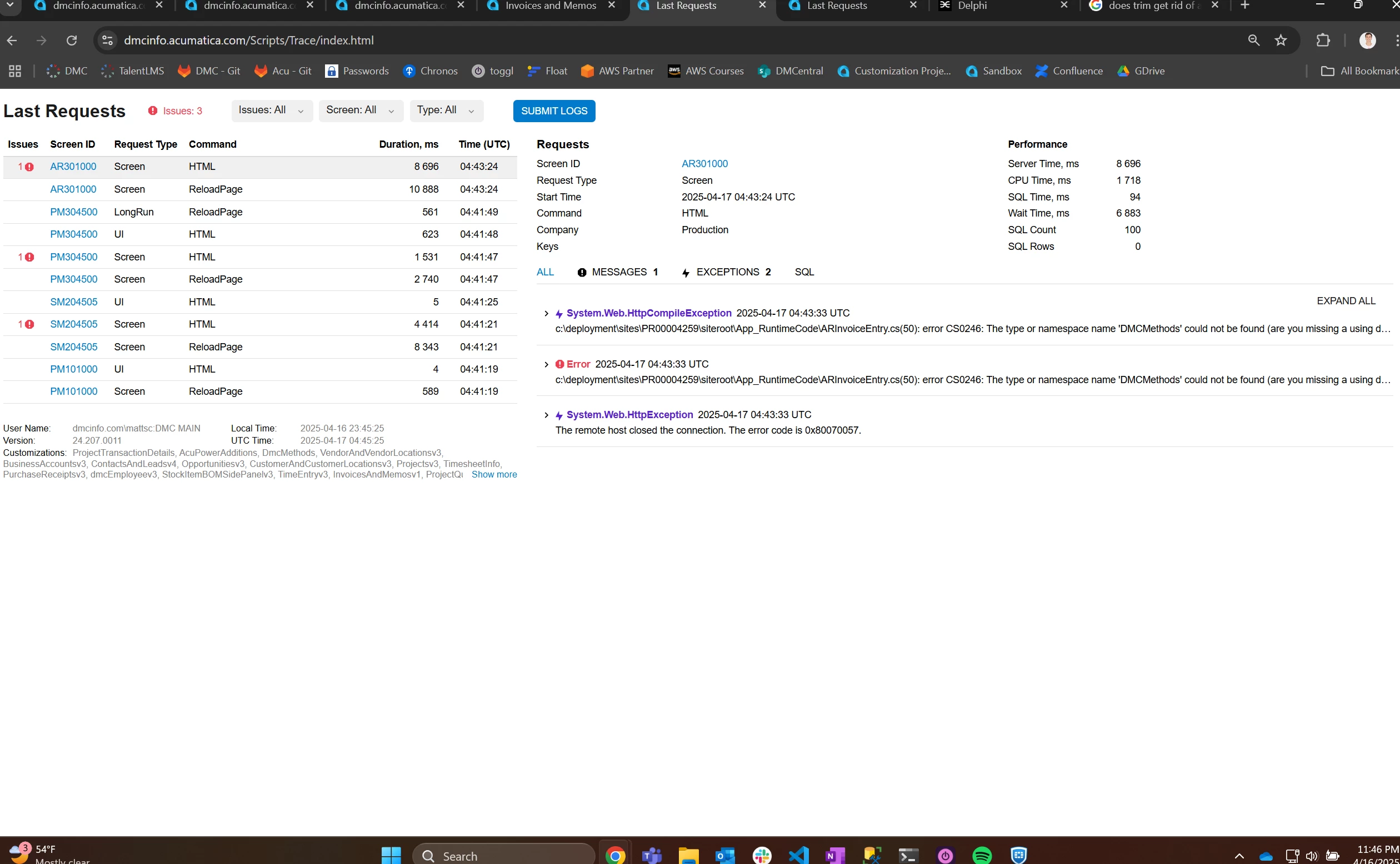
I have been a developer on our company’s Acumatica Cloud ERP instance for about 8 months, and we publish new updates weekly by unpublishing all customizations and then republishing all of the customization projects. We have about 50 total. 2 of our last 3 publishes resulted in the site completely crashing. The header and sidebar were still showing, the search was still working, but the body of every screen was blank. I was able to access the trace through the URL, and have attached a screenshot of the error below. I can ensure that DMCMethods (a custom namespace) was absolutely deployed along with all of our other customization project files. The fix both times was to contact support and wait for them to restart the server. Once the server was restarted, the customizations were already published and functioning as expected.

Has anyone had a similar issue and know of any solutions? I’ll also link a similar post from a year ago that addresses a similar issue.

Similar Issue: 


Thanks ahead of time for any insight!
Best answer by valentynbeznosiuk

@Nilkanth Dipak From what I understand, in this case, Acumatica loads HUD and menu, but does not load the screen with its UI and buttons, so they are not able to press any button


@mattsc Usually this happens in case some .dll or file in the App_RuntimeCode folder is not valid. From what I see on your Trace screenshot you probably missed namespace in the ARInvoiceEntry file.

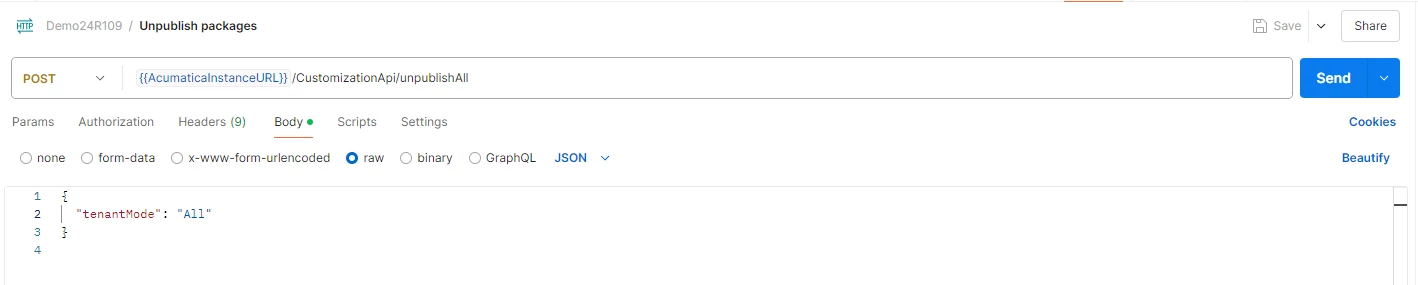
Meanwhile, if you meet this issue again, you can try to unpublish all customizations using an API call. If the problem came from one of the packages after publishing, you will be able to use the UI again after unpublishing them


5 replies

DipakNilkanth
Pro III
Forum|alt.badge.img+13

Hi ​@mattsc,

Have you tried using Reset Caches and Restart Application from the Apply Updates screen?

Note: It's recommended to try this during non-working hours.
Hope, it helps!


valentynbeznosiuk
Jr Varsity I
Forum|alt.badge.img+3

@Nilkanth Dipak From what I understand, in this case, Acumatica loads HUD and menu, but does not load the screen with its UI and buttons, so they are not able to press any button


@mattsc Usually this happens in case some .dll or file in the App_RuntimeCode folder is not valid. From what I see on your Trace screenshot you probably missed namespace in the ARInvoiceEntry file.

Meanwhile, if you meet this issue again, you can try to unpublish all customizations using an API call. If the problem came from one of the packages after publishing, you will be able to use the UI again after unpublishing them


  • Author
  • Freshman I
  • April 18, 2025

Thanks for the response! ​@Nilkanth Dipak 

I have used those actions before, but the problem in this case is that all the screens are completely blank. So, I tried navigating to the Apply Updates screen, but the screen doesn’t load and the trace I pictured above is left. So, I can’t restart or reset once this error has occurred.

My team and I have discussed using Restart Application before every mass publishing as a way to try to prevent this in the future, but it would be helpful to know why this has been happening to prevent it going further. 


  • Author
  • Freshman I
  • April 18, 2025

@valentynbeznosiuk That’s a great idea, thank you! I just set up that endpoint and will attempt to use that if we see this error again. 

Thanks for the help! 


valentynbeznosiuk
Jr Varsity I
Forum|alt.badge.img+3

@mattsc I also suggest trying if this endpoint works while you didn’t meet this issue, just in case there are some user restrictions in place. Because from what I know, it won’t work if for the user the two factor auth enabled. It's just to make sure that it's ready to be used


