Solved

Customization Error - Error while deleting screen info folder

  • July 9, 2026
  • 4 replies
  • 105 views
  • Translate All

I had a customization project error in our sandbox.

Ever since the error occurred, I can’t publish or unpublish anything without getting another error prompt during compilation.

[2026-07-09 11:16:04.284] Removing previous Modern UI files
[2026-07-09 11:16:14.321] Error while deleting screen info folder

How would I go about fixing this?

Acumatica 2025 R2, Build 25.201.0213

Best answer by ranjithduraisamy72

​@ErickWCel96 Have you tried restarting your application from Apply Update screen and tried to republish those packages? Also, If you have customization packages in multiple tenant, Please maintain all customization in one tenant and publish it to all tenant.


View original

4 replies

Forum|alt.badge.img+5

​@ErickWCel96 Have you tried restarting your application from Apply Update screen and tried to republish those packages? Also, If you have customization packages in multiple tenant, Please maintain all customization in one tenant and publish it to all tenant.


Translate

Forum|alt.badge.img+4
  • Captain II
  • July 10, 2026

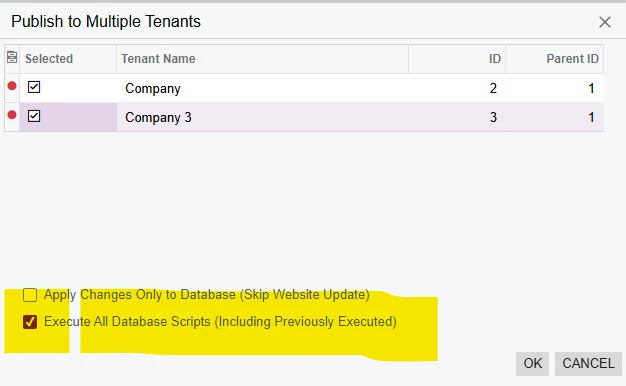
HI ​@ErickWCel96 In addition to maintaining all customization in one tenant and publishing from that tenant, I also recommend selecting Execute All Database Script. I have found that helpful sometimes. 


Translate

Forum|alt.badge.img+3
  • Jr Varsity III
  • July 18, 2026

​@ErickWCel96  Hi,
    If you are not using modern UI.In package you found Modern UI files option expand it and delete respective screen and again publish a package.

Translate

KrunalDoshi
Pro I
Forum|alt.badge.img+9

Hi ​@ErickWCel96,

Please unpublish all customization and make sure nothing resides in your bin folder of the application. Once you are confirmed, then you can publish with cleanup, all the required customization from your main or live tenant to all the tenants. Select “Execute All Database Scripts...” while publishing the customizations.

Hope this helps resolve your issue!

Translate