Solved

Custom Logo on collapsed menu

  • Jun 9, 2021 5:36 PM UTC
  • 2 replies
  • 235 views
  • Translate All

Hi,

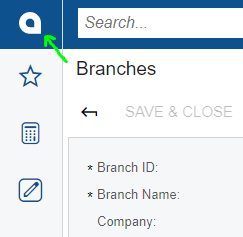
We are currently able to change the default Acumatica logo by setting it in the Branches screen on the Visual Appearance tab, but when the left side menu is collapsed, the small Acumatica “a” logo is displayed.

Is it possible to set another custom image as the logo when this menu is collapsed?
Thanks in advance

Best answer by larryly

Replace below file on your server. 


View original

2 replies

Forum|alt.badge.img+1
  • Semi-Pro III
  • Answer
  • Jun 10, 2021 8:26 PM UTC

Replace below file on your server. 


Translate

Doug Johnson
Acumatica Moderator
Forum|alt.badge.img+4
  • Acumatica VP, Product Management
  • Oct 31, 2025 4:56 PM UTC

If you have issues updating your SaaS instance, then see the workaround here: 


Translate