I have a simple screen with line details where an inventory item can be selected. The form works fine in the normal UI. I need this on mobile also but can’t get the Inventory or UOM selector to work on mobile.
Here is my DAC field, I have tried several different attributes, but this doesn’t make any difference.
        #region InventoryID
        public abstract class inventoryID : PX.Data.BQL.BqlInt.Field<inventoryID> { }
        protected Int32? _InventoryID;
        /*[PXDBInt()]
        [PXUIField(DisplayName = "Inventory ID")]
        [PXSelector(typeof(Search<InventoryItem.inventoryID,
            Where<InventoryItem.stkItem, Equal<True>>>),
            typeof(InventoryItem.inventoryCD),
            typeof(InventoryItem.descr),
            SubstituteKey = typeof(InventoryItem.inventoryCD),
            DescriptionField = typeof(InventoryItem.descr))]
        [PXForeignReference(typeof(FK.InventoryItem))]/**/

        /*
        [PXDBInt()]
        [PXDefault()]
        [PXUIField(DisplayName = "Inventory ID")]
        [PXSelector(typeof(Search<InventoryItem.inventoryID,
            Where<InventoryItem.stkItem, Equal<True>>>),
            typeof(InventoryItem.inventoryCD),
            typeof(InventoryItem.descr),
            SubstituteKey = typeof(InventoryItem.inventoryCD))]
        /**/
        [PXDefault]
        [StockItem(DisplayName = "Inventory ID")]
        public virtual Int32? InventoryID
        {
            get
            {
                return this._InventoryID;
            }
            set
            {
                this._InventoryID = value;
            }
        }
        #endregion
Then on the mobile side:
This doesn’t work:
    add container "Details" {

       add field "InventoryID" {
        listPriority = 100
        pickerType = Searchable
       }


        add field "Quantity"
        add field "UOM"
        add field "Description"

        add containerAction "Insert" {
            icon = "system://Plus"
            behavior = Create
        }

        add selectionAction "Delete" {
            icon = "system://Trash"
            behavior = Delete
        }

        add recordAction "Delete" {
            icon = "system://Trash"
            behavior = Delete
            after = Close
        }

        add recordAction "Insert" {
            displayName = "Add Another"
            icon = "system://Plus"
            behavior = Create
        }

    }
Neither does this:
        add field "InventoryID" {
            listPriority = 100
            pickerType = Detached
            selectorDisplayFormat = KeyDescription
            selector {
                fieldsToShow = 2
                add field "InventoryCD"
                add field "Descr"
            }
        }
Nor this:
add field "InventoryID"or this:
    add field "InventoryID" {
        listPriority = 100
        pickerType = Searchable
        selector {
            add field "InventoryID"
            add field "Description"
        }
    }
I also tried copying from Sale Order entry:
    add group "LineInventoryIdGroup" {
      displayName = "LineInventoryIdGroup"
      collapsed = True
      template = ExpansionPanel
      add field "InventoryID" {
        listPriority = 100
        selectorDisplayFormat = Key
        pickerType = Searchable
      }
      add field "LineDescription" {
        listPriority = 80
      }
      add layout "LineSubitemRow" {
        displayName = "LineSubitemRow"
        layout = "Inline"
        add field "AlternateID"
        add field "Subitem"
      }
    }
But all those options just give me a non selectable Inventory ID field:
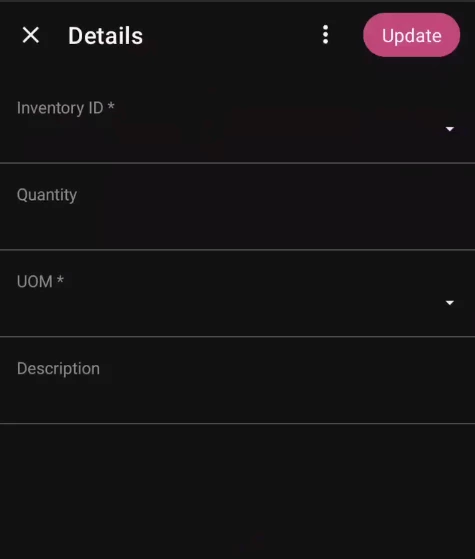
I can however view existing lines, but it isn’t showing the description.
clicking on it does nothing.
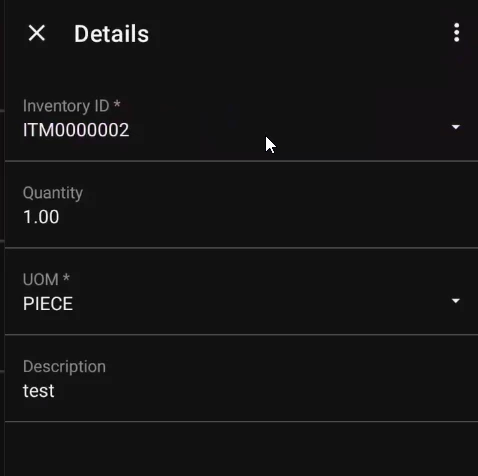
What am I doing wrong here?
Here is my full Mobile form:
add screen AA999999 {
    openAs = Form

    add container "DocumentSummary" {
        displayName = "Transfer Request"
        fieldsToShow = 2
        formActionsToExpand = 1

        add field "RequestNbr"
        add field "Date"
        add field "Status"
        add field "Description"
        add field "Warehouse"
        add field "TransferRefNbr"

        add layout "DetailsTab" {
            displayName = "Details"
            layout = "DataTab"
            add containerLink "Details"
        }

        add recordAction "Save" {
            behavior = Save
        }

        add recordAction "Cancel" {
            behavior = Cancel
        }

        add recordAction "GenerateTransfer" {
            displayName = "Generate Transfer"
            behavior = Record
            redirect = True
        }

        attachments {
        }
    }

    add container "Details" {

        add field "InventoryID" {
            pickerType = Searchable
        }

        add field "Quantity"
        add field "UOM"
        add field "Description"

        add containerAction "Insert" {
            icon = "system://Plus"
            behavior = Create
        }

        add selectionAction "Delete" {
            icon = "system://Trash"
            behavior = Delete
        }

        add recordAction "Delete" {
            icon = "system://Trash"
            behavior = Delete
            after = Close
        }

        add recordAction "Insert" {
            displayName = "Add Another"
            icon = "system://Plus"
            behavior = Create
        }

    }
}