Solved

Custom Feature Switch: Field cannot be empty

  • November 30, 2022
  • 22 replies
  • 393 views

priekenberg40
Varsity I
Forum|alt.badge.img+1

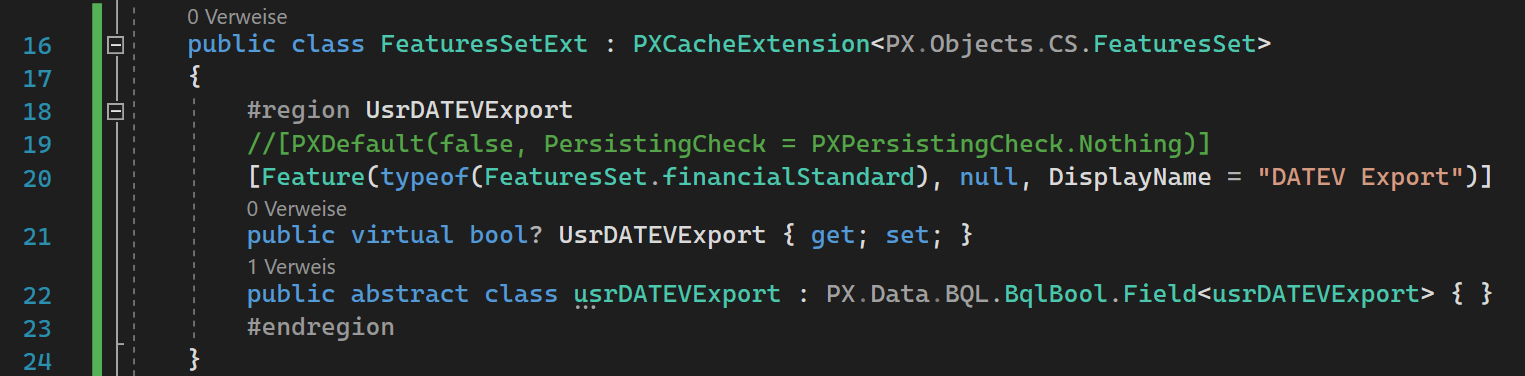
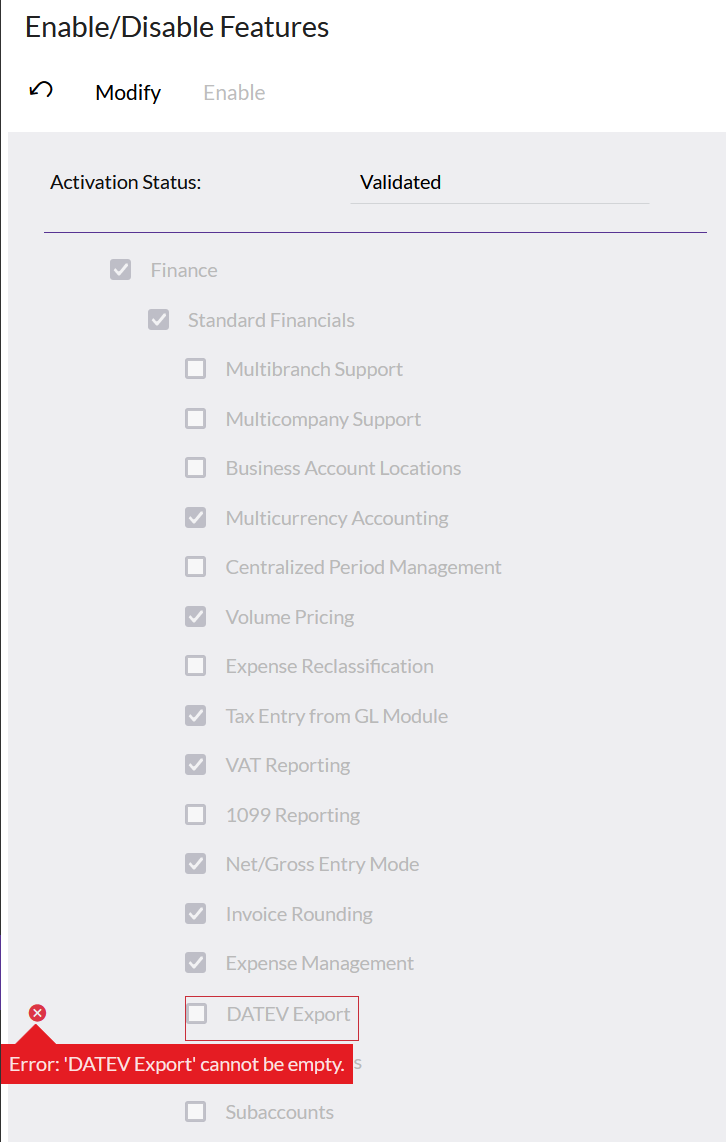
When adding a new custom feature switch i get an error when changing another feature due to the null value in the new feature switch field. How can i prevent this?

[PXDefault(false, PersistingCheck = PXPersistingCheck.Nothing)] doesn’t help here!


Best answer by priekenberg40

The trick is to create the Usr-Field in FeaturesSet with default false/0:

<Table TableName="FeaturesSet">
<Column TableName="FeaturesSet" ColumnName="UsrMyFeature" ColumnType="bool" DefaultValue="0" DecimalPrecision="0" DecimalLength="0" IsNewColumn="True" IsUnicode="True" />
</Table>

Use “Source Control” “Save Project to Folder...”, edit _project\FeaturesSet.xml and then “Open Project From Folder...”

22 replies

Shawn Burt
Jr Varsity I
Forum|alt.badge.img+1
  • Jr Varsity I
  • November 30, 2022

I have always used CustomPlugin class to set the values in the db. Essentially ran the sql equivalent of:

update featuresset set Newfield=false where Newfield is null 


When you publish the vales will be set to whatever you want the defaults to be, and once set, even if the customplugin runs again, nothing happens as your filter is for when there is no value.


priekenberg40
Varsity I
Forum|alt.badge.img+1
  • Author
  • Varsity I
  • November 30, 2022

@Shawn Burt this could be a solution but i can’t beleve that there isn’t a more simple approach.


Shawn Burt
Jr Varsity I
Forum|alt.badge.img+1
  • Jr Varsity I
  • November 30, 2022

The problem I found is that the default tools are for new records, given that featuresset only has one record, the default doesn't seem to work correctly.  Not sure but think it's related to how the screen and the feature attribute works. 


priekenberg40
Varsity I
Forum|alt.badge.img+1
  • Author
  • Varsity I
  • November 30, 2022

For existing records with uninitialized user fields we have “[PXDefaultAttribute(PersistingCheck = PXPersistingCheck.Nothing)]”. But unfortunately this doesn’t work here.


Shawn Burt
Jr Varsity I
Forum|alt.badge.img+1
  • Jr Varsity I
  • November 30, 2022

Yeah, it's like the feature attribute overrides that,  that's why i had to set the values in the CustomPlugin 


Dmitrii Naumov
Acumatica Moderator
Forum|alt.badge.img+7
  • Acumatica Moderator
  • November 30, 2022

@priekenberg40  I’d like to make sure that the feature switch you are adding is confirmed with your Technical Account Manager at Acumatica. Because the feature switches are controlled by Acumatica licensing server, if it is not registered in the licensing server you’ll not be able to activate this feature in a licensed Acumatica instance.


Naveen Boga
Captain II
Forum|alt.badge.img+20
  • Captain II
  • November 30, 2022

Hi @priekenberg40  Yes, as indicated by Dmitrii, this customization normally will work with the trial version license, to work with the real Acumatica license, we need to inform to Acumatica add this module/integration in the license and whoever buys this module will get this feature.


For the customization, you can refer - https://asiablog.acumatica.com/2021/10/add-new-custom-feature-to-the-enable-disable-features-screen-cs100000.html 


priekenberg40
Varsity I
Forum|alt.badge.img+1
  • Author
  • Varsity I
  • November 30, 2022

@Dmitrii Naumov we are developing extensions for Haufe.X360 (Germany). No issue there.


priekenberg40
Varsity I
Forum|alt.badge.img+1
  • Author
  • Varsity I
  • November 30, 2022

@Naveen Boga This is no issue here. The setup of the custom feature switch is done already, as shown in initial post. The problem is the null value in the new user field in the FeatureSet record.


Naveen Boga
Captain II
Forum|alt.badge.img+20
  • Captain II
  • November 30, 2022

@priekenberg40  As I indicated in my blog post, can you please try like below.

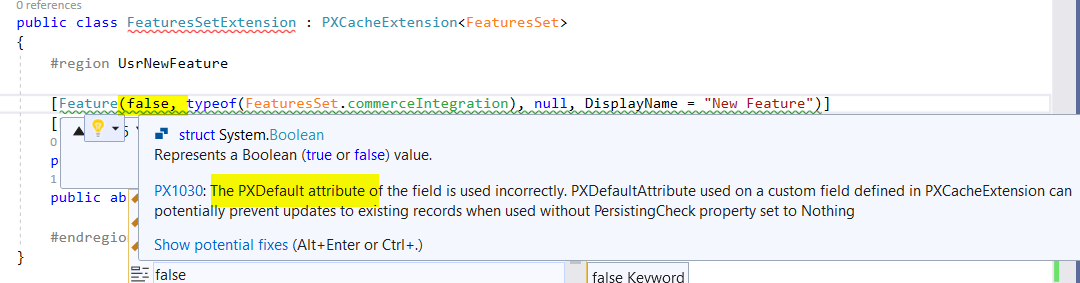
  [Feature(false, typeof(FeaturesSet.commerceIntegration), null, DisplayName = "New Feature")]


Above, the highlighted text is missing your DAC file. Which is the default value for the field.


priekenberg40
Varsity I
Forum|alt.badge.img+1
  • Author
  • Varsity I
  • December 1, 2022

@Naveen Boga i also tried it with setting default value to false first. Same result.
Screenshot is from the last of several tries.


Naveen Boga
Captain II
Forum|alt.badge.img+20
  • Captain II
  • December 1, 2022

@priekenberg40  That should work and it is working for me with the same code.

Not sure why it is not working for you, please reach out to the Acumatica support team by creating a support case OR @Dmitrii Naumov can help you with this.


priekenberg40
Varsity I
Forum|alt.badge.img+1
  • Author
  • Varsity I
  • December 1, 2022

@Naveen Boga  Are you sure? You create a new switch and then enable/disable another feature switch in CS.10.00.00 and leave the new one untouched and don’t get an error?


priekenberg40
Varsity I
Forum|alt.badge.img+1
  • Author
  • Varsity I
  • December 1, 2022

FeatureAttribute constructor needs one change:


Naveen Boga
Captain II
Forum|alt.badge.img+20
  • Captain II
  • December 1, 2022

Yes, @priekenberg40  I did not see any issues.

I don’t think any changes are required to the FeatureAttribute.

if we provide like the below at the DAC level, internally automatically it will invoke the constructor and taken care of the default value as FALSE

[Feature(false, typeof(FeaturesSet.commerceIntegration), null, DisplayName = "New Feature")]


priekenberg40
Varsity I
Forum|alt.badge.img+1
  • Author
  • Varsity I
  • December 1, 2022

@Naveen BogaOkay, if you don’t see any issues it may be related to multi language or to our local version here in Germany (Haufe.X360). Reproduced in 2021 R2 and 2022 R1.

@Shawn Burt, which version are you using when you face this issue? Are you using multi language?


Forum|alt.badge.img
  • Freshman II
  • March 11, 2026

@priekenberg40 

I’m facing the same problem. Did you find any solution?

I defined the the following feature in my FeatureSetExt:

[Feature(false, typeof(FeaturesSet.integrationModule), null, DisplayName = "My Feature")]
[PXUIField(DisplayName = "My Feature")]
public virtual bool? UsrMyFeature { get; set; } = false;

public abstract class usrMyFeature : PX.Data.BQL.BqlBool.Field<usrUsrMyFeature > { }

The default value [Feature(false,...)] doesn’t seem to work. 


priekenberg40
Varsity I
Forum|alt.badge.img+1
  • Author
  • Varsity I
  • Answer
  • March 11, 2026

The trick is to create the Usr-Field in FeaturesSet with default false/0:

<Table TableName="FeaturesSet">
<Column TableName="FeaturesSet" ColumnName="UsrMyFeature" ColumnType="bool" DefaultValue="0" DecimalPrecision="0" DecimalLength="0" IsNewColumn="True" IsUnicode="True" />
</Table>

Use “Source Control” “Save Project to Folder...”, edit _project\FeaturesSet.xml and then “Open Project From Folder...”


Forum|alt.badge.img
  • Freshman II
  • March 12, 2026

@priekenberg40 

Thanks for your response! I’ll give it a try.


Forum|alt.badge.img
  • Freshman II
  • March 12, 2026

@priekenberg40 

Sadly it didn’t work for me.

The xml of my customization project contains the following table adaption:

<Table TableName="FeaturesSet">
<Column TableName="FeaturesSet" ColumnName="UsrDefaultFeature2" ColumnType="bool" AllowNull="True" DefaultValue="0" DecimalPrecision="0" DecimalLength="0" IsNewColumn="True" IsUnicode="True" />
</Table>

The FeatureSet.xml contains the Feature as well

<?xml version="1.0" encoding="utf-8"?>
<Features Type="Test.FeaturesSetExt" Key="0">
<Feature Name="UsrDefaultFeature2">
</Feature>
</Features>

and the FeatureSet-DAC contains the feature as well:

using PX.Data;
using PX.Objects.CS;

namespace Test
{
public class FeaturesSetExt : PXCacheExtension<PX.Objects.CS.FeaturesSet>
{
[Feature(false, typeof(FeaturesSet.integrationModule), null, DisplayName = "My Default Feature 2")]
[PXUIField(DisplayName = "My Default Feature 2")]
public virtual bool? UsrDefaultFeature2 { get; set; } = false;
public abstract class usrDefaultFeature2 : PX.Data.BQL.BqlBool.Field<usrDefaultFeature2> { }
}
}

I released customization project.

However, i receive the same error (cannot be empty) after clicking on “activate” in CS100000 without making any changes.

Did I miss something?


Thanks in advance!


priekenberg40
Varsity I
Forum|alt.badge.img+1
  • Author
  • Varsity I
  • March 13, 2026

Maybe your column is already added by a former run (without default). You can try “publish with cleanup” or drop the column by hand from FeaturesSet and publish again (with cleanup).


Forum|alt.badge.img
  • Freshman II
  • March 13, 2026

@priekenberg40 

Didn’t work for me. I ended up with a database script in my customization. The script initializes the feature:

UPDATE FeaturesSet
SET UsrDefaultFeature2 = 0
WHERE UsrDefaultFeature2 IS NULL

But thanks for your support!