Solved

Creating and printing multiple sales orders at one time

  • Apr 22, 2021 5:05 PM UTC
  • 7 replies
  • 933 views
  • Translate All

Forum|alt.badge.img

Trying to figure out a solution to create shipments on multiple sales orders and print them all at once vs. going into each sales order individually and creating the shipment then using quick process. Ideas?

Best answer by Kimberly

Michelle,

In the Sales Orders workspace, under Processes, you will find two screens:

  • The Process Orders screen where you can create shipments in bulk for selected Sales Orders
  • The Process Shipments screen where you can print Pick Lists and/or Shipment Confirmations in bulk for selected Shipments.

In both screens, clicking the drop-down in the Action field will show your options for actions to take on that screen for the records you select.

Cheers,

Kimberly

View original

7 replies

Kimberly
Jr Varsity III
Forum|alt.badge.img
  • Jr Varsity III
  • Answer
  • Apr 23, 2021 12:09 AM UTC

Michelle,

In the Sales Orders workspace, under Processes, you will find two screens:

  • The Process Orders screen where you can create shipments in bulk for selected Sales Orders
  • The Process Shipments screen where you can print Pick Lists and/or Shipment Confirmations in bulk for selected Shipments.

In both screens, clicking the drop-down in the Action field will show your options for actions to take on that screen for the records you select.

Cheers,

Kimberly

Translate

Gabriel Michaud
Captain II
Forum|alt.badge.img+12

You might also want to look enabling Device Hub if you want to support unattended printing of pick lists to a printer in your warehouse. This way you can schedule creation of shipments *and* printing.

There’s a video on YouTube that @Doug Johnson recorded a while back -- a few things have changed since then but this is a good introduction: 


Translate

Forum|alt.badge.img
  • Author
  • Freshman II
  • Apr 26, 2021 4:16 PM UTC

How can I create the shipment and take the shipment off hold once printed without taking it off hold manually?

Translate

Kimberly
Jr Varsity III
Forum|alt.badge.img
  • Jr Varsity III
  • Apr 27, 2021 10:10 PM UTC

I’m afraid I am not following your workflow. Are you referring to taking the Sales Order off hold (Shipments do not have an ‘On Hold’ status)? Or are you talking about Confirming Shipment?

Translate

Forum|alt.badge.img
  • Author
  • Freshman II
  • Apr 28, 2021 3:58 PM UTC

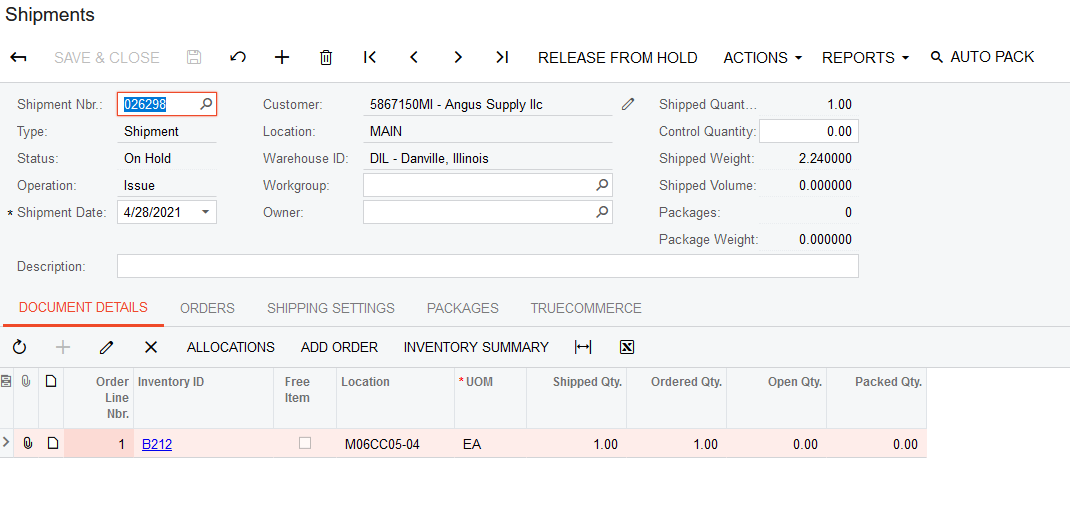
Yes, taking it off of hold to confirm the shipment. When I create a shipment from the process orders screen, then i print the pick list from the process shipments screen it then leaves the shipment on hold before confirming the shipment. see attached screen shot. Is there a way I can take the shipment off of “hold” once the pick list has been printed?


Translate

Kimberly
Jr Varsity III
Forum|alt.badge.img
  • Jr Varsity III
  • Apr 28, 2021 4:17 PM UTC

My apologies, Michelle. I had forgotten that holding shipments upon entry was even an option.

If it is necessary for your circumstance to have shipments created in the on hold status, the shipment records could be taken off hold en masse with an import scenario.... I do not know whether there is a quicker or smoother way. I would be interested in hearing from someone who has more experience with the new workflow engine to learn whether that could be a potential solution.

If it is not truly necessary for your shipments to be created with the on hold status, you can uncheck that setting in sales orders preferences. Shipments would then be created with the open status.

Translate

Forum|alt.badge.img
  • Author
  • Freshman II
  • Apr 28, 2021 4:46 PM UTC

@Kimberly thank you for all of your help! This has definitely improved our work flow tremendously!

Translate