

Solved

Create Discount Code via Code

  • February 20, 2026
  • 8 replies
  • 60 views

Forum|alt.badge.img

Hello Community,

Could you help me with code that allows me to create a discount code and then apply it to a sales order?

I am creating the discount code, and it is being created correctly — all the data is saved properly in both the header and the details. However, when I try to apply it to a sales order, the discount code is not applied: the sequence ID is not generated automatically, and when I set the sequence ID manually, the type is not set. By contrast, if I create the same discount manually and apply it to a sales order, all the fields are saved correctly.
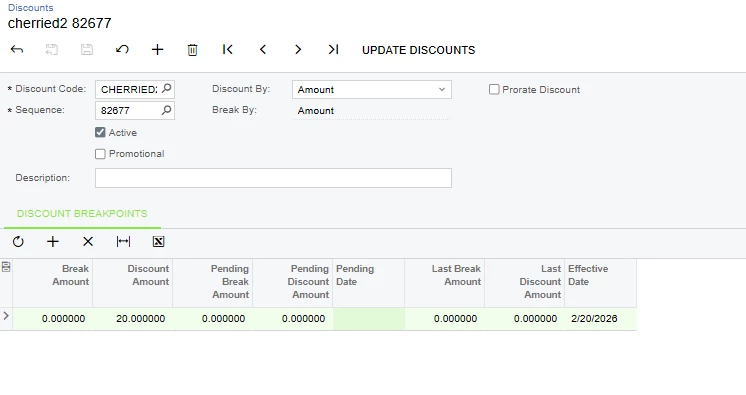



Best answer by Vard86

My problem was that I was entering the Discount ID in lowercase, but it should have been in uppercase. The issue is now resolved.

8 replies

Forum|alt.badge.img+1

Forum|alt.badge.img
  • Author
  • Varsity I
  • February 20, 2026

Thank you for sharing this, but I want to create the discount code correctly via C# code.


Forum|alt.badge.img+1
  • Jr Varsity I
  • February 20, 2026

Hi ​@Vard86 
 

The issue occurs because the discount is being created without running the same business logic as the UI. You must use the DiscountMaint graph and save through the graph so defaulting, linking, and numbering logic execute properly.


Try this approach:

var graph = PXGraph.CreateInstance<DiscountMaint>();

var discount = graph.Document.Insert(new Discount
{
DiscountID = "CHERRIED",
Type = DiscountType.Line,
IsActive = true
});

var sequence = graph.Sequence.Insert(new DiscountSequence
{
DiscountID = discount.DiscountID,
IsActive = true,
StartDate = graph.Accessinfo.BusinessDate
});

graph.Details.Insert(new DiscountDetail
{
DiscountID = discount.DiscountID,
SequenceID = sequence.SequenceID,
BreakAmount = 0m,
DiscountPercent = 20m
});
graph.Actions.PressSave();


Key points:

  • Use DiscountMaint graph.

  • Do not use PXDatabase.Insert.

  • Do not hardcode SequenceID if numbering is configured.

  • Always call PressSave().

This ensures the sequence, type, and linking are created correctly and the discount applies properly to Sales Orders.


Forum|alt.badge.img
  • Author
  • Varsity I
  • February 20, 2026

Hello ​@aryanjadhav50 ,

Thank you for the information, but I am currently working in version 24R2, and the DiscountMaint graph does not exist there.

I have the Discount Codes screen, where the graph is ARDiscountMaint. After inserting the record like this:

ARDiscountMaint aRDiscountMaint = PXGraph.CreateInstance<ARDiscountMaint>();

var discount = aRDiscountMaint.Document.Insert(new ARDiscount
{
DiscountID = coupon.CouponCodeName,
Type = coupon.AcuDiscountType,
ApplicableTo = coupon.AcuDiscountApplicableTo,
Description = coupon.Description,
});

aRDiscountMaint.Actions.PressSave();

After that, I try to configure it in the Discounts screen to set the required percent or amount. The graph there is ARDiscountSequenceMaint.

The issue occurs specifically with document-level discount codes, while line-level discounts are working normally.
 

Regards,

Vard


Forum|alt.badge.img+1
  • Jr Varsity I
  • February 20, 2026

Hello ​@aryanjadhav50 ,

Thank you for the information, but I am currently working in version 24R2, and the DiscountMaint graph does not exist there.

I have the Discount Codes screen, where the graph is ARDiscountMaint. After inserting the record like this:

ARDiscountMaint aRDiscountMaint = PXGraph.CreateInstance<ARDiscountMaint>();

var discount = aRDiscountMaint.Document.Insert(new ARDiscount
{
DiscountID = coupon.CouponCodeName,
Type = coupon.AcuDiscountType,
ApplicableTo = coupon.AcuDiscountApplicableTo,
Description = coupon.Description,
});

aRDiscountMaint.Actions.PressSave();

After that, I try to configure it in the Discounts screen to set the required percent or amount. The graph there is ARDiscountSequenceMaint.

The issue occurs specifically with document-level discount codes, while line-level discounts are working normally.
 

Regards,

Vard
 

Yes ​@Vard86 

In 24R2 you are correct that DiscountMaint does not exist. You must use ARDiscountMaint for the header and ARDiscountSequenceMaint for the sequence.

The issue with document-level discounts is that creating only the header is not enough. You must fully configure the sequence in ARDiscountSequenceMaint, including Type, BreakBy, DiscountBy, StartDate, Active flag, and at least one breakpoint.

Create the discount in ARDiscountMaint and save it. Then create the sequence in ARDiscountSequenceMaint like this:

  • Set DiscountID

  • Set IsActive = true

  • Set StartDate

  • Ensure Type = Document

  • Set BreakBy and DiscountBy properly

  • Insert ARDiscountDetail with BreakAmount and DiscountPercent or DiscountAmount

  • Call PressSave()

Document-level discounts will not apply unless the sequence is completely configured. Line discounts work because they require fewer fields.

Make sure the sequence is active and valid for the current date before applying it to the Sales Order.

Hope this will work for you.


Forum|alt.badge.img
  • Author
  • Varsity I
  • February 20, 2026

Hello ​@aryanjadhav50 ,

Thank you for the information, but I am currently working in version 24R2, and the DiscountMaint graph does not exist there.

I have the Discount Codes screen, where the graph is ARDiscountMaint. After inserting the record like this:

ARDiscountMaint aRDiscountMaint = PXGraph.CreateInstance<ARDiscountMaint>();

var discount = aRDiscountMaint.Document.Insert(new ARDiscount
{
DiscountID = coupon.CouponCodeName,
Type = coupon.AcuDiscountType,
ApplicableTo = coupon.AcuDiscountApplicableTo,
Description = coupon.Description,
});

aRDiscountMaint.Actions.PressSave();

After that, I try to configure it in the Discounts screen to set the required percent or amount. The graph there is ARDiscountSequenceMaint.

The issue occurs specifically with document-level discount codes, while line-level discounts are working normally.
 

Regards,

Vard
 

Yes ​@Vard86 

In 24R2 you are correct that DiscountMaint does not exist. You must use ARDiscountMaint for the header and ARDiscountSequenceMaint for the sequence.

The issue with document-level discounts is that creating only the header is not enough. You must fully configure the sequence in ARDiscountSequenceMaint, including Type, BreakBy, DiscountBy, StartDate, Active flag, and at least one breakpoint.

Create the discount in ARDiscountMaint and save it. Then create the sequence in ARDiscountSequenceMaint like this:

  • Set DiscountID

  • Set IsActive = true

  • Set StartDate

  • Ensure Type = Document

  • Set BreakBy and DiscountBy properly

  • Insert ARDiscountDetail with BreakAmount and DiscountPercent or DiscountAmount

  • Call PressSave()

Document-level discounts will not apply unless the sequence is completely configured. Line discounts work because they require fewer fields.

Make sure the sequence is active and valid for the current date before applying it to the Sales Order.

Hope this will work for you.


I have carefully configured everything according to the documentation,there are still two inconsistencies in the solution you provided.

First, we cannot set the Type to Document again in the DiscountSequence DAC, since it has already been defined at the Discount Code level.

Second, there is no DAC such as ARDiscountDetail in this version.

I need a solution that will definitely work, as I have already tried all possible variations.


Thank you.


Forum|alt.badge.img
  • Author
  • Varsity I
  • Answer
  • February 25, 2026

My problem was that I was entering the Discount ID in lowercase, but it should have been in uppercase. The issue is now resolved.


Chris Hackett
Community Manager
Forum|alt.badge.img
  • Acumatica Community Manager
  • February 25, 2026

Thank you for sharing your solution with the community ​@Vard86!
