Solved

Column color styling not applied in Modern UI grid

  • March 23, 2026
  • 5 replies
  • 65 views

Forum|alt.badge.img+1

I have a grid where two columns are colored in Classic UI, and this works correctly there.

However, in Modern UI those same two columns are no longer colored and appear with default styling. Is there a supported way to apply styling to specific grid columns in Modern UI?
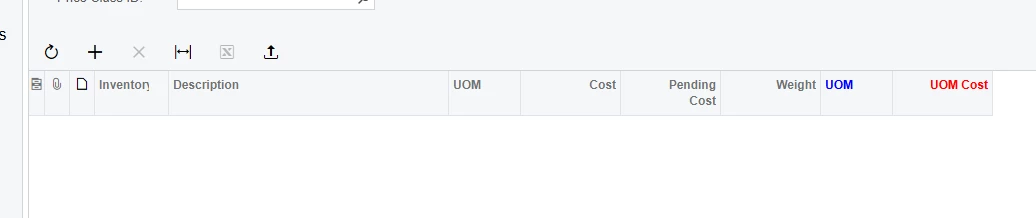
 

I also tried applying custom CSS like this

     qp-grid#grid [data-field="UOMSelect"] {
color: #0078d4;
}

qp-grid#grid [data-field="UOMCost"] {
color: #d40000;
}

but it didnt work

Best answer by darylbowman

I think you’ll find this example helpful.

@handleEvent(CustomEventType.GetCellCss, 
{ view: 'Transactions', column: 'CuryLineAmt' })
getTransactionsCellCss(args: CellCssHandlerArgs): string | undefined {
if (args?.selector?.rowIndex === 0 &&
args?.selector?.cellValue > 1000) {
// see static/custom.css
return 'red-cell';
}
return undefined;
}


5 replies

Forum|alt.badge.img
  • Jr Varsity III
  • March 23, 2026

@Marat43 Can you try this?

<template>

<style>

    .myclass label

    {

      color: red !important;

    }

</style>

….

<qp-label caption="UOM Cost" >

</qp-label>

….

</template>


Forum|alt.badge.img+1
  • Author
  • Varsity I
  • March 23, 2026

I tried this, but it didn’t work


darylbowman
Captain II
Forum|alt.badge.img+16
  • Answer
  • March 23, 2026

I think you’ll find this example helpful.

@handleEvent(CustomEventType.GetCellCss, 
{ view: 'Transactions', column: 'CuryLineAmt' })
getTransactionsCellCss(args: CellCssHandlerArgs): string | undefined {
if (args?.selector?.rowIndex === 0 &&
args?.selector?.cellValue > 1000) {
// see static/custom.css
return 'red-cell';
}
return undefined;
}


Forum|alt.badge.img+1
  • Author
  • Varsity I
  • March 23, 2026

@darylbowman, this does change the color, but not in the same way as in Classic UI


darylbowman
Captain II
Forum|alt.badge.img+16

You’ll need to define your own CSS styles to match what you need.