

Question

Check and Payment Void Not Saving data for Custom Payment Method

  • Oct 30, 2026 8:11 PM UTC
  • 2 replies
  • 20 views
  • Translate All

 Hello

I'm working on an AP integration in Acumatica 2025 R2 using a custom payment method (CUSTOM) 

I'm encountering an issue with the native Void functionality on the Checks and Payments screen (AP302000).

Issue:

When I attempt to void a released AP payment using the CUSTOM payment method, Acumatica executes the native VoidCheck() method and creates the Voided Check (VCK) document in the cache. However, the new document is not saved to the database.

The same native void functionality works correctly when using a standard Acumatica payment method.

Current implementation:

I have a graph extension for APPaymentEntry with the following override, which simply calls the native method without any additional processing:

public delegate IEnumerable VoidCheckDelegate(PXAdapter adapter);

[PXOverride]
public IEnumerable VoidCheck(
PXAdapter adapter,
VoidCheckDelegate base_VoidCheck)
{
APPayment payment = Base.Document.Current;

if (payment == null)
return base_VoidCheck(adapter);

if (payment.PaymentMethodID == "CUSTOM")
{
PXTrace.WriteInformation(
"Testing native void for custom payment.");

return base_VoidCheck(adapter);
}

return base_VoidCheck(adapter);
}

Debugging findings:

After the native VoidCheck() executes, I can see the newly created VCK document with the following values:

  • DocType: VCK

  • PaymentMethodID: CUSTOM

  • VoidAppl: true

  • Released: false

  • Hold: true

  • Status: H (On Hold)

  • CacheStatus: Inserted

However, the document is not persisted to the database.
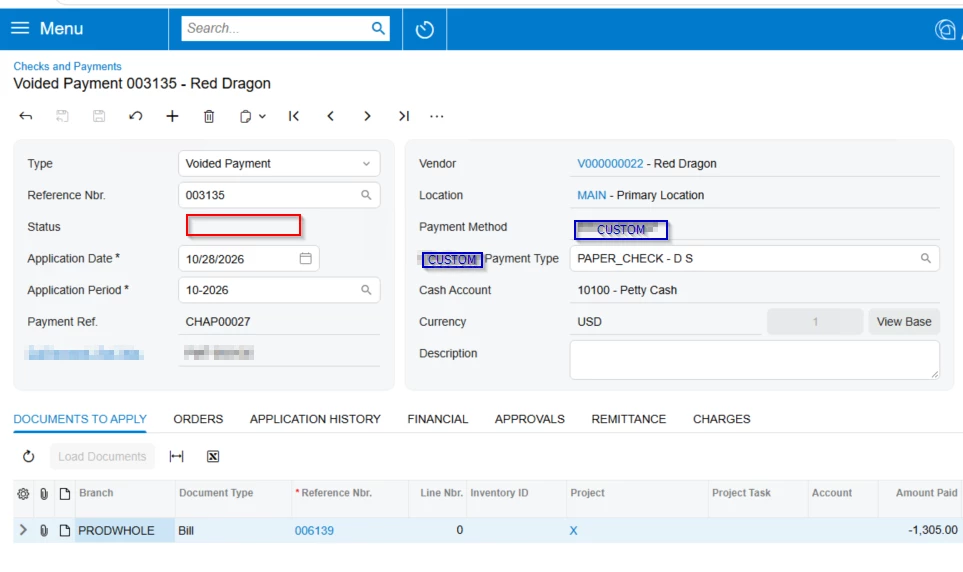


I also tried calling Base.Save.Press() after the native void execution, but received the following error:

"Your changes cannot be saved due to the status of the record stored in the APPayment.status field. Modify the record so that its status changes, and then save it."

Questions:

  1. Does the native APPaymentEntry.VoidCheck() workflow support custom payment types, or are there additional workflow configurations required for a custom payment type such as EBZ?

  2. Why would the new VCK document have Status = H and Hold = true, but still fail validation when saving?

  3. Is there a recommended way to extend the native void document creation or workflow initialization for a custom payment method without replacing or overriding the native VoidCheckProc() logic?

  4. Is there a specific workflow configuration or validation in AP302000 that I should investigate?

My goal is to retain the standard Acumatica void functionality and avoid duplicating native void processing.

Any guidance would be appreciated.

Thanks!

2 replies

Steve Milner
Varsity III
Forum|alt.badge.img+6
  • Varsity III
  • Oct 30, 2026 9:13 PM UTC

@vishalr53 your override isn't the problem. A VCK sitting in the cache as Inserted is where the native void stops. VoidCheckProc builds the VCK with no save, and it presses initializeState inside SuppressWorkflowAutoPersistScope. In the UI, VoidCheck then throws PXRedirectRequiredException carrying that unsaved graph. Save on the redirected screen writes the record. Release saves too, but it rejects status H, so remove hold first.

No extra workflow configuration is needed for a custom payment method. VoidCheck, VoidCheckProc and APPaymentEntry_Workflow never read the payment method ID, and the workflow has one default flow.

Status H isn't what failed either. Hold defaults from Hold Documents on Entry in AP Preferences. Your save error comes from PXWorkflowService.CheckNonPersistentStateWhilePersisting, which throws when a row being persisted is in a non-persistent workflow state. In the stock AP302000 workflow, the only such state is the initial "_". So unless your project adds its own, an APPayment row was in "_" at that Save. Either it isn't the row you were watching or its status changed afterward. Log DocType, RefNbr and Status for every row in Base.Document.Cache.Inserted and Updated right before the Save.

Also look at how you reached that Save. base_VoidCheck only returns when IsContractBasedAPI or IsImport is true, or when the payment has ExternalPaymentID filled. Otherwise it throws, and the next line never runs. A standard payment in the UI takes the throw. So if you aren't catching the redirect, one of those three applied to your test, and ExternalPaymentID is the one to check on CUSTOM payments. Saving after a void that returned isn't wrong in itself: APPaymentEntryEPPExt.VoidPayment does it.

To extend the VCK without replacing anything, override VoidCheckProc with PXOverride, call the base, then change Base.Document.Current and update it. Stock POAdjustExtension does the same.

I read all this in the 2025 R2 source (25.200.0248).

Translate

Forum|alt.badge.img+3
  • Jr Varsity III
  • Oct 31, 2026 7:56 AM UTC

​@vishalr53  Hi, Can you please check our customization projects for a Workflow item or a WorkflowGraphExtension on APPaymentEntry. If it redefines states or transitions without covering VCK, or filters states by payment method or a custom field, you get exactly this.


Recommended way to extend void creation without replacing VoidCheckProc? Don’t wrap the whole action. Hook the pieces the native code already exposes:

  • RowInserting/RowInserted on APPayment (check DocType == "VCK") to initialize custom fields on the void document.
  • FieldDefaulting for specific custom fields.
  • Run your logic after base_VoidCheck returns, only on the VCK in cache, and don’t change Status yourself. Set Hold through the field so the workflow recalculates it.
Translate
