Solved

Can access right be applied to specific action button?

  • July 26, 2026
  • 3 replies
  • 59 views

Hi, I was wondering if we can control visibility of individual action buttons based on user access rights. 

Currently, it appears that access rights can be assigned at the screen/header level, but not directly to individual fields or action buttons. I would like to know whether it is possible to configure access rights at the action level, so that a button can be shown or hidden depending on the user’s access rights.

Is there a standard way to do that? If not, is there a recommended customization approach for achieving this?

Thank you.
Best answer by aiwan

@ulfwee 


You do not need a customisation for this.


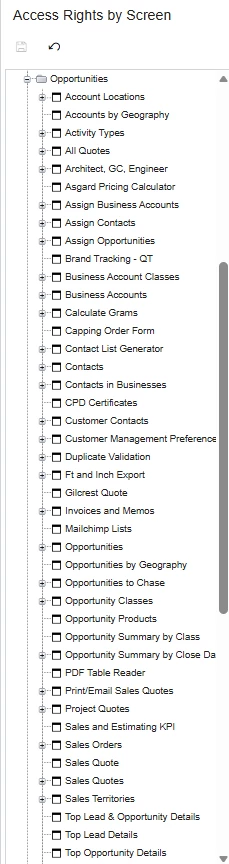
You can do this via the ‘Access Rights By Screen’ screen.

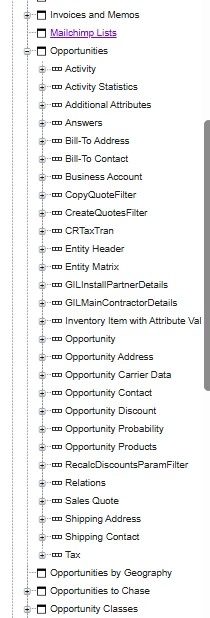
Firstly open the screen and expand the namespace of the screen you want to edit:

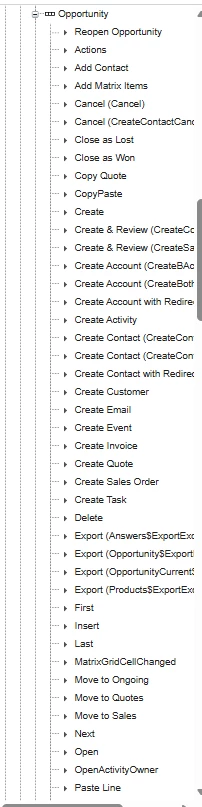
Then select the screen and expand it: 

Then expand the data view which hold the action:

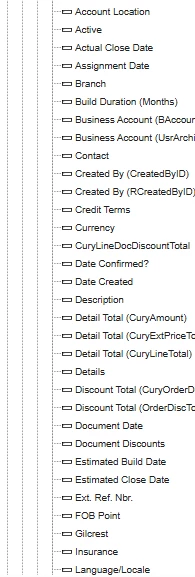
The records with a triangle are actions and the record with rectangles are fields.

3 replies

Forum|alt.badge.img

@ulfwee Hi,

Yes, this is possible, but not through standard Access Rights configuration.

Acumatica's Access Rights are primarily managed at the screen, graph, DAC, and field levels. There is no built-in feature that allows you to assign security permissions directly to an individual PXAction (button).

The recommended approach is to implement this through customization by checking the current user's roles or permissions and enabling/disabling (or hiding) the action accordingly.

For example, in the graph you can control the action's availability:

if(check user role)

{
YourAction.SetEnabled(canExecute);
YourAction.SetVisible(canExecute);

}


Forum|alt.badge.img+4
  • Jr Varsity II
  • July 27, 2026

Hi ​@ulfwee ,

If your requirement is to allow only specific users or roles to execute a particular action, the recommended customization is to:

  • Check the current user's role or permissions in a graph extension.
  • Dynamically call SetVisible(false) or SetEnabled(false) for the action during row selection or graph initialization.

Hope above helps!!


Forum|alt.badge.img+9
  • Captain II
  • Answer
  • July 27, 2026

@ulfwee 


You do not need a customisation for this.


You can do this via the ‘Access Rights By Screen’ screen.

Firstly open the screen and expand the namespace of the screen you want to edit:

Then select the screen and expand it: 

Then expand the data view which hold the action:

The records with a triangle are actions and the record with rectangles are fields.