Solved

Bills Adjustments search bar don't pull information from "Vendor ID" after system update

  • April 7, 2026
  • 4 replies
  • 52 views

Forum|alt.badge.img

Hi there, 

We recently completed an update to our Acumatica to  2025 R2, and I noticed a change in the search functionality.

Before the update, we were able to enter a Vendor ID in the search bar and retrieve results that included the Vendor ID. However, after the update, the search bar only returns results based on Vendor Name or Description, and no longer recognizes Vendor ID.

I also checked the Demo company, where searching by Vendor ID still appears to work as expected.

Has anyone experienced this issue or knows how to restore the ability to search by Vendor ID?

Any guidance would be greatly appreciated. Thank you!

 

Best answer by Novstat

Hi ​@epan 


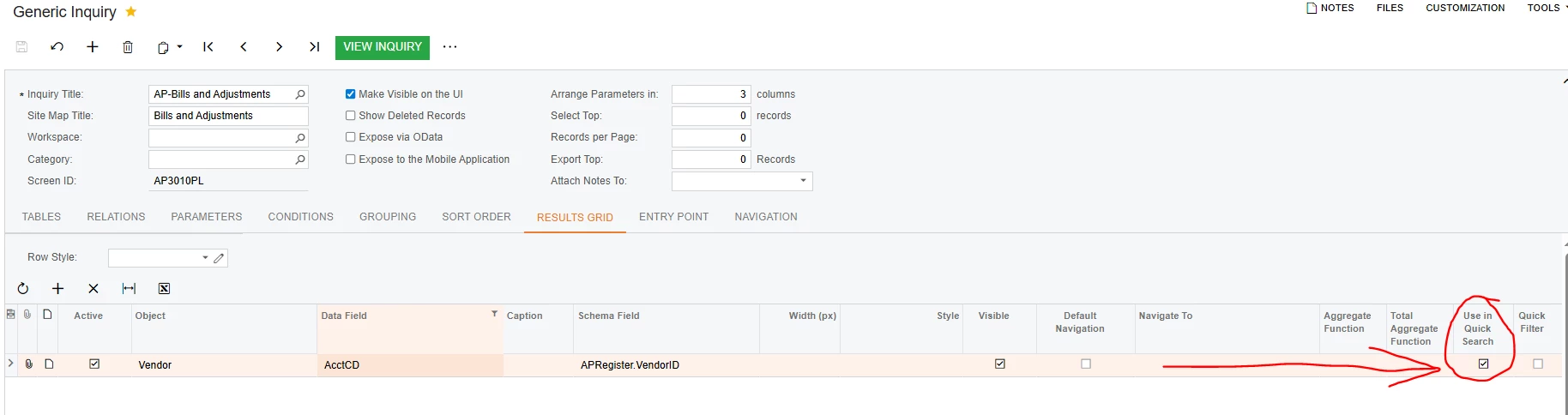
Try checking if the column “Use in Quick Search” is ticked in the generic inquiry screen for Vendor ID field.


4 replies

Forum|alt.badge.img
  • Varsity I
  • April 8, 2026

This behavior is likely related to changes in the search indexing / full-text search introduced in newer versions like 2025 R2.


In many screens, the search bar now prioritizes name/description fields instead of IDs unless the field is explicitly included in the search index.


Since it still works in the Demo company, I would suggest checking:


Customization differences (fields removed from selector/search)

Search configuration / selector settings (e.g., SubstituteKey, DescriptionField)

Whether VendorID is included in the selector or search columns


As a workaround, you can:


Use advanced filter instead of search, or

Customize the selector to include VendorID in searchable fields


Forum|alt.badge.img
  • Varsity I
  • Answer
  • April 8, 2026

Hi ​@epan 


Try checking if the column “Use in Quick Search” is ticked in the generic inquiry screen for Vendor ID field.


Forum|alt.badge.img
  • Author
  • Jr Varsity III
  • April 8, 2026

Hi ​@epan 


Try checking if the column “Use in Quick Search” is ticked in the generic inquiry screen for Vendor ID field.


Thank you so much, it worked. 


Forum|alt.badge.img
  • Author
  • Jr Varsity III
  • April 8, 2026

This behavior is likely related to changes in the search indexing / full-text search introduced in newer versions like 2025 R2.


In many screens, the search bar now prioritizes name/description fields instead of IDs unless the field is explicitly included in the search index.


Since it still works in the Demo company, I would suggest checking:


Customization differences (fields removed from selector/search)

Search configuration / selector settings (e.g., SubstituteKey, DescriptionField)

Whether VendorID is included in the selector or search columns


As a workaround, you can:


Use advanced filter instead of search, or

Customize the selector to include VendorID in searchable fields

Thank you.