I have been working on an automation to place the SO in BackOrder status if the order isnt completely shipped. The scenario is for Drop Shipments.
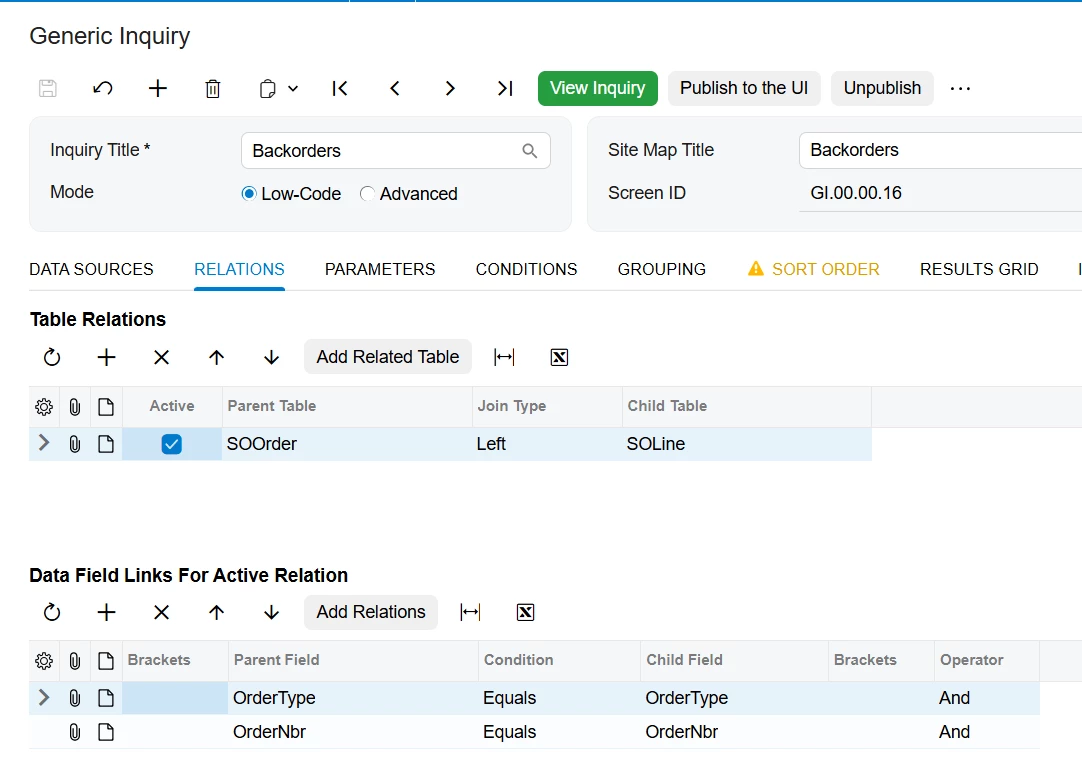
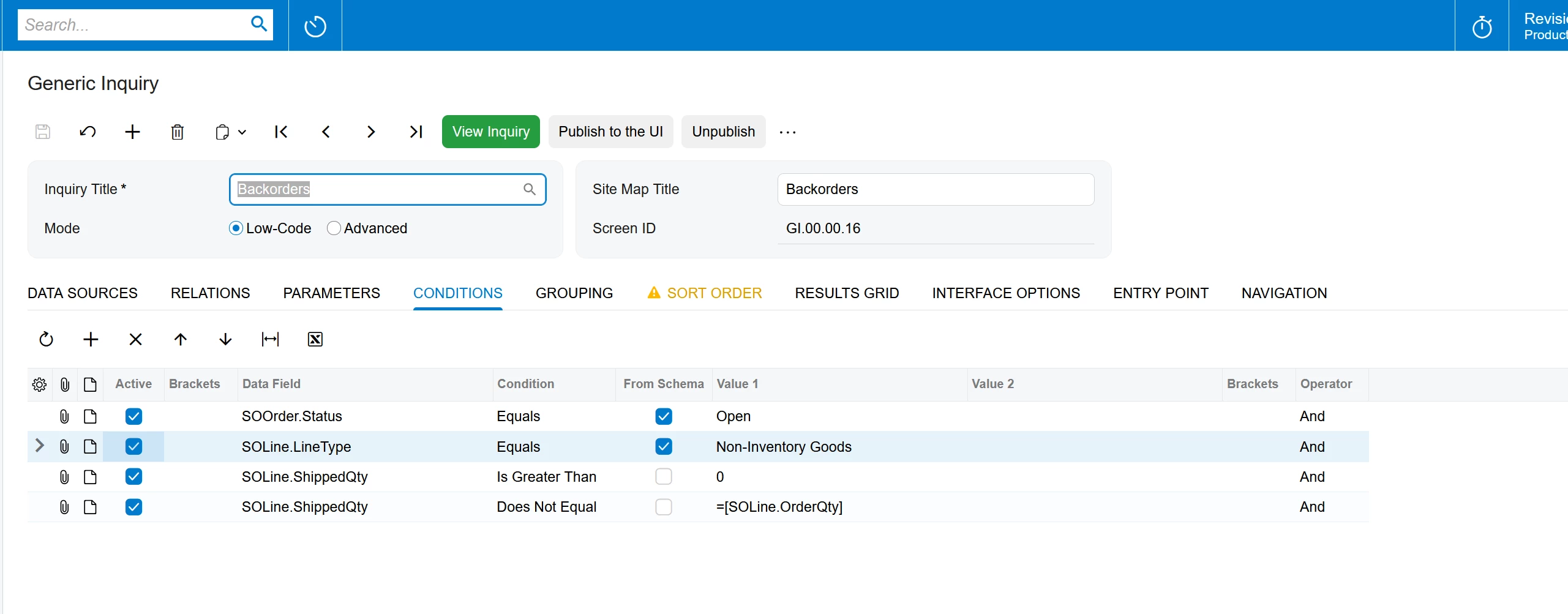
I created a GI:
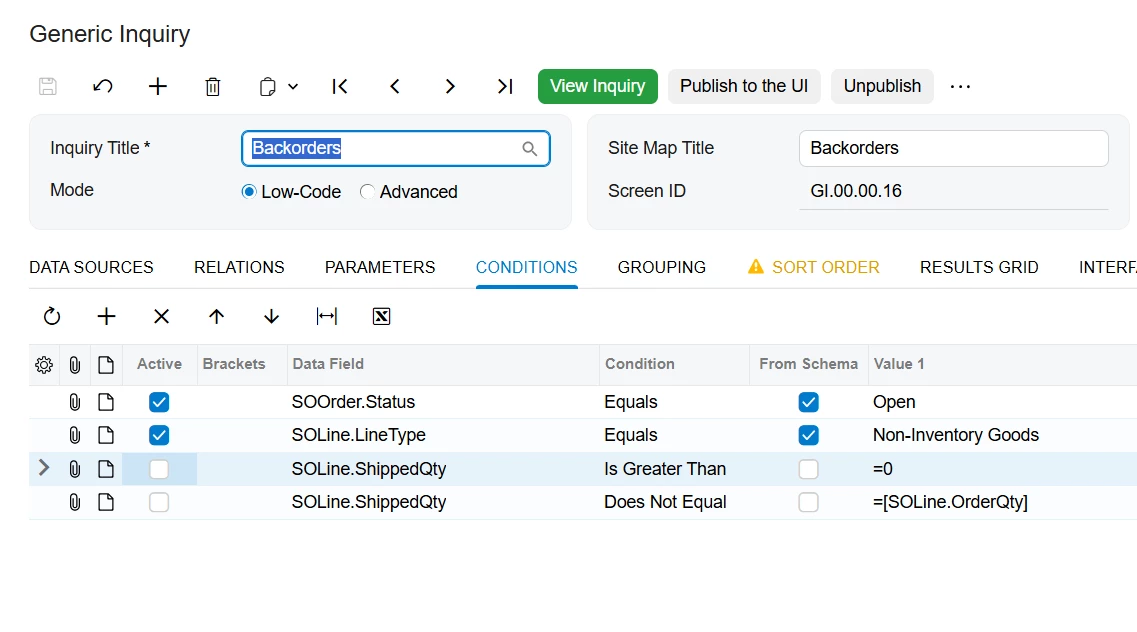
If I disable the last 2 conditions, the biz event automation works perfectly fine. However if any one of the last 2 conditions or both of them are enabled the biz event doesnt work at all. My condition to display the orders whose Shipped Qty >0 & <> Order Qty. Reason being the Unshipped qty is a nonexistent field in DB:
Is there anything I’m missing or doing wrong? Any help would be appreciated. Also attaching the XML of the GI.
Best answer by KrunalDoshi
Hi @Harry,
Thanks for uploading the Business Event. Below are my findings, which I think could be the cause for your issue.
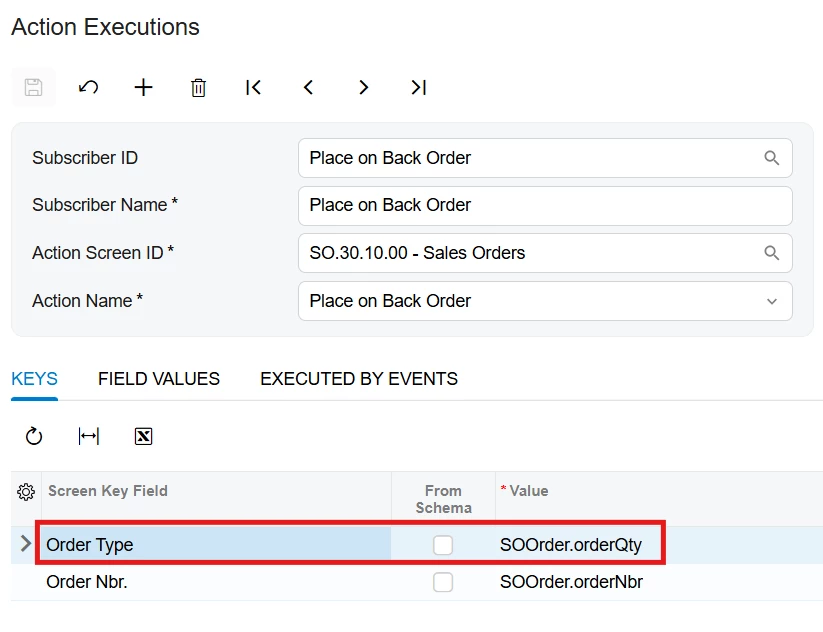
The Business Event's action parameter mapping for OrderType appears to be incorrect. The OrderType parameter is mapped to SOOrder_orderQty, which is the order quantity, not the order type. This should be corrected.
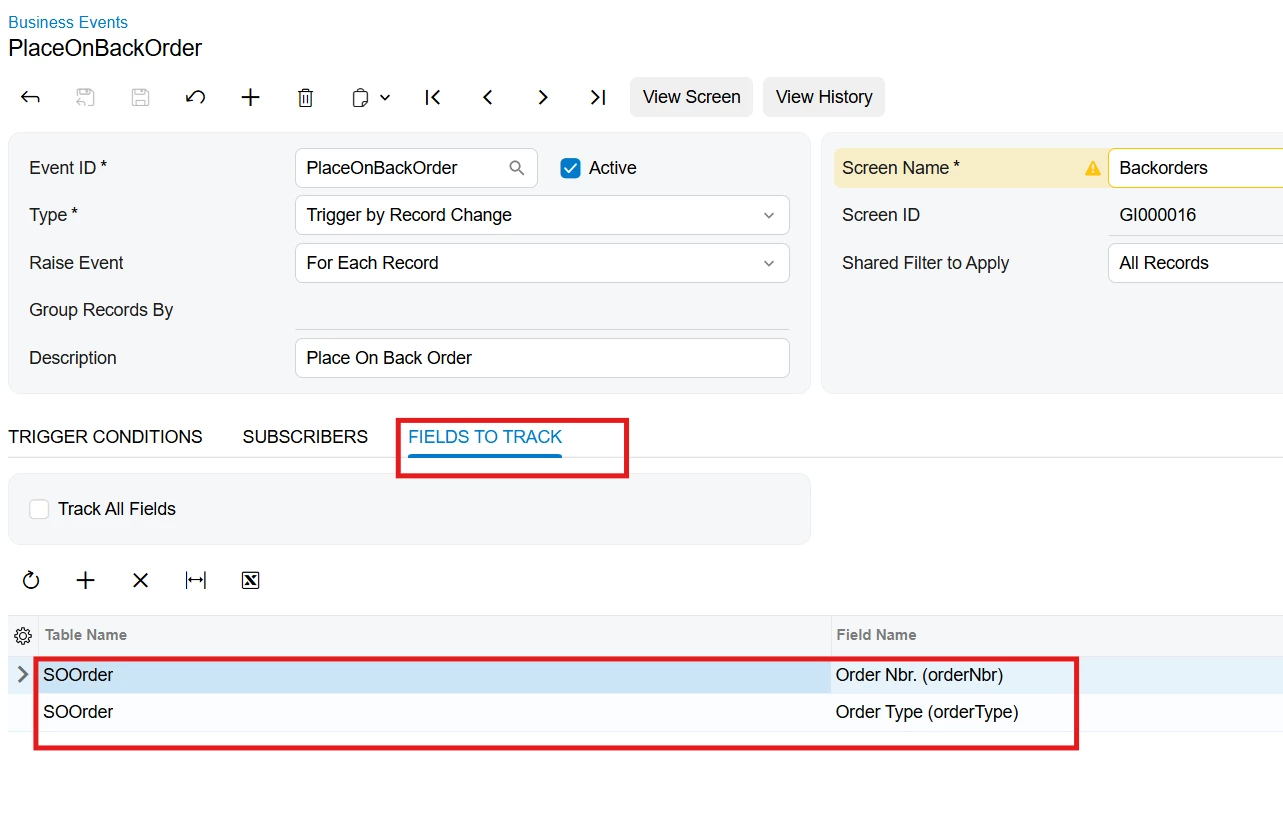
Your GI's partial-shipment logic depends on the SOLine fields. If the event relies on tracked field changes to detect when an order enters the GI result set, you should add tracked fields for SOLine.shippedQty or SOLine.orderQty.
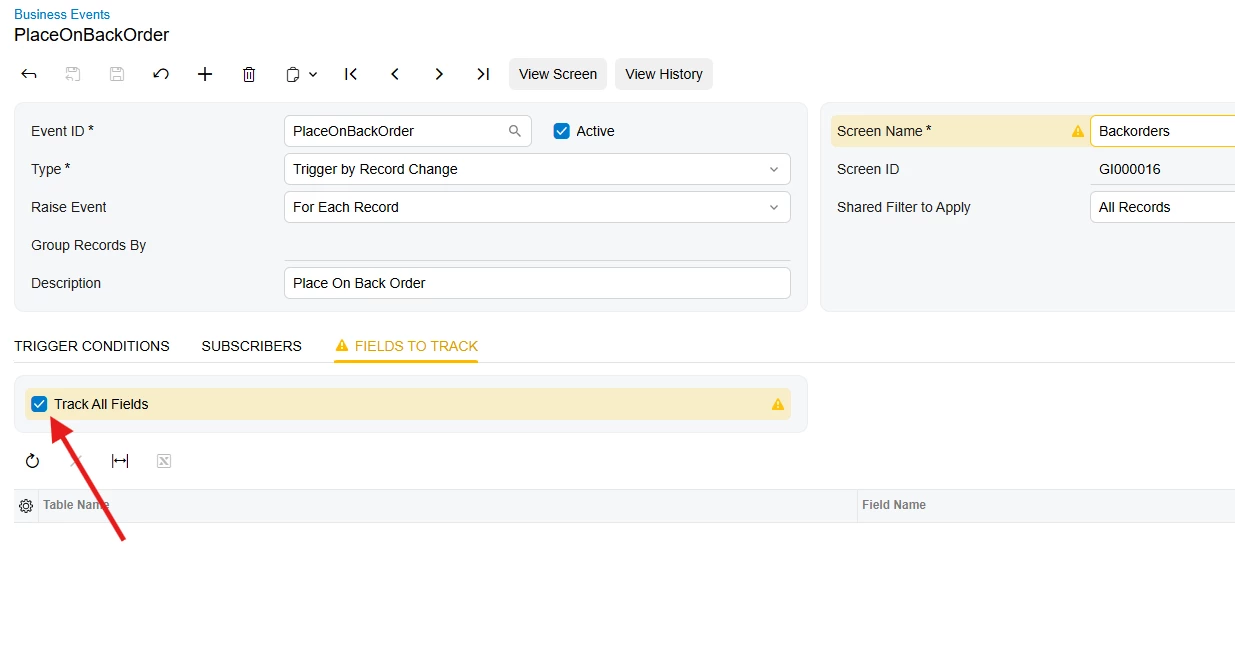
For initial troubleshooting, select Track All Fields. This is also the approach shown in Acumatica's documentation for configuring a Business Event with the Record Inserted operation.
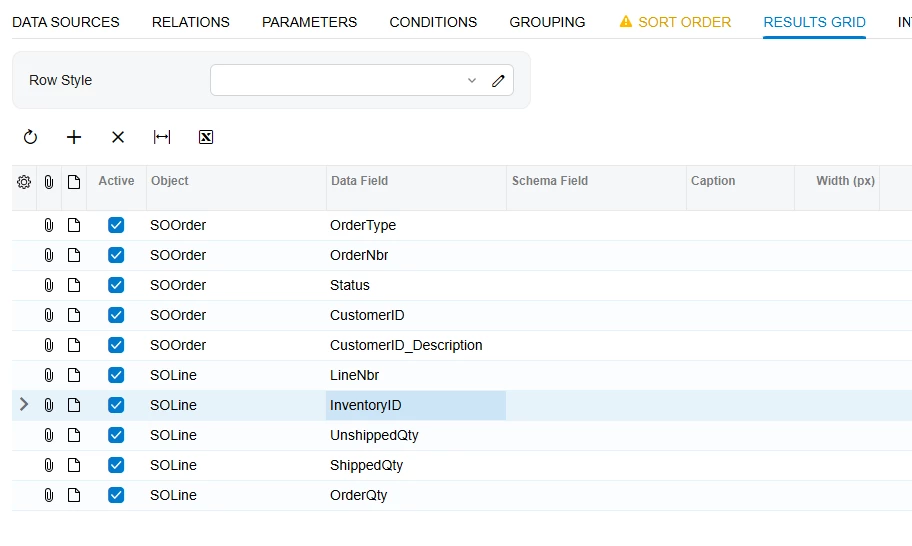
Make sure the Results Grid includes the key fields required for the tables used by the GI. Your current results include the Sales Order type and number, but you should add SOLine.LineNbr as well. Acumatica recommends including all key fields for the DACs used by a record-change Business Event.
Hope this helps!
Hi @KrunalDoshi , Thanks for pointing this out, but the issue still persists. It is not getting converted. its a drop ship for non stock items.
Hi @Harry,
I have tested it as below, the Business Event got fired and Sales Order got converted to Back Order.
Here are my GI columns looks like-
Business Event is now Tracking all Fields.
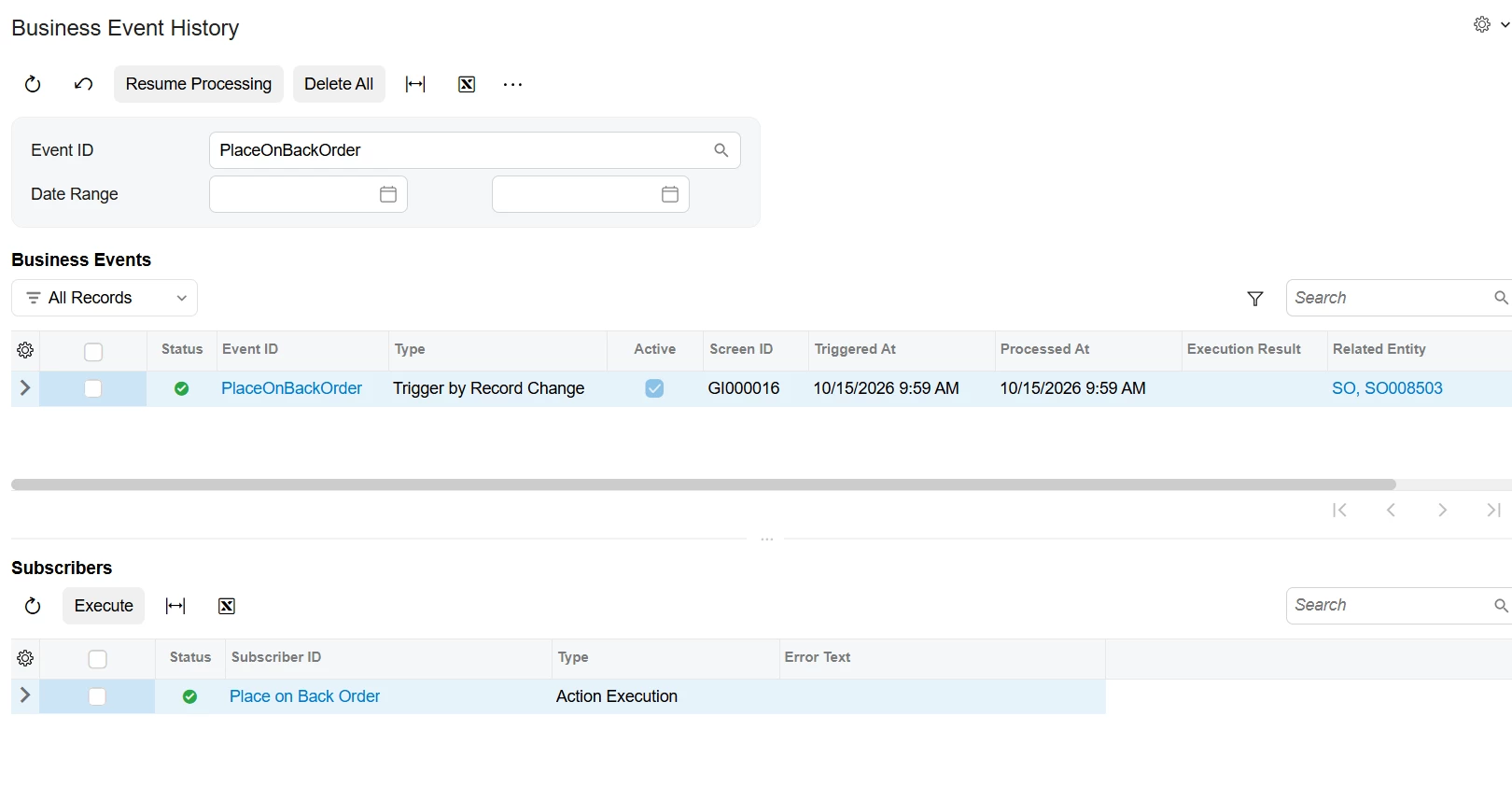
Now, as soon as the GI has a record, the Business Event triggers and executed successfully.
I would recommend you checking whether the Sales Order you are testing with, is available to Place for BackOrder. Meaning, whether you can convert that from the Sales Order screen.
Secondly, check the GI, whether it is listing the Sales Order which want to test.
Third, check Business Event History. If it has any error or executed successfully without processing.
I believe the issue is related to how Acumatica Business Events process records entering a Generic Inquiry result set, rather than the fact that Unshipped Qty is not a physical database field. It will be better if you upload the Business Event too. That will help to troubleshoot the issue if it is related to that.
I believe the issue is related to how Acumatica Business Events process records entering a Generic Inquiry result set, rather than the fact that Unshipped Qty is not a physical database field. It will be better if you upload the Business Event too. That will help to troubleshoot the issue if it is related to that.
Thanks for uploading the Business Event. Below are my findings, which I think could be the cause for your issue.
The Business Event's action parameter mapping for OrderType appears to be incorrect. The OrderType parameter is mapped to SOOrder_orderQty, which is the order quantity, not the order type. This should be corrected.
Your GI's partial-shipment logic depends on the SOLine fields. If the event relies on tracked field changes to detect when an order enters the GI result set, you should add tracked fields for SOLine.shippedQty or SOLine.orderQty.
For initial troubleshooting, select Track All Fields. This is also the approach shown in Acumatica's documentation for configuring a Business Event with the Record Inserted operation.
Make sure the Results Grid includes the key fields required for the tables used by the GI. Your current results include the Sales Order type and number, but you should add SOLine.LineNbr as well. Acumatica recommends including all key fields for the DACs used by a record-change Business Event.
Thanks for uploading the Business Event. Below are my findings, which I think could be the cause for your issue.
The Business Event's action parameter mapping for OrderType appears to be incorrect. The OrderType parameter is mapped to SOOrder_orderQty, which is the order quantity, not the order type. This should be corrected.
Your GI's partial-shipment logic depends on the SOLine fields. If the event relies on tracked field changes to detect when an order enters the GI result set, you should add tracked fields for SOLine.shippedQty or SOLine.orderQty.
For initial troubleshooting, select Track All Fields. This is also the approach shown in Acumatica's documentation for configuring a Business Event with the Record Inserted operation.
Make sure the Results Grid includes the key fields required for the tables used by the GI. Your current results include the Sales Order type and number, but you should add SOLine.LineNbr as well. Acumatica recommends including all key fields for the DACs used by a record-change Business Event.
Hope this helps!
Hi @KrunalDoshi , Thanks for pointing this out, but the issue still persists. It is not getting converted. its a drop ship for non stock items.
@Harry Here are my recommendations. Please check on your side and let me know if you still face any issues.
In the Generic Inquiry → Conditions → Please remove = before 0.
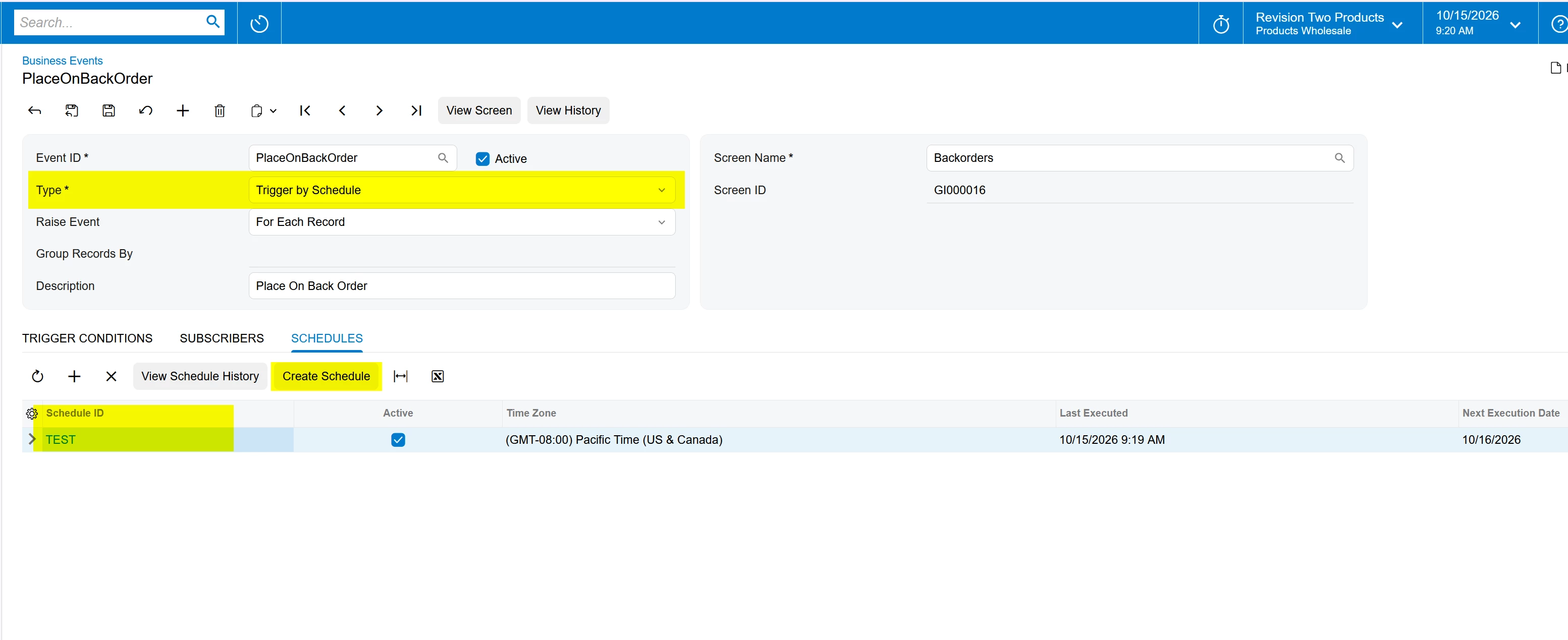
In the Business Events, Please change the Type i.e. Trigger by Record Change to Trigger By Schedule.
As soon as you choose this Type, system will enable the new tab. i.e. Schedule. Please create a Automation Schedule and it will process the Automation schedule and execute the Action i.e. PLACE ON BACK ORDER.
Thanks for uploading the Business Event. Below are my findings, which I think could be the cause for your issue.
The Business Event's action parameter mapping for OrderType appears to be incorrect. The OrderType parameter is mapped to SOOrder_orderQty, which is the order quantity, not the order type. This should be corrected.
Your GI's partial-shipment logic depends on the SOLine fields. If the event relies on tracked field changes to detect when an order enters the GI result set, you should add tracked fields for SOLine.shippedQty or SOLine.orderQty.
For initial troubleshooting, select Track All Fields. This is also the approach shown in Acumatica's documentation for configuring a Business Event with the Record Inserted operation.
Make sure the Results Grid includes the key fields required for the tables used by the GI. Your current results include the Sales Order type and number, but you should add SOLine.LineNbr as well. Acumatica recommends including all key fields for the DACs used by a record-change Business Event.
Hope this helps!
Hi @KrunalDoshi , Thanks for pointing this out, but the issue still persists. It is not getting converted. its a drop ship for non stock items.
Hi @Harry,
I have tested it as below, the Business Event got fired and Sales Order got converted to Back Order.
Here are my GI columns looks like-
Business Event is now Tracking all Fields.
Now, as soon as the GI has a record, the Business Event triggers and executed successfully.
I would recommend you checking whether the Sales Order you are testing with, is available to Place for BackOrder. Meaning, whether you can convert that from the Sales Order screen.
Secondly, check the GI, whether it is listing the Sales Order which want to test.
Third, check Business Event History. If it has any error or executed successfully without processing.
Thanks for uploading the Business Event. Below are my findings, which I think could be the cause for your issue.
The Business Event's action parameter mapping for OrderType appears to be incorrect. The OrderType parameter is mapped to SOOrder_orderQty, which is the order quantity, not the order type. This should be corrected.
Your GI's partial-shipment logic depends on the SOLine fields. If the event relies on tracked field changes to detect when an order enters the GI result set, you should add tracked fields for SOLine.shippedQty or SOLine.orderQty.
For initial troubleshooting, select Track All Fields. This is also the approach shown in Acumatica's documentation for configuring a Business Event with the Record Inserted operation.
Make sure the Results Grid includes the key fields required for the tables used by the GI. Your current results include the Sales Order type and number, but you should add SOLine.LineNbr as well. Acumatica recommends including all key fields for the DACs used by a record-change Business Event.
Hope this helps!
Hi @KrunalDoshi , Thanks for pointing this out, but the issue still persists. It is not getting converted. its a drop ship for non stock items.
Hi @Harry,
I have tested it as below, the Business Event got fired and Sales Order got converted to Back Order.
Here are my GI columns looks like-
Business Event is now Tracking all Fields.
Now, as soon as the GI has a record, the Business Event triggers and executed successfully.
I would recommend you checking whether the Sales Order you are testing with, is available to Place for BackOrder. Meaning, whether you can convert that from the Sales Order screen.
Secondly, check the GI, whether it is listing the Sales Order which want to test.
Third, check Business Event History. If it has any error or executed successfully without processing.
Hopefully this will help you!
Thanks a lot @KrunalDoshi for sharing the solution. This really worked. The checkbox - track All fields was the point.