

Question

Auto Close Subcontract when pass Expires On

  • August 6, 2026
  • 4 replies
  • 37 views

What determines POOrder.Status transition to Closed on Subcontracts screen (SC301000), besides bill release amount? Is there a supported way to force-close based on ExpirationDate?"

I’ve already tried create a GI + biz event + automation schedule and import scenarios but it didn’t work. Thanks


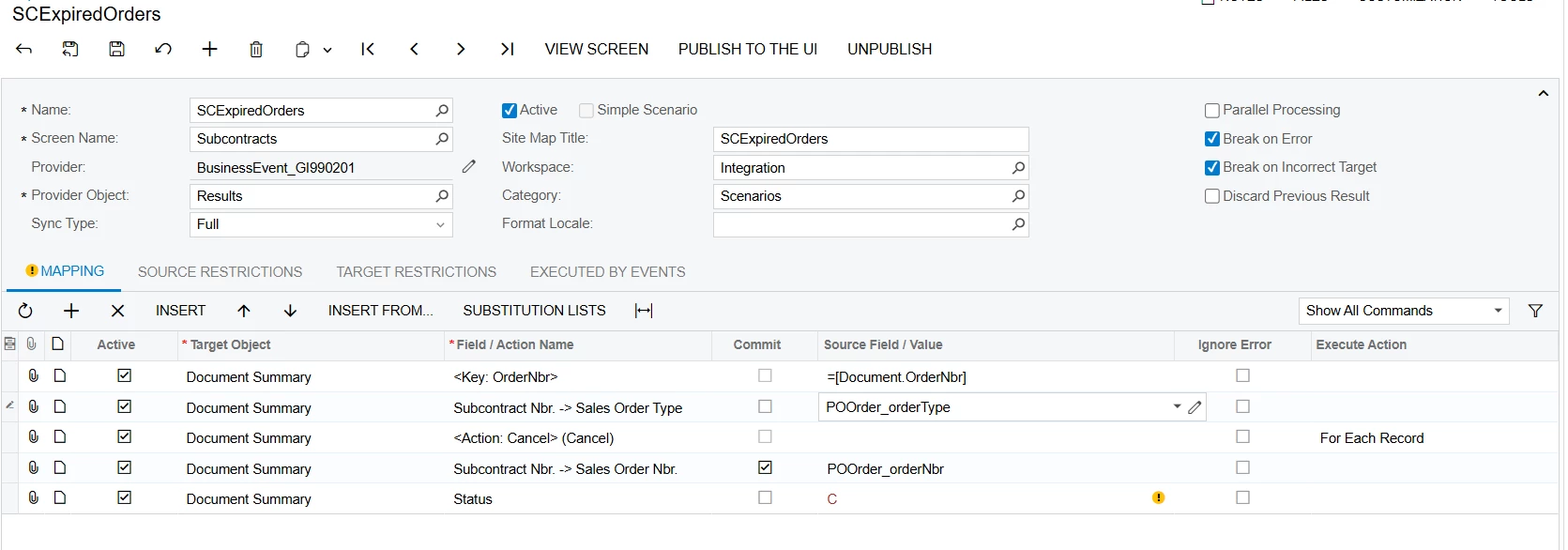
This is what i setup in the import scenarios
 

4 replies

Forum|alt.badge.img+4
  • Jr Varsity II
  • August 6, 2026

Hi ​@phuongphuong230505 ,

You can add a custom action on the Subcontract screen that sets the status to Closed.

Then, in the Business Event subscriber's Import Scenario, map that custom action accordingly.

I tested this approach, and the same scenario worked for me.

Hope this helps!


Forum|alt.badge.img+3
  • Captain II
  • August 6, 2026

By default, the Closed status on the Subcontracts (SC301000) screen is system-controlled and is primarily based on the subcontract's completion/billing logic, not the Expiration Date. There isn't a supported out-of-the-box way to force a subcontract to Closed based solely on its expiration date.


Since you've already tried a GI, Business Event, Automation Schedule, and Import Scenario without success, this likely requires a customization if your business process needs automatic closure based on ExpirationDate.


By default, the Closed status on the Subcontracts (SC301000) screen is system-controlled and is primarily based on the subcontract's completion/billing logic, not the Expiration Date. There isn't a supported out-of-the-box way to force a subcontract to Closed based solely on its expiration date.


Since you've already tried a GI, Business Event, Automation Schedule, and Import Scenario without success, this likely requires a customization if your business process needs automatic closure based on ExpirationDate.

Oh, Thanks for advice ^^ 


Hi ​@phuongphuong230505 ,

You can add a custom action on the Subcontract screen that sets the status to Closed.

Then, in the Business Event subscriber's Import Scenario, map that custom action accordingly.

I tested this approach, and the same scenario worked for me.

Hope this helps!

Thanks for your help. I would try 😍
