

Answer

Authentication unsuccessful when testing email setup

  • August 28, 2023
  • 5 replies
  • 356 views

Forum|alt.badge.img

Hi,


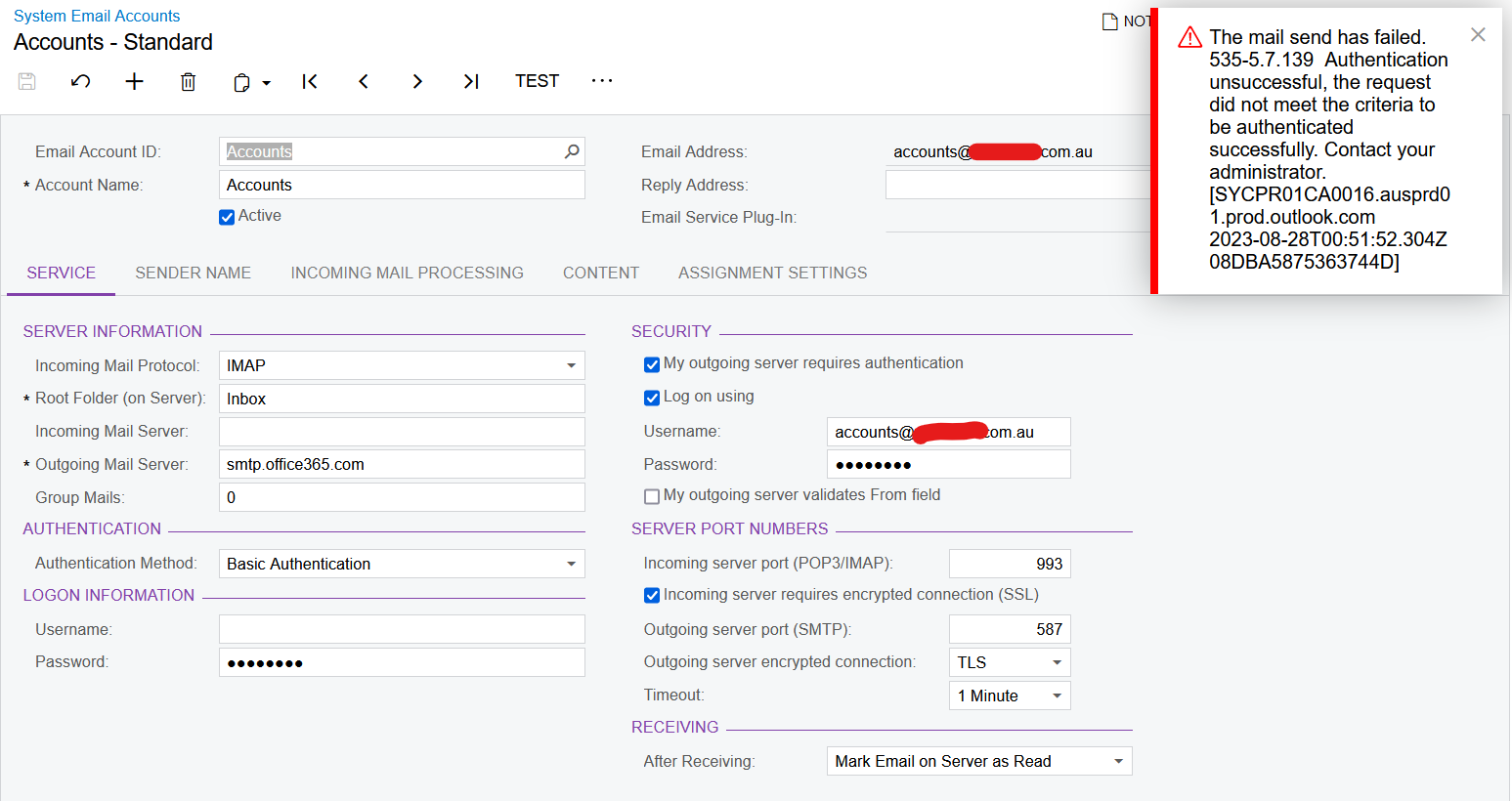
I have tried setting up a new System Email Account for a client, but when I go to test it, I get the error shown below.


I tried setting it up using my own business email and it worked perfectly, so I was wondering if you had any ideas as to why this client email isn’t working?


I should also note that this email has been created by the client’s IT Department recently for the purpose of sending emails from Acumatica.


Let me know if I can provide any other information.


Kind regards,

Andrew


Best answer by darylbowman

You haven't filled out the Login Information section. As far as I know, this needs to be filled in.


If they're using O365 though, you can no longer use Basic Authentication. You must use modern authentication, which there are numerous articles on here about.

5 replies

Forum|alt.badge.img+9
  • Semi-Pro III
  • August 28, 2023

Hi @AndrewA ,


To resolve the issue with the client's email account authentication, consider seeking guidance from their IT department as they likely have specific settings for external application usage like Acumatica. Additionally, reaching out to the client's email service provider's support can provide valuable insights into configuring the email account for third-party applications. It's also worth checking if the client's email server has any IP address whitelisting or blocking in place, ensuring that the server running Acumatica is allowed to send emails through their email system.


Regards,

Sweta


Forum|alt.badge.img
  • Author
  • Varsity I
  • August 28, 2023

Thanks @sweta68 , I will speak with their IT person and see what we can do.

Kind regards,

Andrew


darylbowman
Captain II
Forum|alt.badge.img+15
  • Answer
  • August 28, 2023

You haven't filled out the Login Information section. As far as I know, this needs to be filled in.


If they're using O365 though, you can no longer use Basic Authentication. You must use modern authentication, which there are numerous articles on here about.


darylbowman
Captain II
Forum|alt.badge.img+15

@AndrewA - Did you get this figured out?


Forum|alt.badge.img
  • Author
  • Varsity I
  • September 22, 2023

Hi Daryl, apologies for the delayed response. Yes I managed to get this sorted by setting up the modern authentication. Thanks for your help!


Kind regards,

Andrew

