The existence of the total aggregate column in setting up a GI implies the existence of standard methods for creating a footer in a PXGrid. This is further supported by the existence of markup for the Footer of a PXGridColumn, such as the following being valid markup:
However, I can’t find any reliable documentation of how to leverage the GI technique in a custom page, and other questions/answers relating to this topic don’t on close inspection actually answer the topic. For example, one of the threads suggests a solution of instead of modifying the footer to add a dummy row for the subtotal to the end of the result set - a solution that isn’t applicable to the large result sets I’m dealing with.
Can someone suggest if there is a way to replicate the GI footer subtotals in a custom page?
Best answer by darylbowman
I’m noticing a few things:
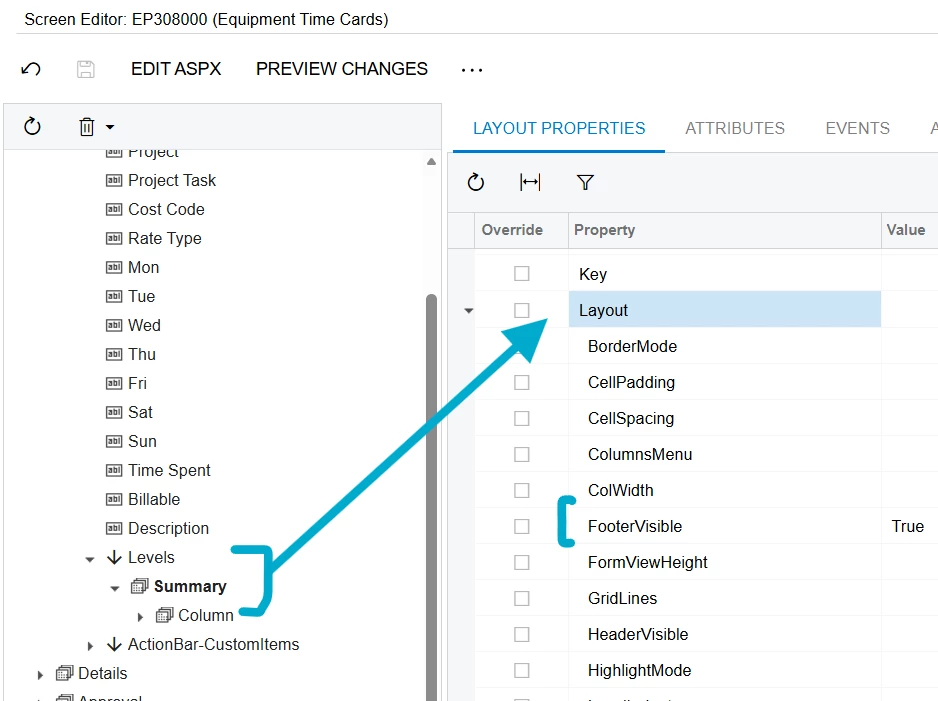
The ‘Footer’ is enabled through the ‘Levels’ node:
The ‘Mon’ - ‘Sun’ fields have two properties enabled: AutoCallBack, RenderEditorText (this might have to do with the PXTimeSpan)
In ASPX, the grid has a databinding event configured: <px:PXGrid ID="gridDetails" OnRowDataBound="gridDetails_OnRowDataBound">
I’ve been very interested in the same question myself. Oddly enough, I noticed earlier today that as of 25 R1, the Equipment Time Cards screen (EP.30.80.00) DOES have totals on the Summary grid.
I haven’t had a chance to look at how it’s done yet, but I definitely will.