Question

Add Upload from File button to Purchase Requests

  • September 3, 2026
  • 12 replies
  • 123 views

Forum|alt.badge.img

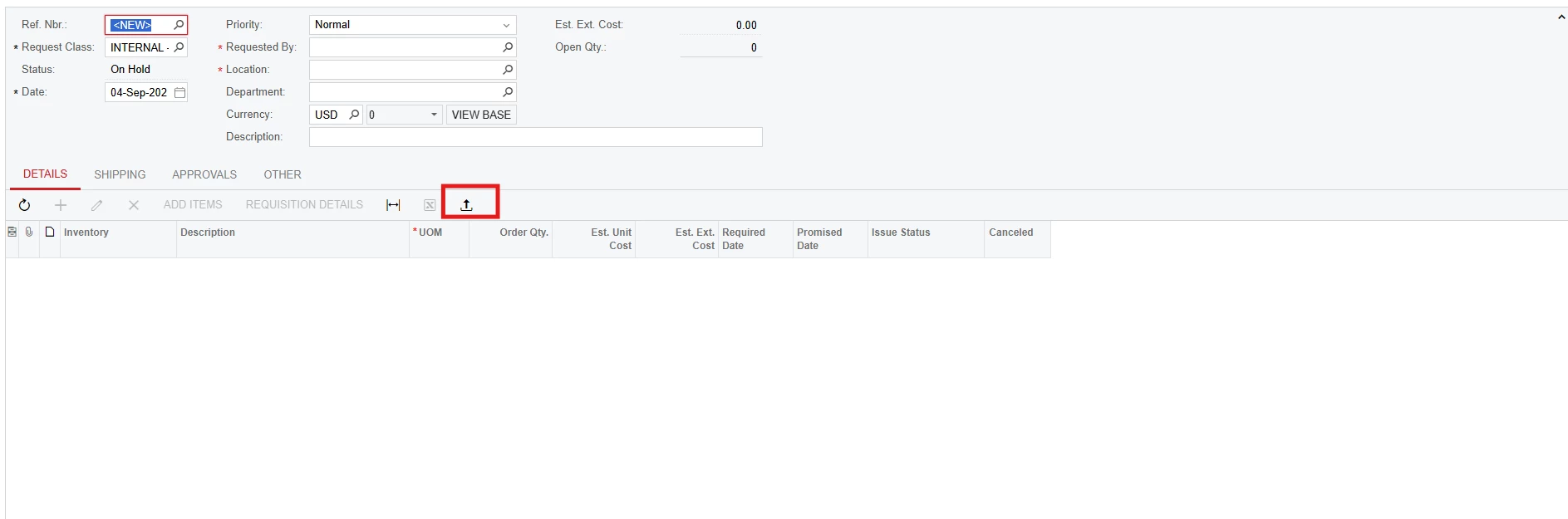
Hello everyone! Is there a way to add an Upload from File button to the Purchase Requests screen to allow for imports from excel directly into a purchase request?


We are using this for our quoted goods and lots of the quotes can run pretty long. I want to avoid a hit on efficiency by having the requestor spend time on filling out every single item from a quote.


Thank you!

12 replies

darylbowman
Captain II
Forum|alt.badge.img+17

If you mean the ‘Requisitions’ screen (RQ302000), yes, I’ve done it


Forum|alt.badge.img+5

Hello ​@jdunmire yes we can add if you mean Requisitions screen as you tagged in post. You can provide more details so we can better assist you.


Forum|alt.badge.img
  • Author
  • Jr Varsity III
  • September 4, 2026

If you mean the ‘Requisitions’ screen (RQ302000), yes, I’ve done it

Hey @darylbowman, I was actually speaking about the Requests (RQ301000) screen. Was wondering if it was possible to add the upload from file button there.


Thank you for the quick reply!


Forum|alt.badge.img+5

@jdunmire Yes we can if you saying at Grid level:


Forum|alt.badge.img
  • Author
  • Jr Varsity III
  • September 4, 2026

@jdunmire Yes we can if you saying at Grid level:


Hmm weird, I guess they removed that with the Modern UI. Do you know if there is a way to add that back?


Forum|alt.badge.img+5

@jdunmire Yes off course! you can follow below steps:
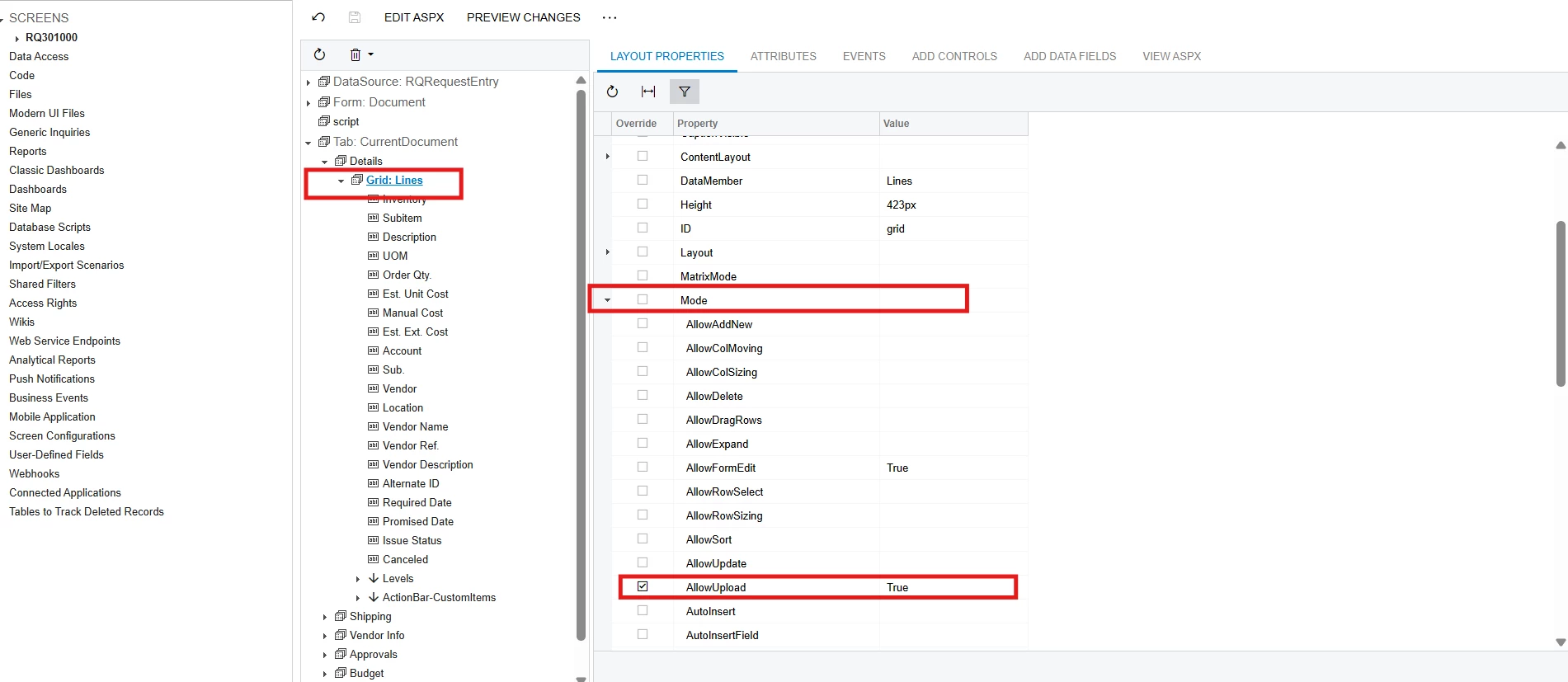
create or use Customization Project Editor and do this configuration:

Request screen → Detail Tab → select Grid → Expand Mode dropdown → Set AllowUpload - True → Save 


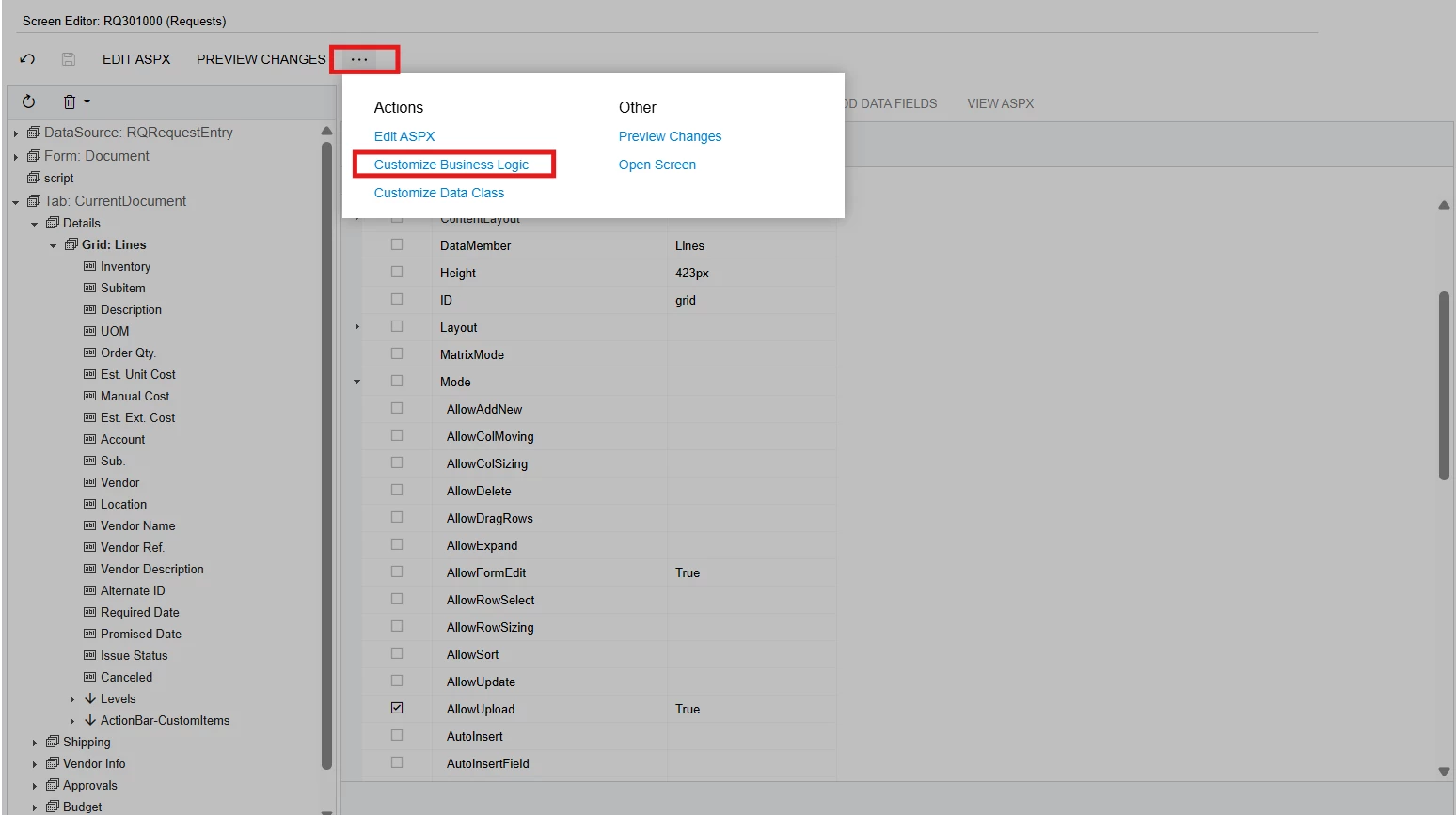
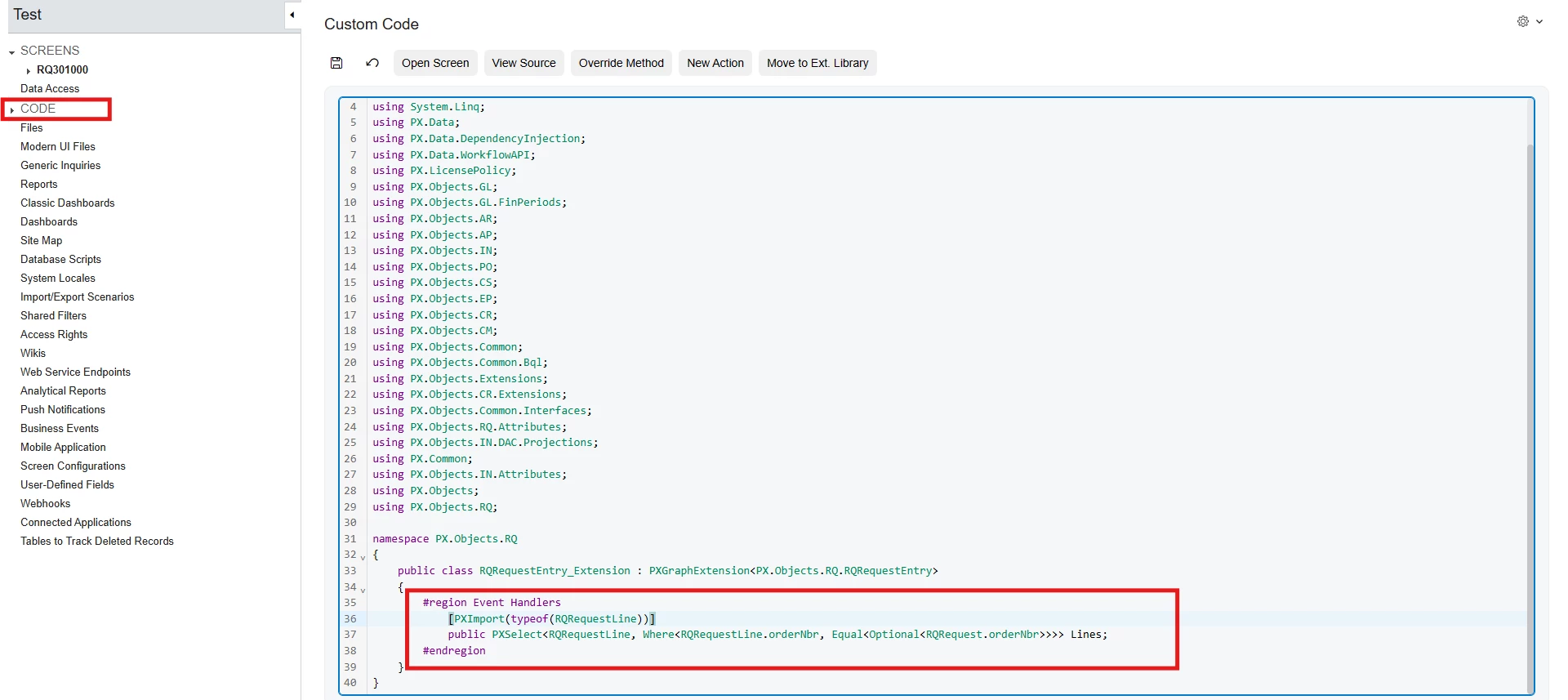
Then Click on 3 dots → Customize Business Logic → it Redirect to Code section → add below snippet → Save → Publish Project.


Snippet:

  [PXImport(typeof(RQRequestLine))]
public PXSelect<RQRequestLine, Where<RQRequestLine.orderNbr, Equal<Optional<RQRequest.orderNbr>>>> Lines;

It will work for both MUI and Classic UI. If anything else is needed, you can continue in the thread.

I hope it helps.


  • Freshman I
  • September 7, 2026

Forum|alt.badge.img
  • Author
  • Jr Varsity III
  • September 8, 2026

@jdunmire Yes off course! you can follow below steps:
create or use Customization Project Editor and do this configuration:

Request screen → Detail Tab → select Grid → Expand Mode dropdown → Set AllowUpload - True → Save 


Then Click on 3 dots → Customize Business Logic → it Redirect to Code section → add below snippet → Save → Publish Project.


Snippet:

  [PXImport(typeof(RQRequestLine))]
public PXSelect<RQRequestLine, Where<RQRequestLine.orderNbr, Equal<Optional<RQRequest.orderNbr>>>> Lines;

It will work for both MUI and Classic UI. If anything else is needed, you can continue in the thread.

I hope it helps.

Hey Abhishek, thank you for this! I will try to do implement this and publish the customization.


Quick question for you, I was speaking with one of the developers from our VAR and they mentioned that this solution was only for the Classic UI and that the Modern UI would need a typescript extension. 


Have you heard of anything about that?


Thank you!


Forum|alt.badge.img+5

@jdunmire For MUI, the button will appear the same as in Classic UI, so there is no need to implement it separately. The only time you need to implement the entire Upload button is when you want to add additional features. For that, you can follow Yuriy’s blog link.

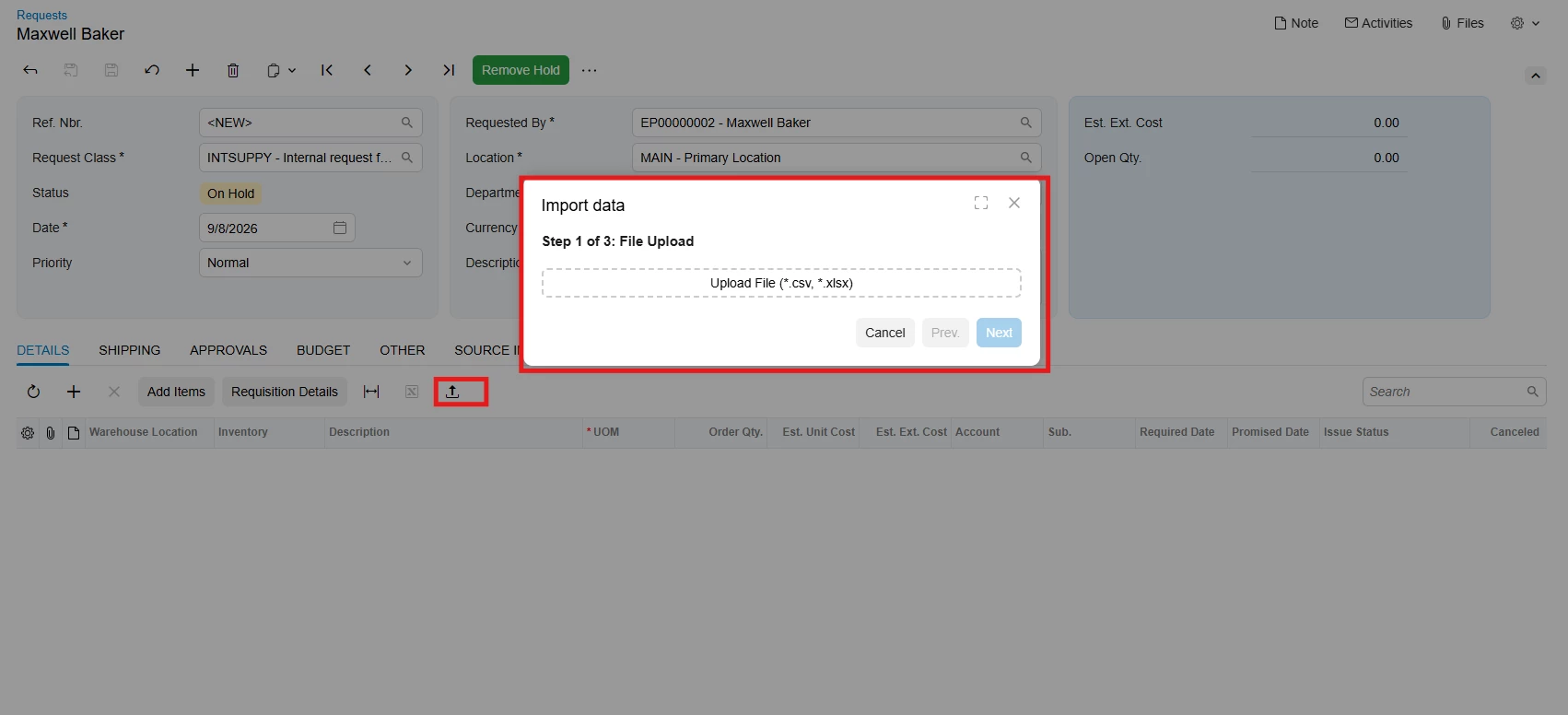
This is MUI


Forum|alt.badge.img
  • Author
  • Jr Varsity III
  • September 8, 2026

@jdunmire For MUI, the button will appear the same as in Classic UI, so there is no need to implement it separately. The only time you need to implement the entire Upload button is when you want to add additional features. For that, you can follow Yuriy’s blog link.

This is MUI


Thats perfect! Hate to be a bother but can you please send some screenshots of how button functions? Im expecting it to be the same as the Purchase Orders/Sales Orders/Production Order Details screens but just want to make sure. 
 

Thank you for being such a big help!


Forum|alt.badge.img+5

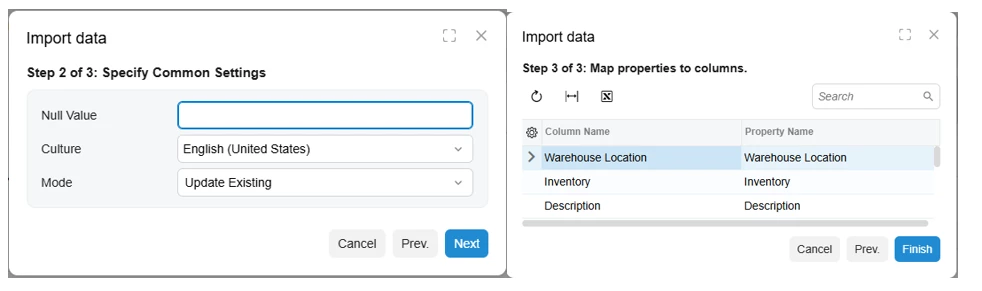
@jdunmire Snaps:
 

Excel Data
File upload & Column mapping

This works like any other base Upload button in Acumatica and behaves the same way across all screens.


Forum|alt.badge.img+2
  • Jr Varsity III
  • September 12, 2026

@jdunmire ,
           you can take view declaration of grid from Base code and add it on your graph file then above it add like this [PXImport(typeof(YourDacName))].Then follow below process.