

Solved

Add Print link in Dashboard data table widget

  • Apr 29, 2022 5:14 AM UTC
  • 6 replies
  • 211 views
  • Translate All

Hi,

I have created a sales order data table widget on dashboard. Now i want to add a print link as one of the column in the widget. how can i do that?

Best answer by yhartman

Good morning,

If understand correctly you are trying to add a column that say “print text” that has the link?
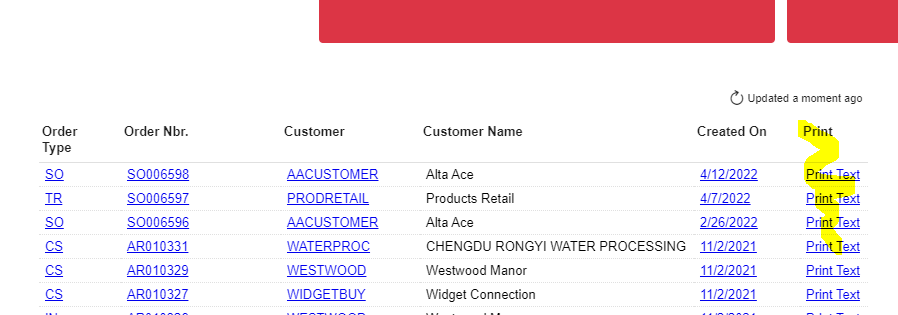
 

You can add another column to your GI. See image below.



View original

6 replies

Forum|alt.badge.img+3
  • Jr Varsity I
  • May 2, 2022 2:25 AM UTC

Hi, What do you mean by a “print link”?

Translate

  • Author
  • Freshman II
  • May 2, 2022 9:51 AM UTC

Hello @yhartman ,

      Print link means i need a link in each row of Data Table , on click of that link need to print sales order..

Translate

Forum|alt.badge.img+3
  • Jr Varsity I
  • May 2, 2022 11:30 AM UTC

You can use the navigation section on the generic inquiry to link to the sales order report. You can add the column to your dashboard data table.


Translate

  • Author
  • Freshman II
  • May 3, 2022 4:43 AM UTC

Hi,

 yes i have already added link in navigation section for print orders and in the results grid section added CreatedDatetime field for that navigation. So,currently it displays CreatedDatetime Field as link in dashboard data table. How to add column in dashboard table that has print text and navigation added?


Translate

Forum|alt.badge.img+3
  • Jr Varsity I
  • Answer
  • May 3, 2022 12:23 PM UTC

Good morning,

If understand correctly you are trying to add a column that say “print text” that has the link?


You can add another column to your GI. See image below.


Translate

  • Author
  • Freshman II
  • May 5, 2022 4:19 AM UTC

Hey,

Thank you so much. It worked 🙂

Translate