



Hello,
Can you please help me add a custom button on the Payments tab of the Sales Order screen?
In which extension should the new button be created?
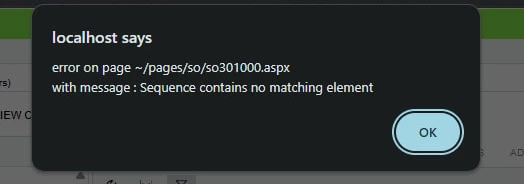
When I try to add it in the Sales Order extension, I get the following error message.
Hello,
Can you please help me add a custom button on the Payments tab of the Sales Order screen?
In which extension should the new button be created?
When I try to add it in the Sales Order extension, I get the following error message.
Best answer by Vard03
This issue occurred when I was trying to add the button from the customization project. I added it directly in the ASPX, and the issue was resolved. However, I didn’t understand why it wasn’t possible to add it through the customization project.
Enter your E-mail address. We'll send you an e-mail with instructions to reset your password.



