Question

Access Roles

  • Oct 29, 2026 3:54 PM UTC
  • 5 replies
  • 42 views
  • Translate All

dalesimmerly58
Pro I
Forum|alt.badge.img+1

We spend a ton of time modifying and creating Access Roles and it is a pain in the butt to move them from one tenant to other tenants.  According to the Community there is no import export for roles and has been on the idea list for 3 years.  Does anyone have a solution for this ?  Could there be a custom customization for this?  I see the out box customization has something for Access by screens - could we do this for roles ?  
 

5 replies

zherring
Varsity I
Forum|alt.badge.img
  • Varsity I
  • Oct 29, 2026 4:05 PM UTC

I have not tested this but at first glance this is what I would try. It is definitely not a ‘best way’ solution, but you can go to Access Rights by Screen and export whatever screen you want to excel. Then I assume you could make an import scenario that imports into Access Rights by Screen using that same excel you just exported.

Translate

dalesimmerly58
Pro I
Forum|alt.badge.img+1

​@zherring Thanks for response but need this by role not by screen -  have 4 different tenants - we need to create in one and move to the other 3…. both new roles and updated roles

we have 10 different locations going live over the next 12 months and each one seems to have different views on access - moving a role from test to production in a major pain for us (me)


Translate

Forum|alt.badge.img
  • Varsity II
  • Oct 29, 2026 6:30 PM UTC

The PX.SM.Role DAC is nonexistent in the database but you could use the Access Rights by Role report (SM651500). Filter for the role you need (Additional Sorts and Filters tab), and export to excel to use as a data provider for an import scenario. You would have to build an import scenario to update either the Access Rights by Screen or Access Rights by Role entry screens. It may be difficult to map the fields correctly as you’re working with the tree->grid view but it should be possible. 

Translate

willhowardnz
Freshman I
  • Freshman I
  • Oct 29, 2026 8:42 PM UTC

​@dalesimmerly58  - 
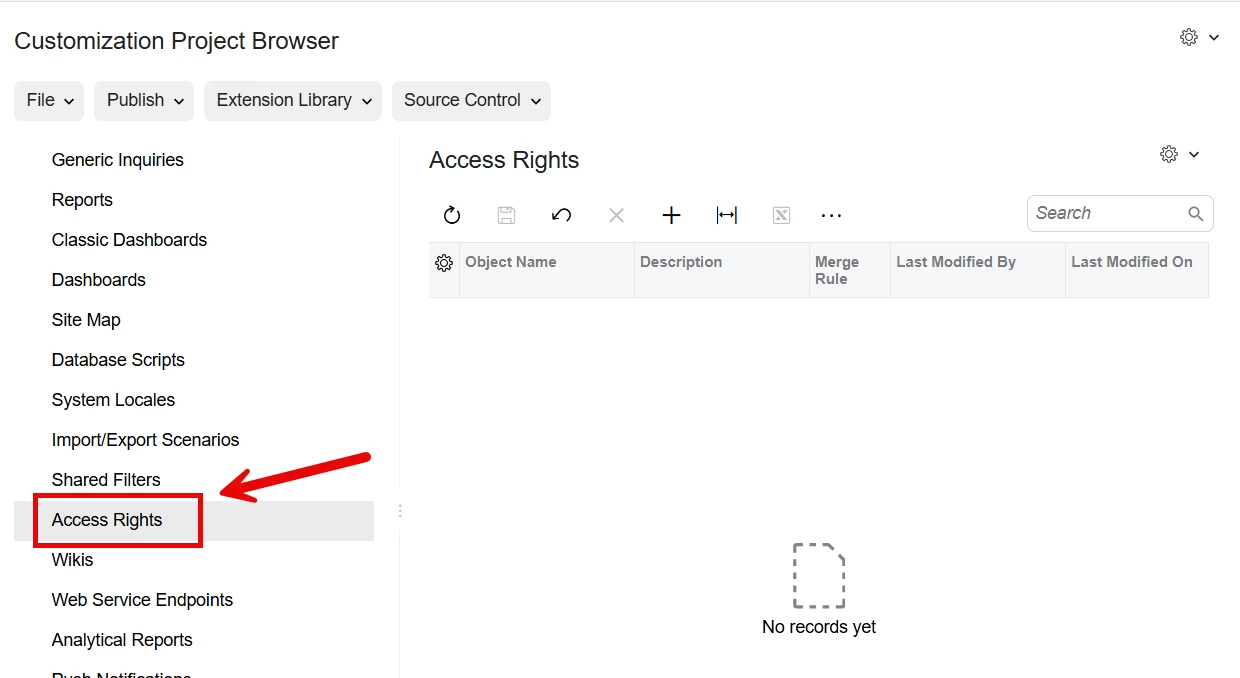
You should be able to achieve this by using a Customization to bundle the access rights for all relevant screens:
https://beacon.acumatica.com/r/Customization-Tool-Reference-Guide/Access-Rights#page-toolbar-and-more-menu

This is covered in the T200 course guide around Page 74, it’s probably your best bet for publishing to multiple instances/tenants/sites, and also allows you to copy from Sandbox sites to production sites.

Translate

Steve Milner
Varsity III
Forum|alt.badge.img+6
  • Varsity III
  • Oct 29, 2026 10:39 PM UTC

@dalesimmerly58 the customization route @willhowardnz linked does work by role. The Access Rights page is organized by screen, but each screen item carries every role's rights on that screen plus the source tenant's full role list. I built a test project on 2026 R1 and published it to a second tenant to confirm this, and I'm happy to share it. Roles missing from the target were created there, even one with no rights on the screen I packaged.

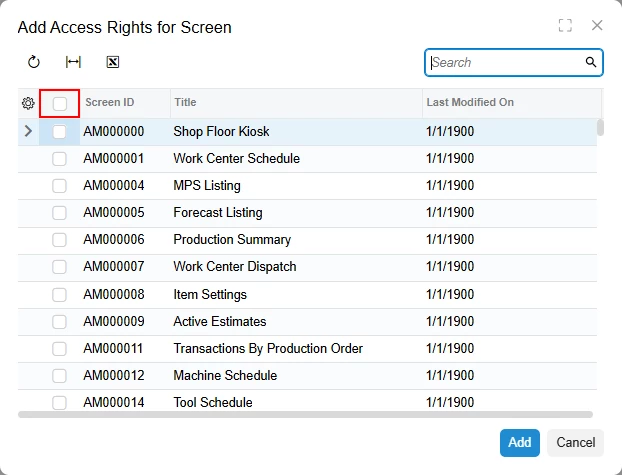
To move whole roles, add every screen. A role with rights on over 800 screens arrived with rights on the one screen I included. On 2025 R2 and later, the check box in the column header of the Add Access Rights for Screen dialog selects them all.

For your four tenants, build roles in the one you treat as the master and use Publish to Multiple Tenants for the other three. For updated roles, click Reload from Database on the project's Access Rights page and publish again. With the default merge rule, Copy From Current Tenant, the master's rights replace the target's for every role the master has, on every screen in the project. Roles that exist only in a target tenant are left alone, so access unique to one location can live in a role created only there. User assignments don't come across.

@dgranger70's Access Rights by Role report (SM651500) is the easiest way to check the result. Run it in each tenant and filter it to the role.

If production is a separate site, export the project from Customization Projects and import it there. Publishing unpublishes any project that isn't part of that publish, so select your existing projects with it and try it on a test tenant first.

Translate