

Question

[2025 R2 Build 25.201.0213.3] Very Strange Inventory ID Hyperlinks in Saved Sales Orders

  • April 28, 2026
  • 2 replies
  • 28 views

Forum|alt.badge.img+6

After upgrading to 2025 R2 Build 25.201.0213.3, we encountered a very strange issue.

Within one day right after the upgrade, we accidentally found that clicking the Inventory ID in the sales order details grid had no response and triggered no error and no pop-up window displayed.

We spent a lot of time troubleshooting and conducting tests in the test environment, which has been upgraded for two months and works properly.
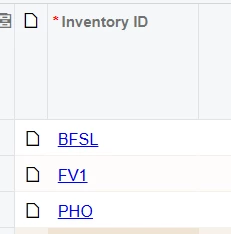
When we were at a loss, the function suddenly and miraculously returned to normal today. Clicking the Inventory ID now brings up the pop-up window as expected.

We did not update the browser (both Chrome and Edge showed the same issue in previous tests), nor did we modify any line of customization code. The problem got fixed automatically out of nowhere, which is extremely weird.

Does anyone know the root cause?

2 replies

Forum|alt.badge.img
  • Jr Varsity I
  • April 28, 2026

@ray20 When Acumatica upgrades to a new build, it deploys new JavaScript bundles and static assets. Your browser had aggressively cached the old JS files from the pre-upgrade version. The new build's server-side code expected the new frontend JS behavior for the Inventory ID click handler (the popup trigger). This mismatch caused the click to silently fail — no error, no popup, no console exception — because the old cached script simply didn't match what the server expected to coordinate with

After any Acumatica build upgrade, immediately do a hard cache clear on all client browsers:

  • Chrome/Edge: Ctrl + Shift + Delete → clear Cached images and files
  • Or simply: Ctrl + Shift + R (hard reload) on the Acumatica URL
  • Better yet, instruct users to do this before first login after an upgrade

Naveen Boga
Captain II
Forum|alt.badge.img+20
  • Captain II
  • April 28, 2026

@ray20  This was almost certainly a post-upgrade cache/compilation warm-up issue,  most likely a combination of stale browser-cached JavaScript files and IIS/Acumatica screen compilation completing in the background. The self-resolution after 24 hours is the strongest indicator. It is not a bug in 2025 R2 itself but rather an expected transitional state that can be mitigated with proper post-upgrade warm-up procedures in future upgrades.

Warm-Up Best Practice:  After every upgrade:

1. Restart IIS App Pool
2. Open key heavy screens manually    (SO Entry, PO Entry, AR Invoice)
3. Wait for full load
4. Clear browser cache on test machine
5. Re-test key screens
6. Then announce system available to users

