

Answer

Vendor clean up unused vendors

  • September 3, 2024
  • 4 replies
  • 211 views

Does anyone have a process in Acumatica to inactivate their vendors in the database that are no longer being used?  

Best answer by Laura03

Hello,

Consider adding Last Document details to the Vendor List, for insight into which vendors are no longer being used. Look for blank Last Document fields - these vendors have no transaction records in Acumatica. Sort descending by last document date to identify vendors who were last used long ago.
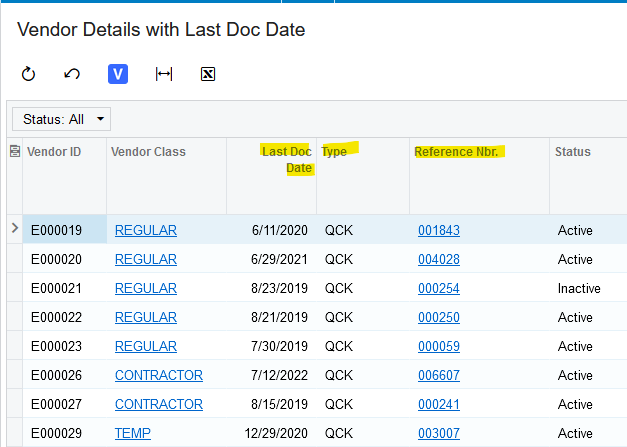
 

After identifying Unused Vendors, four different methods of deacivating the vendors are:

  1. Manually Inactivate the Vendors in Vendors Screen
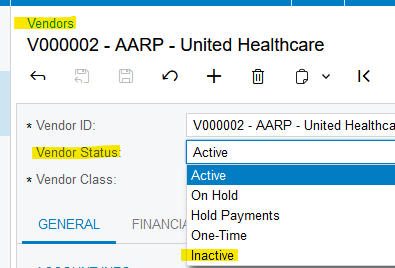
  1. Export Unused vendors to Excel. Use the Excel list with an Import Scenario to import the change of Vendor Status field to Inactive.
  2. Use the Vendor Preview List (with small modifications) to update the status of unused vendors to Inactive:
  1. Once the Last Document Date has been added to a generic inquiry, the generic inquiry could be used with a scheduled business event. The Business Event could run once a month, for example, and continue to automatically Inactivate any vendor whose oldest document is more than 2 years older than “today”.


Laura

4 replies

Laura03
Captain II
Forum|alt.badge.img+19
  • Captain II
  • Answer
  • September 4, 2024

Hello,

Consider adding Last Document details to the Vendor List, for insight into which vendors are no longer being used. Look for blank Last Document fields - these vendors have no transaction records in Acumatica. Sort descending by last document date to identify vendors who were last used long ago.


After identifying Unused Vendors, four different methods of deacivating the vendors are:

  1. Manually Inactivate the Vendors in Vendors Screen
  1. Export Unused vendors to Excel. Use the Excel list with an Import Scenario to import the change of Vendor Status field to Inactive.
  2. Use the Vendor Preview List (with small modifications) to update the status of unused vendors to Inactive:
  1. Once the Last Document Date has been added to a generic inquiry, the generic inquiry could be used with a scheduled business event. The Business Event could run once a month, for example, and continue to automatically Inactivate any vendor whose oldest document is more than 2 years older than “today”.


Laura


  • Author
  • Freshman I
  • September 4, 2024

Thanks so much!!


  • Freshman II
  • December 16, 2024

Hi what is the screenID of the GI you added Last Document Date to and what is the data table and the field name? Thanks!


Dear Laura02

Could you perhaps clarify how you managed to identify the Last Document date?

Kind regards,

Wanda
