



Solved

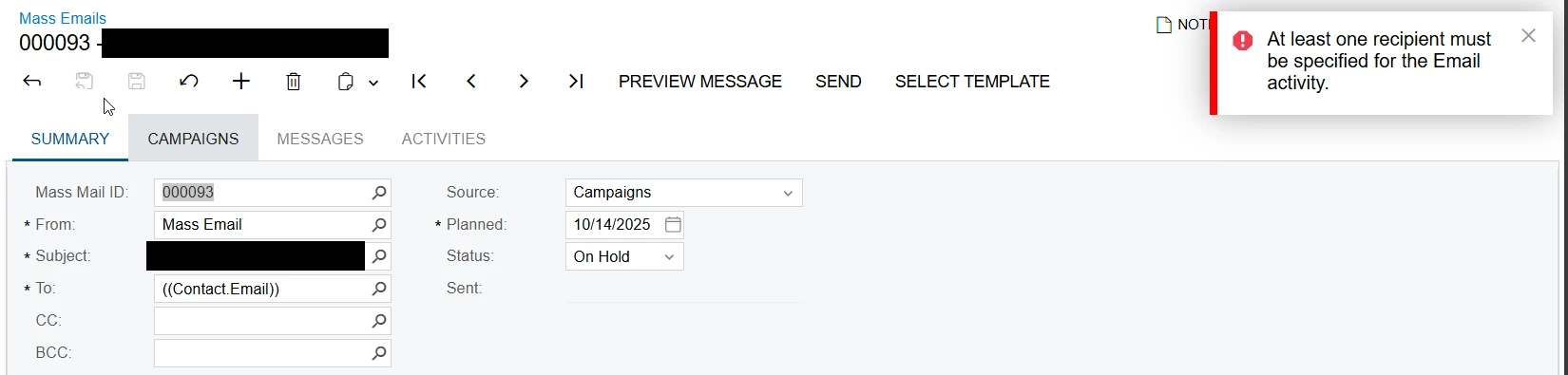
Mass Email error: At least one recipient must be specified for the Email activity

  • October 14, 2025
  • 5 replies
  • 145 views
  • Translate All

jhouser
Captain II
Forum|alt.badge.img+7

Hi all,

I have an error when processing Mass Email. The first time I clicked Send, it only generated two emails, but the campaign has hundreds of members. I then copied email to create new one. Now I get the error in screenshot below.

Details:

  • There is a campaign selected on Campaigns tab. 
  • Both the Campaign and its associated Marketing List have hundreds of members, and all of them have email addresses. 

Thanks in advance for any help. 


Best answer by jhouser

I figured this out. Apparently campaigns only allow one mass email to the same contacts. Since one mass email had already been sent, there was no one left to email. I’m surprised campaigns work this way, posted about it here to get feedback: One Mass Email per Marketing Campaign? | Community

View original

5 replies

Forum|alt.badge.img

jhouser
Captain II
Forum|alt.badge.img+7
  • Author
  • Captain II
  • October 14, 2025

​@smuddurthi81 Thanks, but I found that already and checked things the article mentions. 

Translate

mohammadnawaz51
Varsity I
Forum|alt.badge.img+8

​@jhouser 

Can you check marketing campaign are present here.

Translate

jhouser
Captain II
Forum|alt.badge.img+7
  • Author
  • Captain II
  • Answer
  • October 28, 2025

I figured this out. Apparently campaigns only allow one mass email to the same contacts. Since one mass email had already been sent, there was no one left to email. I’m surprised campaigns work this way, posted about it here to get feedback: One Mass Email per Marketing Campaign? | Community

Translate

Chris Hackett
Community Manager
Forum|alt.badge.img
  • Acumatica Community Manager
  • October 29, 2025

Thank you for sharing your solution with the community ​@jhouser!

Translate

