

Solved

Updating Default UOM

  • January 14, 2025
  • 8 replies
  • 224 views
  • Translate All

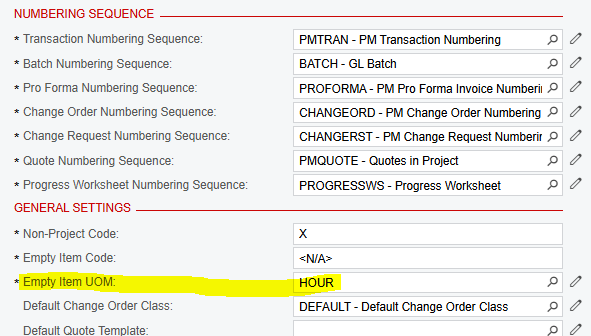
Looking for tips/help on updating the default Empty Item UOM from HOUR to EA. 

When we try and change it we get errors but can’t find where it’s pulling the errors from - our templates all have branch/billing rule/allocation rules filled out (as do our projects). And there isn’t anywhere to select defaults for those on the preferences page. 
 

here is the error we get:

 

Is this a customization?

Best answer by RBye

Hi all - thanks for the suggestion - we were able to get it fixed. My colleague unpublished our customizations - changed the UOM and re-published and that worked. 

View original

8 replies

iqraharrison
Captain II
Forum|alt.badge.img+9

​@RBye hi! I’m not familiar with the error, at least not

on this screen but on the templates, do you have any lines with blank UOMs? I’m wondering if those could be causing the issue or maybe an unreleased transaction

Translate

Heidi Dempsey
Community Manager
Forum|alt.badge.img+3

​@RBye I cannot duplicate this error in 24R1 or 24R2.  What version are you using? 

Translate

  • Author
  • Freshman II
  • January 14, 2025

​@Heidi Dempsey we are using 24R1 

Translate

  • Author
  • Freshman II
  • January 14, 2025

​@iqraharrison  - on the templates and in our projects we don’t have any blank UOMs. 
How our system is set up - our revenue budget are task and item - but our cost budgets are just tasks. Our goal is when we add a new task to the cost budget it defaults to UOM EA instead of HOURS. Which would save a bit of time instead of having to manually update each line. The common tasks don’t have an option for UOM - so the project preferences seems to be the place to do that default, maybe it’s not? 


Translate

Heidi Dempsey
Community Manager
Forum|alt.badge.img+3

​@RBye since I could not duplicate the issue, I would recommend entering a case so we can look at the data and setup.

Translate

Heidi Dempsey
Community Manager
Forum|alt.badge.img+3

​@RBye  I see your colleague Jeremiah also posted regarding this issue.  A case would help so we can see the trace, any customizations, and look at data, since we cannot duplicate in sales demo. 

Translate

sangland
Varsity I
Forum|alt.badge.img
  • Varsity I
  • February 18, 2025

I have a newly provisioned system. No projects, No Project Templates. Trying to change Project preferences from HOUR to EACH getting Error: Updating  'Inventory Item' record raised at least one error. Please review the errors. Error: 'Cost Based On' cannot be empty. In fact other fields cannot eb changed. What would the error point to? The error is not mentioned in the Trace.

Translate

  • Author
  • Freshman II
  • Answer
  • February 18, 2025

Hi all - thanks for the suggestion - we were able to get it fixed. My colleague unpublished our customizations - changed the UOM and re-published and that worked. 

Translate


