Question

Pending Invoice Amount in Projects

  • August 31, 2026
  • 3 replies
  • 35 views

Hi,

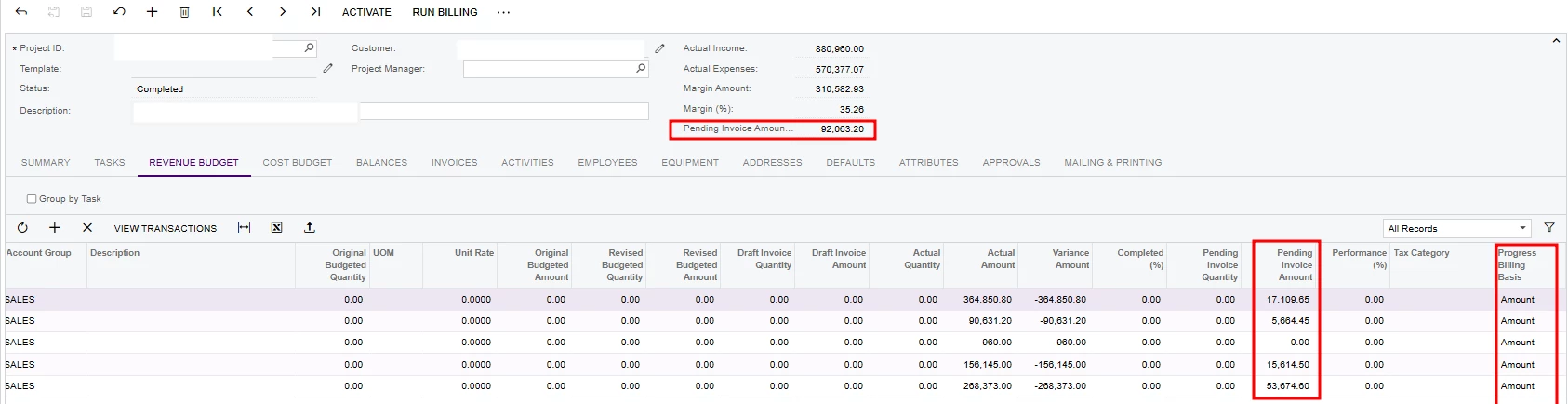
I have a client that presist that “Pending Invoice Amount” was incorrectly calculated before/after completing project.

I have advised with offcial exaplanation Acumatica is that “If the line is billed based on amount, you specify this value manually” & advised this is manually editable.

Could there be any other explanation for this behavior? 


3 replies

Forum|alt.badge.img+5
  • Jr Varsity II
  • August 31, 2026

Hi ​@Avishka ,

While your explanation to the client is correct—when the Progress Billing Basis is set to Amount, the Pending Invoice Amount field is designed to be manually updated—there are a few other common scenarios in Acumatica that can cause this field to display unexpected values, especially around the time a project is marked as "Completed":

Here are a few other explanations you can investigate or share with your client:

1. Unreleased or Unprocessed Invoices

If there is a Pro Forma Invoice or an AR Invoice that was generated but never released (e.g., sitting on hold, pending approval, or left in a draft state), Acumatica may still be factoring those amounts into the project's billing pipeline.

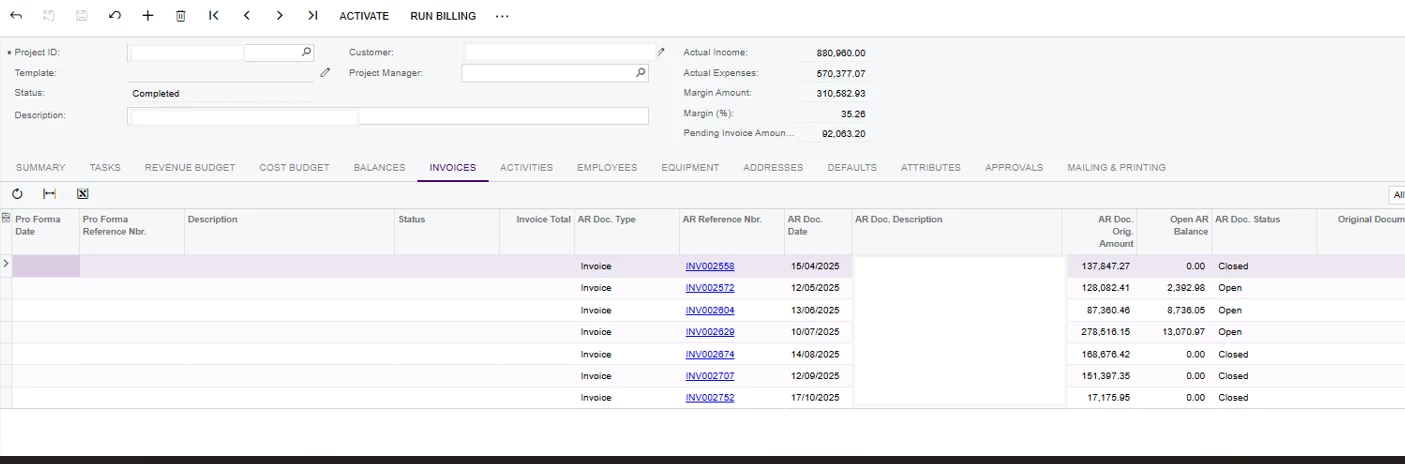
  • Action: Check the Invoices tab on the Project screen to ensure there are no unreleased or rejected Pro Forma/AR invoices hanging around. If a Pro Forma invoice was created in error, it might need to be deleted.

2. Reversed Invoices or Credit Memos

If a previously released AR Invoice tied to this project was reversed, or if a Credit Memo was applied to it, Acumatica often returns that billed amount back to the project. This makes the amount available to be billed again, which populates the Pending Invoice Amount field.

  • Action: Review the project's transaction history for any late-stage reversals or credits.

3. Out-of-Sync Project Balances

Sometimes, Acumatica's summary tables and internal calculations get out of sync with the actual line-item transactions, resulting in "ghost" amounts appearing in the header or budget lines.

  • Action: Have the client go to the Actions menu on the Projects screen and click Validate Project Balances. This forces the system to recalculate the totals from the ground up and often clears up erroneous pending amounts.

Hope above helps!!


  • Author
  • Freshman I
  • September 1, 2026

Hi ​@Rakshanda,

Thank you as always with your insights.
You’re reply make sense as there are Opened AR Invoices which has balances, however the total of them does not match to the “Pending Invoice Amounts” in the revenue budget screen.
I have also Recalculated Project Balances for this project.


Forum|alt.badge.img+5
  • Jr Varsity II
  • September 1, 2026

Hi ​@Avishka ,

"Open AR Invoices" and "Pending Invoice Amount" are two completely different things.

Explanation as below

The Core Misunderstanding: Unpaid vs. Unbilled
We are comparing Open AR Invoices (invoices that have been generated, sent to the customer, but are unpaid) to the Pending Invoice Amount.

In Acumatica, Pending Invoice Amount strictly means "Unbilled." It is the amount of money sitting in the queue waiting to be put onto the next invoice when you click "Run Billing". Once an invoice is actually generated and released (becoming an AR Invoice), the amount is subtracted from the Pending Invoice Amount and becomes an actual billed amount. Therefore, the total of their Open AR Invoices should not match the Pending Invoice Amount.

The Solution

Since the project is marked Completed and there is no further billing to be done, we can simply click into the grid, change all the amounts in the Pending Invoice Amount column to 0.00, and click Save. Because the billing basis is "Amount," this field is designed to be manually overridden to reflect reality.


Hope above works!!