This happens on a non billable item. Can someone assist me in troubleshooting the below issue.
Brief explanation:
When a user selects a project task from the search option in Acumatica, it is always displayed as a billable item. However, once the form is completed using the same information, the task is correctly indicated as non-billable.
Best answer by Heidi Dempsey
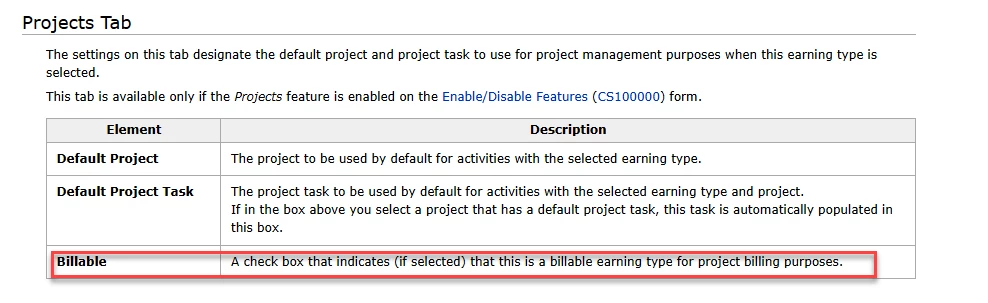
@tebogo37 In trying to duplicate the issue, If my earning type is marked as billable, whether i have a task in the header or not, does not matter, that box is checked and I am able to uncheck before saving. It seems you should enter a case, so we can look at setting and see what the issue may be. I am testing 25R1. Project Tasks do not have the ability to be marked as non-billable.
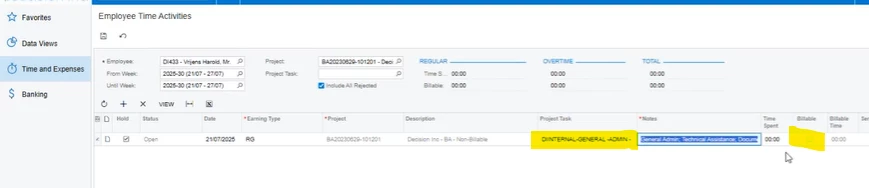
The issue is that the project task has been set an non billable. When we load the task on the screen header asper below, it then appears on the line as billable which is incorrect:
But when we load the task on the line as per below, it then appears correctly as non billable:
Do you perhaps know how i can sort this to appear correctly as non billable?
With reference to the screenshot that i just sent, when the task ‘Internal leave’ is selected on the Project Task field highlighted then again on the transaction line, the billable field on the line is greyed out and marked billable which is incorrect as the task should be non billable.
But when the task is not selected on top, where currently is highlighted on the provided screenshot, but selected on the transaction line, the billable filed is not greyed out and automatically its not ticked. That on its own is inconsistent.
On the first scenario above we are unable to untick the billable as it is greyed out hence my assistance request.
@tebogo37 In trying to duplicate the issue, If my earning type is marked as billable, whether i have a task in the header or not, does not matter, that box is checked and I am able to uncheck before saving. It seems you should enter a case, so we can look at setting and see what the issue may be. I am testing 25R1. Project Tasks do not have the ability to be marked as non-billable.
Thanks a lot Heidi. I agree with you 100%. I believe it will need me to log a case. The earning type is not marked as billable hence we find it strange for it to lock itself as billable.