Question

Import Scenario for Inventory Issue for Project Stock items

  • Nov 13, 2026 10:23 PM UTC
  • 11 replies
  • 50 views
  • Translate All

Our current proces has items being fabrication for projects that never get issued out via sales or shipments.   I am trying to write a Import Scenario that create an Issue transaction to issue these items back to the source project to clear them out of inventory and put their costs back to the project.  

I have a GI setup as the provider for the Import Scenario.  I am running into two errors:

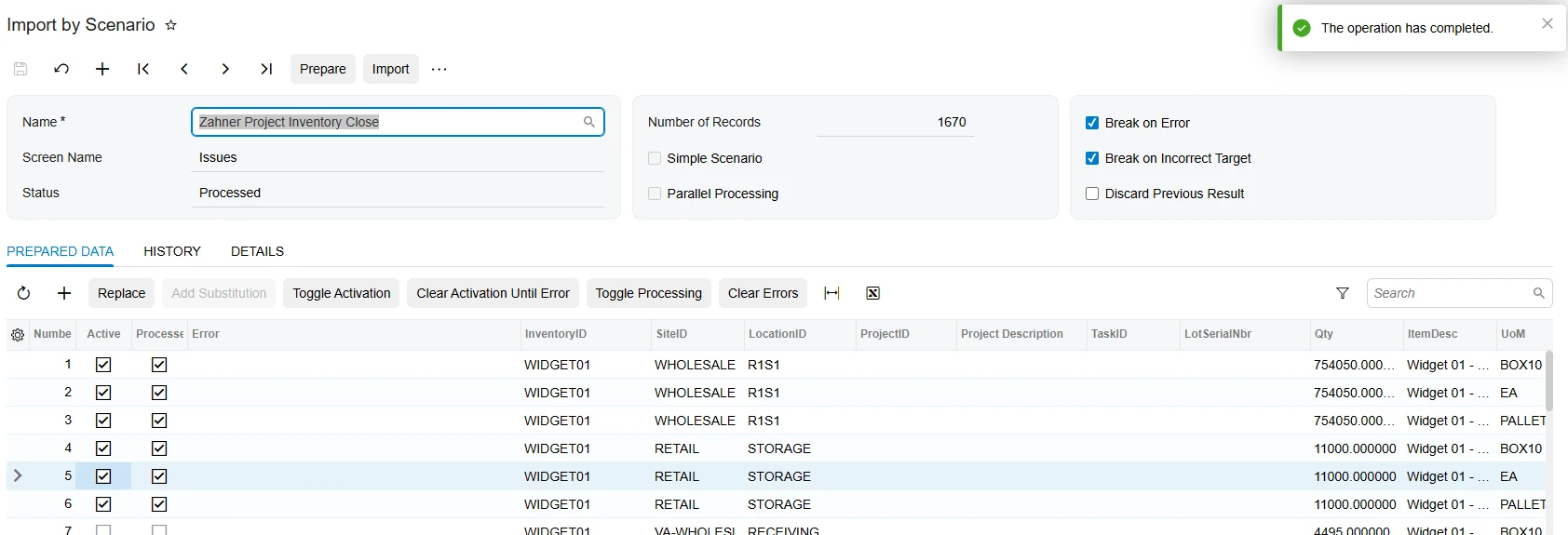
  1. For lot tracked items, the LotNumber is not be recognized.  I have confirmed the LotNumber, Warehouse, Location, Project and Task being passed are all correct.
  2. For non tracked items, I am getting “Object reference not set to an instance of an object.” at the last record.
 

Prepared data:

 

Appreciate any thoughts.

11 replies

mohammadnawaz51
Varsity I
Forum|alt.badge.img+8

​@ehuels Have you tried using excel file provider and import the data?Can you share me sample data and XML file attachment?

Translate

Forum|alt.badge.img+5
  • Varsity III
  • Nov 14, 2026 8:49 AM UTC

hi ​@ehuels 

Can you please share the xml of the GI along with the import scenario?

Translate

Eric Ratté
Jr Varsity I
Forum|alt.badge.img+5
  • Jr Varsity I
  • Nov 15, 2026 7:20 PM UTC

Hi,

If you would try to create an issue manually for the first row, using the exact same steps has what is in your import scenario, you would probably get more info about the error, either at the screen or in the trace.

I had seen the Project cost layer has often being the problem. Depending on the strategy for inventory management assigned to the project, the Free stock allowed or not at the project-level and the cost layer of the inventory in stock (Free or Project), Acumatica will prevent using certain quantity on hand. By creating manually the transaction, there is a good chance you will get an error message more meaningfull.

Translate

Forum|alt.badge.img+12
  • Acumatica Support Team
  • Nov 15, 2026 11:12 PM UTC

Hi ​@ehuels 

Please refer to the following thread, which has a working import scenario reference for Issue document with Lot/Serial. Alter your import scenario to have fields mapping in same sequence. Its a working import scenario from our Demo tenant. Test your import scenario separately to ensure it works on its own. Use it on business event once you get the scenario to work independently first. 


Hope this helps,

Thanks,


Translate

  • Author
  • Freshman I
  • Nov 16, 2026 8:16 PM UTC

I have tried performing a sample transaction manually, by performing the steps in the same order as the import scenario and using the data from the GI.   I don’t run into any problem.

I am taking a look the sample scenario provided by ​@vkumar to see if it points to something.  I will follow-up with any findings.

Translate

  • Author
  • Freshman I
  • Nov 16, 2026 9:01 PM UTC

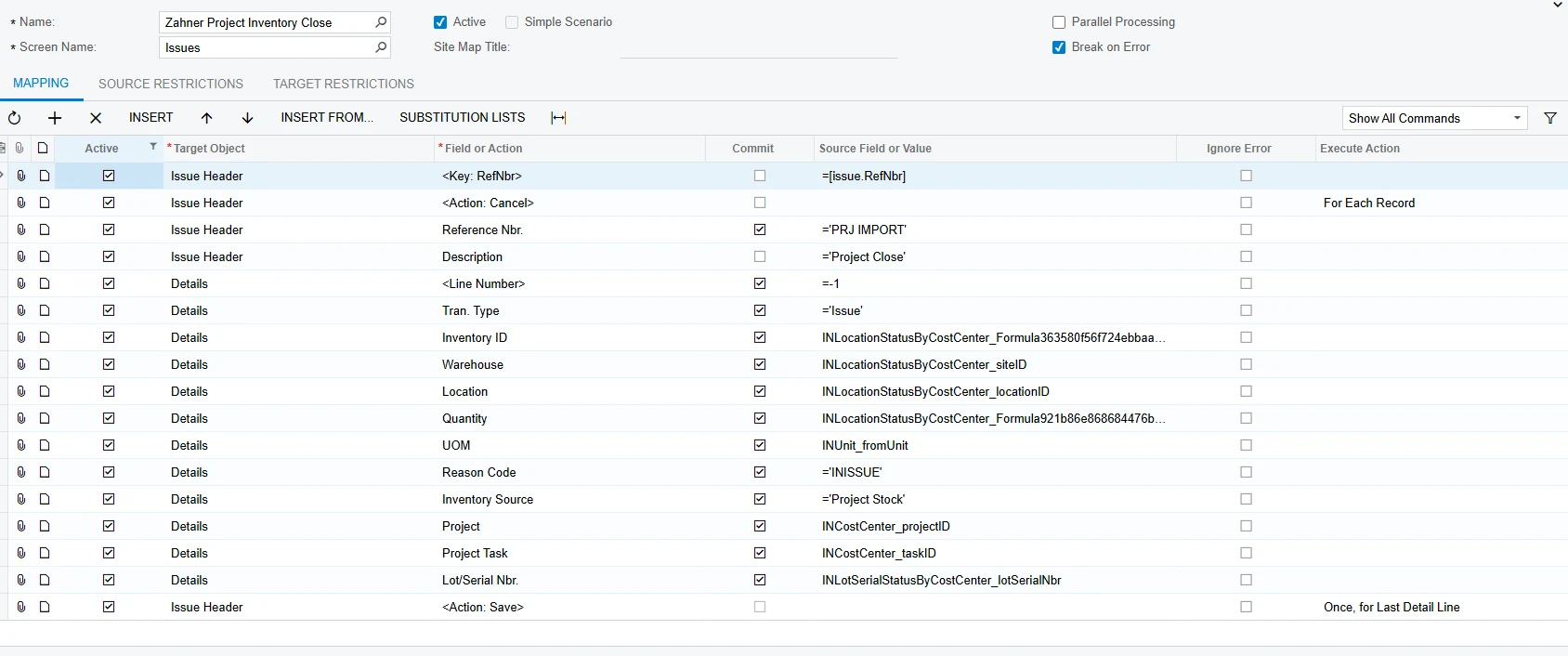
The import scenario provide by ​@vkumar appears to be from an older version or system with a different inventory configuration.   I’m on 2025 R2 with the Construction functionality.  Switching to Classic UI to match the screen shot, the Target Object of “Document Summary” does not exist for the Issues screen.  Instead I have “Issue Header”.   More importantly, the provided scenario does not include the field for “Inventory Source”, which I know is required to successfuly transact “Project Stock” separately from “Free Stock”.

I have realized using the value of -1 for the Reference Nbr at the “Issue Header” level would be incorrect.  I believe I need to provide a placeholder value instead, so I made that change.  Still getting the same errors.

I have attached XML’s for:

  • GI: Zahner-Inventory-Close.xml
  • Data Provider: Zahner Inventory Project Close.xml
  • Import Scenario: Zahner Project Inventory Close.xml

I have also attached a data sample of the GI results.

Appreciate any additional insights.


Translate

  • Author
  • Freshman I
  • Nov 16, 2026 9:26 PM UTC

I changed the placeholder value for the header Reference Nbr to =’<NEW>’ and re-arranged the order of the fields. I am now able to import each row individually without error.  However, running all rows results in  “Object reference not set to an instance of an object.”

Translate

KrunalDoshi
Pro II
Forum|alt.badge.img+9
  • Pro II
  • Nov 17, 2026 12:53 PM UTC

Hi ​@ehuels,

Thanks for uploading all the files. They were really helpful in understanding the issue.

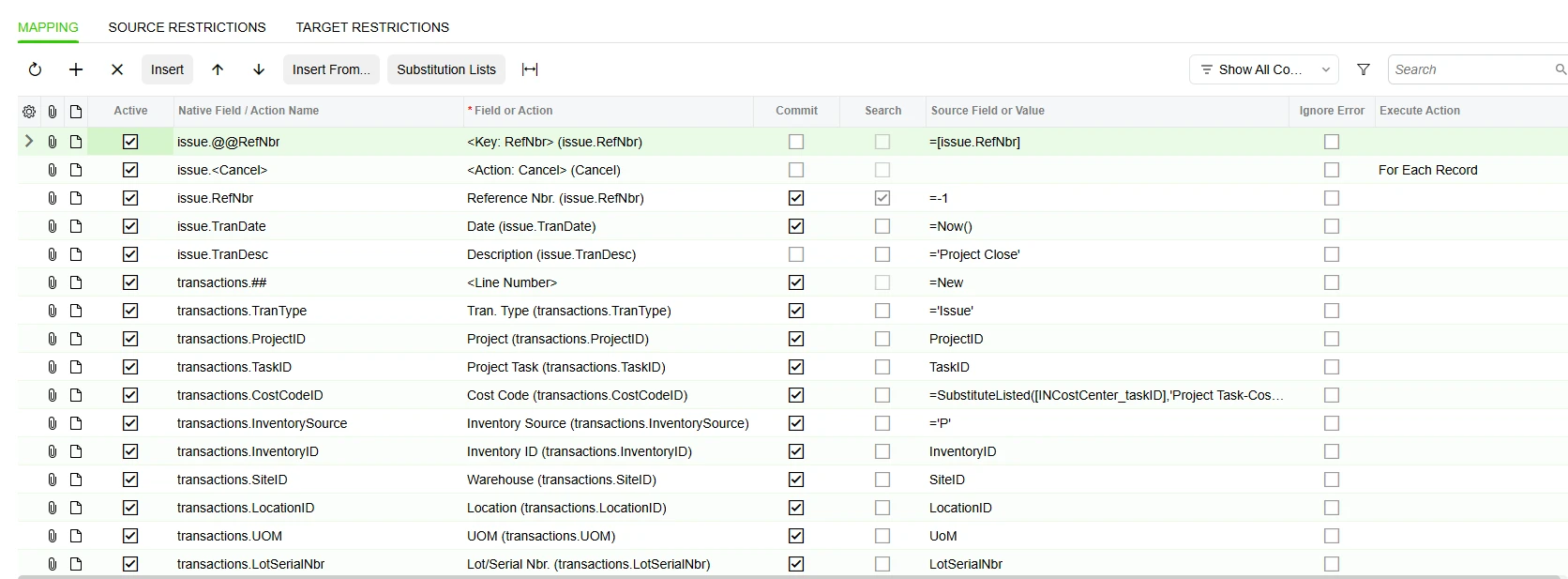
I made a few minor changes to your Import Scenario, as you already had most of it configured correctly and I was able to run it successfully for both tracked as well as non-tracked items. See updated import scenario in screenshot below.

A couple of things to keep in mind:

  1. Field sequence: The Import Scenario should follow the same sequence of steps as you would when manually entering a record in Acumatica. In your case, I have rearranged the field order accordingly (please refer to the updated Import Scenario in the screenshot below).

  2. Required fields: Make sure all required fields have valid values, such as Project and Project Task.

  3. Correct field values: Ensure that you are passing the actual display values rather than the database values. For example, for Inventory Source, use Project Stock instead of P, which is the underlying database value.

My suggestion would be to first try entering the same data manually through the Issues screen and confirm that it works without errors. Once you have verified that, you can run the Import Scenario using the same field sequence and values.

Hope this helps! Let me know how it goes.


Translate

  • Author
  • Freshman I
  • Nov 17, 2026 8:28 PM UTC

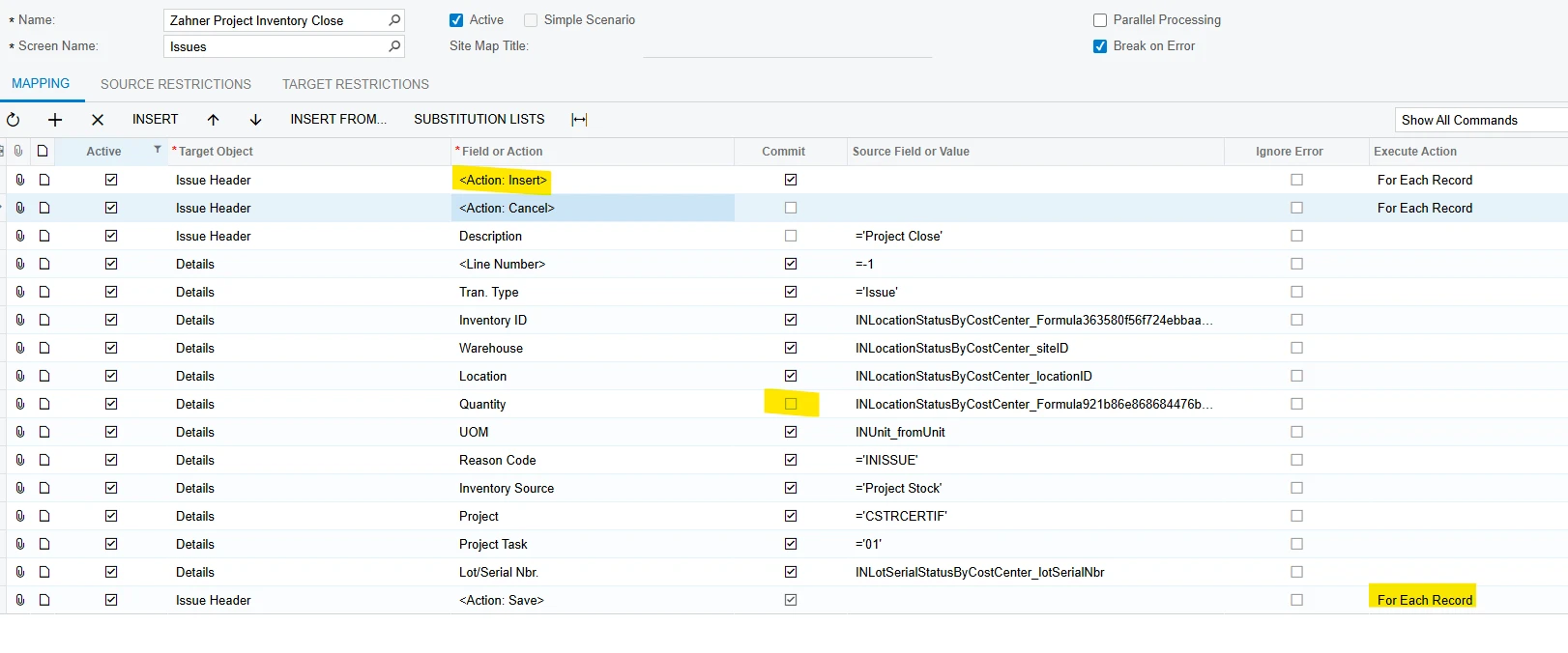
​@KrunalDoshi I modified the scenario based on the changes you showed.  A couple corrrections:

  1. I kept CostCode row as it is a required value.
  2. Correct the Reason Code value to ‘ISSUE’

I am at the same place I was with my previous post…  Importing each row individually is successful, but trying to import more that 1 row at once results in the  “Object reference not set to an instance of an object.” error on the last row and all rows fail. 

I attempted adding the Reference Nbr as a static value in the GI instead on in the Import Scenario with no change.

I have confirmed that I can manually create the Issue transaction with all data rows without error.

Translate

KrunalDoshi
Pro II
Forum|alt.badge.img+9

Hi ​@ehuels,

The corrections you mentioned were fine, as I had different values configured in my demo environment. However, when I tested the Import Scenario with multiple records, all records were imported successfully without any errors.

Here are a few things I would suggest checking:

  1. Required fields: Make sure all required fields are populated in your Import Scenario.

  2. Automatically populated fields: Try creating an Inventory Issue manually and check whether any fields are automatically populated by Acumatica. If so, make sure those values are also handled appropriately in your Import Scenario.

  3. Field values: Verify that the correct values are being passed for each field. For example, when setting the Warehouse, make sure the corresponding Location value is also correct and consistent with your source data.

  4. Save Action: If each row in your source GI represents a separate Inventory Issue, I would recommend changing <Action: Save> from Once, for Last Detail Line to For Each Record. However, if multiple rows represent detail lines belonging to the same Inventory Issue, retain Once, for Last Detail Line.

I have also modified the Import Scenario to let Acumatica automatically generate the Reference Number, since that is how it works in my demo environment. If your Reference Number is also auto-generated, you can try the same approach.

Hope this helps!


Translate

  • Author
  • Freshman I
  • Nov 17, 2026 10:27 PM UTC

​@KrunalDoshi 

By changing the Save action to Each Record, the import completes successfully, but it creates 3 separate Issue transaction with 1 detail line each, rather than a single Issue transaction with 3 detail lines.   

When in production I expect there will be many lines imported, potentially hundreds at a shot.  Each will Issue result in a corresponding GL Transaction.  For data cleanliness, I would prefer to contain to a single transaction.  Will designing to have individual transactions cause performance or licensing issues vs. figuring out how to contain to a single Issue and GL transaction?

Translate