Solved

How to enforce correct pairing of expense items with job costing on expense receipts?

  • March 4, 2025
  • 8 replies
  • 215 views
  • Translate All

Forum|alt.badge.img

Use case: We have some expense items configured to post to job-related GL accounts and others configured to post to G&A GL accounts.  How can we enforce the correct pairing of these expense items with projects on expense receipts?

Scenario 1: A user creates an expense receipt for the purchase of job materials and enters an expense item that posts to a job-related GL account.  How can we make the entry of Project/Project Task/Cost Code required for this scenario and prohibit entering Project X - Non-Project Code?

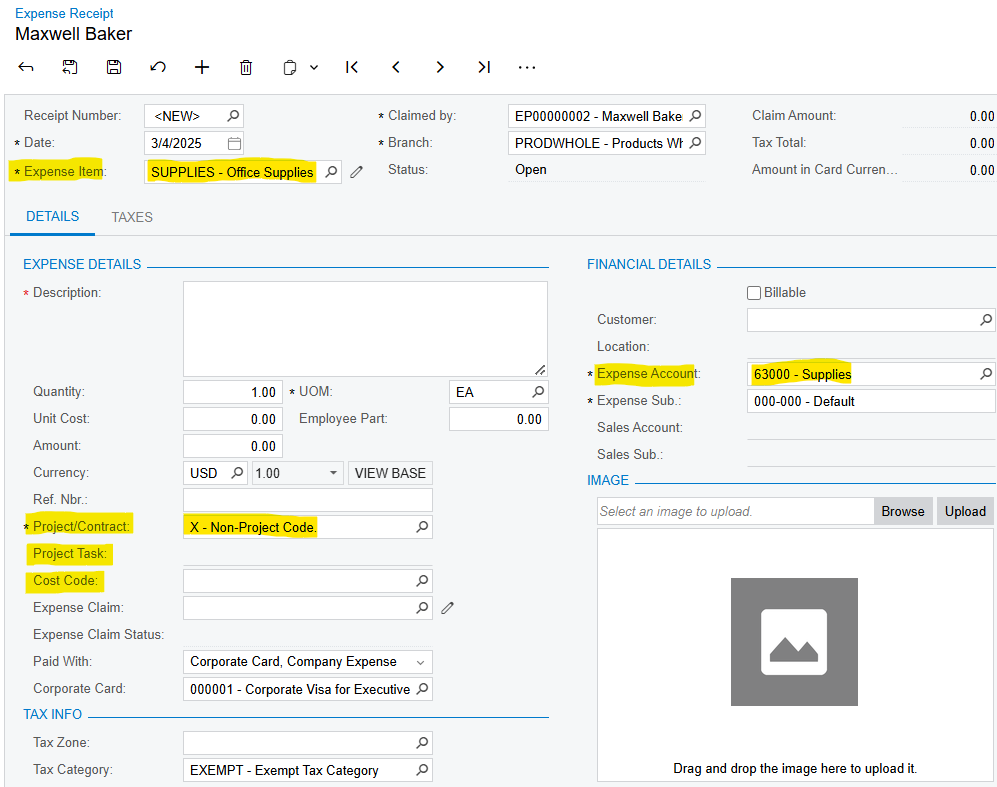
Scenario 2: A user creates an expense receipt for the purchase of office supplies and enters an expense item that posts to a G&A GL account.  How can we force the entry of Project X - Non-Project Code?


Best answer by JohnMichels

​@john55


In order for the approval workflow to function as desired, leaving the Rule Actions/Approval Settings/Approver/Employee = blank along with If No Approver Found=Reject Document will not work.  The approval workflow behavior you have described is working as designed-native ACU.


“If No Approver is Found” is a little deceiving.  It could read, “If No Condition is Met.”  So, if no conditions are met (which is the NOT case with your example), the document will be rejected when “If No Approver Found=Reject Document”.  In your example, the conditions in your approval workflow are the undesirable values (Proj X  & 50000 to 58000), so the conditions are met in your testing


So, you need to set your approval workflow conditions so they are NOT met when the undesirable values (Proj X  & 50000 to 58000) are present in order to automatically reject them when “If No Approver Found=Reject Document” is selected.   This could get a bit tricky but doable.  


View original

8 replies

iqraharrison
Captain II
Forum|alt.badge.img+9

​@john55 i dont believe the functionality to make certain fields required based off the specific GL account is native to acumatica and would require a customization.

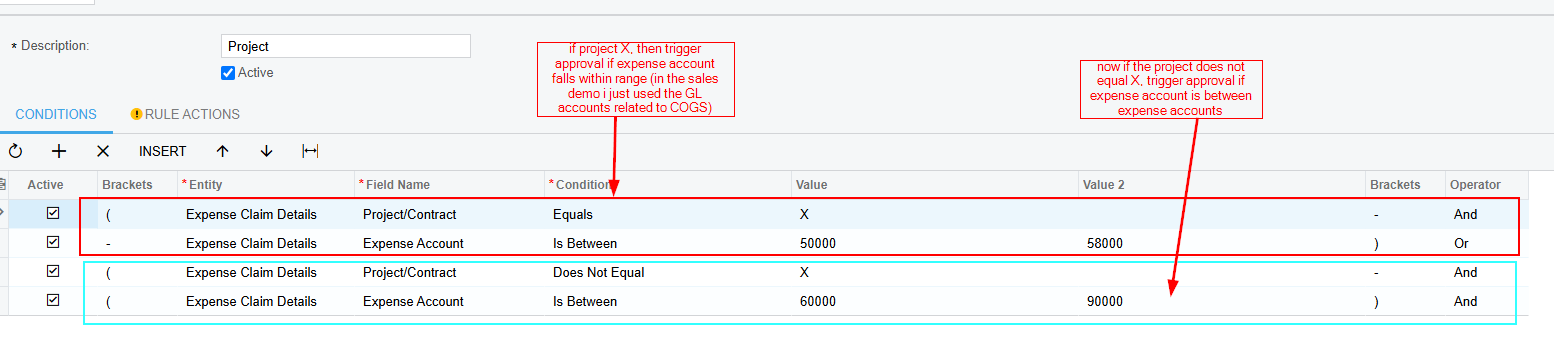
however, there may be some flexibility within the approval maps. in my sales demo i created a project approval map with the following conditions: 

i was trying to limit the maintenance required for this incase GL accounts are added/removed so giving it a range helped however, there were some other options available that you could use that may be better for your needs.

although it won’t prevent them from submitting the expense, it can help correct the errors before the receipt is released

Translate

Forum|alt.badge.img
  • Author
  • Freshman I
  • March 6, 2025

​@iqraharrison Thank you for the suggestion, it’s an interesting alternative!

Translate

rfairchild58
Varsity I
Forum|alt.badge.img+1

​@iqraharrison Very interesting approach.

Translate

iqraharrison
Captain II
Forum|alt.badge.img+9

​@rfairchild58 ​@john55 i tend to get creative with what we have available within acumatica 🙂 it beats the alternative of having to customize! Acumatica is always enhancing the product and I see the value in adding controls to minimize errors and extra work.  i used to be a project accountant in a past life and as much as i enjoyed solving the occasional discrepancy between budget and actual, it’s can become overwhelming when it happens frequently!

May be worth posting on the ideas forum as well!

Translate

Forum|alt.badge.img
  • Author
  • Freshman I
  • March 10, 2025

​@joelhoffman Joel, this is the post I mentioned to you last week.  What are your thoughts?  Is it already on your roadmap or shall I post an Idea?

Translate

Forum|alt.badge.img
  • Author
  • Freshman I
  • June 17, 2025

​@iqraharrison I’m finally getting around to using this technique.  I’m successful triggering approval based on these conditions but I can’t figure out how to automatically reject receipts based on these conditions.  Any suggestions?

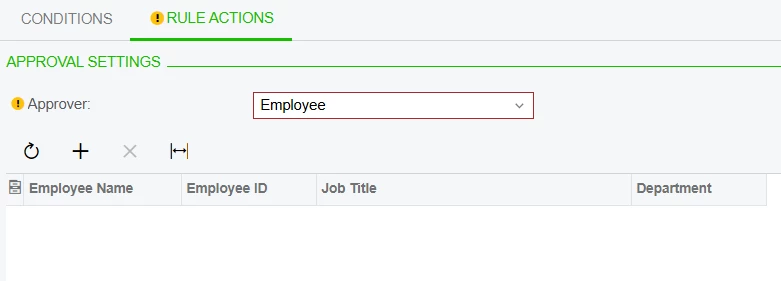
This is the only settings I see to reject documents.


But when I leave the Approver table empty...

The receipt goes into Pending Approval status with no approver listed on the APPROVAL DETAILS tab instead of rejecting it.


Translate

Forum|alt.badge.img+3

​@john55


In order for the approval workflow to function as desired, leaving the Rule Actions/Approval Settings/Approver/Employee = blank along with If No Approver Found=Reject Document will not work.  The approval workflow behavior you have described is working as designed-native ACU.


“If No Approver is Found” is a little deceiving.  It could read, “If No Condition is Met.”  So, if no conditions are met (which is the NOT case with your example), the document will be rejected when “If No Approver Found=Reject Document”.  In your example, the conditions in your approval workflow are the undesirable values (Proj X  & 50000 to 58000), so the conditions are met in your testing


So, you need to set your approval workflow conditions so they are NOT met when the undesirable values (Proj X  & 50000 to 58000) are present in order to automatically reject them when “If No Approver Found=Reject Document” is selected.   This could get a bit tricky but doable.  


Translate

joelhoffman
Community Manager
Forum|alt.badge.img+2

Hi ​@john55 , nothing on the short term roadmap but we are adding additional default values tied to project tasks, inventory items, and cost codes.  More methods to make sure project entries are coded correctly.  Let us know if the flow ​@JohnMichels  suggested works out.  Thanks.

Translate