Question

How to create time and material invoice based on Progress claim instead of actual invoices

  • October 20, 2026
  • 1 reply
  • 13 views
  • Translate All

Forum|alt.badge.img

We are looking for best practices for handling subcontractor costs on time and material projects when the actual AP invoice has not yet been received.

Our subcontractors submit monthly progress claims or schedules of values, which we use to determine the cost of work performed. However, we generally need to obtain client approval before the subcontractors can submit their actual invoices.

As a result, when we prepare our T&M billing, we need to bill the client based on the approved or estimated subcontractor costs, even though no AP bill has been entered in the system yet.

Has anyone found an efficient way in Acumatica to make these costs available for T&M billing without creating a temporary AP bill? Ideally, we would also like to avoid duplicate billing once the actual subcontractor invoice is received.

Any insight, configuration suggestions, or workarounds would be greatly appreciated.

Thank you!

1 reply

Steve Milner
Varsity III
Forum|alt.badge.img+6

@AP13 You can do this without a temporary AP bill. Bill the approved claim from a project transaction, then stop the sub's real bill from billing a second time when it shows up. I ran this end to end on 2026 R1. Give it one pass in a test tenant on your version before you change the process.

When your client approves the claim, add a line on Project Transactions (PM304000) for the project and task, on your subcontract account group, with the approved amount and Billable checked. If you want the cost in the GL now, debit your subcontract cost account and credit an accrual account. Release it, and your T&M billing rule picks it up like any other cost.

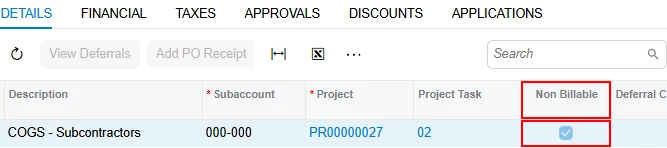
When the sub's invoice arrives, enter the AP bill against the same project and task and check Non Billable on the line. Its project transaction comes through non-billable, so T&M billing skips it unless that rule step has Include Non-Billable Transactions checked.

Then open the estimate on PM304000 and click Reverse. The reversal is excluded from billing, so your client isn't credited. It takes the estimate back out of project cost and reverses the accrual entry if you posted one, so actual cost ends up equal to the sub's bill.

If the sub's invoice doesn't match the approved claim, the difference won't bill on its own. Enter it as its own billable project transaction.

Translate