Answer

How do we remove trailing zeros from our Lien Waivers?

  • November 7, 2024
  • 6 replies
  • 75 views

Our Lien Waivers have two trailing zeros.

Best answer by Laura03

In addition to using the round function in Acumatica Report Designer, you can also customize the screen, using a Round function to round the fields to the correct number of digits.

6 replies

Laura03
Captain II
Forum|alt.badge.img+19
  • Captain II
  • November 7, 2024

Hello,

Please, can you show an example including name of screen or report? I can’t tell if you are seeing the number on a screen/form or on a report and therefore it’s hard to answer.

Thank you.

Laura


  • Author
  • Freshman I
  • November 7, 2024

Under compliance and print/email lien waivers. On screen and when printed.


Laura03
Captain II
Forum|alt.badge.img+19
  • Captain II
  • November 7, 2024

Open the report and round the number.


Laura03
Captain II
Forum|alt.badge.img+19
  • Captain II
  • Answer
  • November 9, 2024

In addition to using the round function in Acumatica Report Designer, you can also customize the screen, using a Round function to round the fields to the correct number of digits.


  • Author
  • Freshman I
  • November 15, 2024

New to Acumatica. How do I do that...round function?


Laura03
Captain II
Forum|alt.badge.img+19
  • Captain II
  • November 15, 2024

Hello,

I don’t have a Lien report or screen, so I can’t show you exactly - but I can show an example.

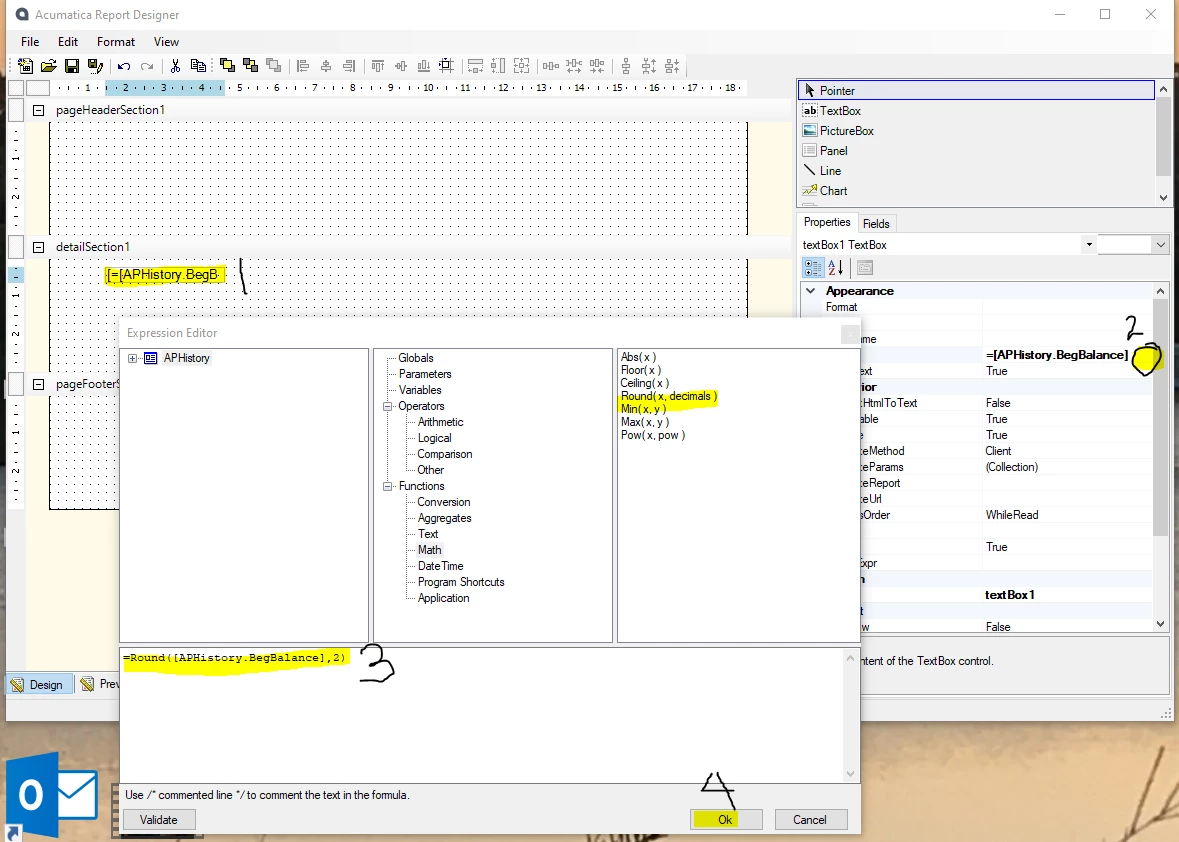
To round a number on a report, Open the report with Acumatica Report Designer. If you don’t have Acumatica Report Designer yet, link can be found in this post:

Open the Report, click on the field to be rounded. Click the [...] on the right side and open Expression Editor. Add Round function to the field name as shown in the bottom of the Expression Editor window. Click OK. Save your report.


Laura