Solved

How do I reconciling Accounts Payable to General Ledger, in Acumatica?

  • December 8, 2022
  • 10 replies
  • 962 views

ChrisWeidner
Varsity I
Forum|alt.badge.img

How would I run a report to show me the open AP documents for a specific period? Currently the reports are not tying because the AP bills were paid in a future period, so they seem to be omitted from AP Open Documents by Vendor. Our AP Aging report won’t work because it doesn’t seem to handle retainage documents.

Any ideas on how to accomplish this? Is it a feature out of the box?
Best answer by Yasas Withanage

@ChrisWeidner 

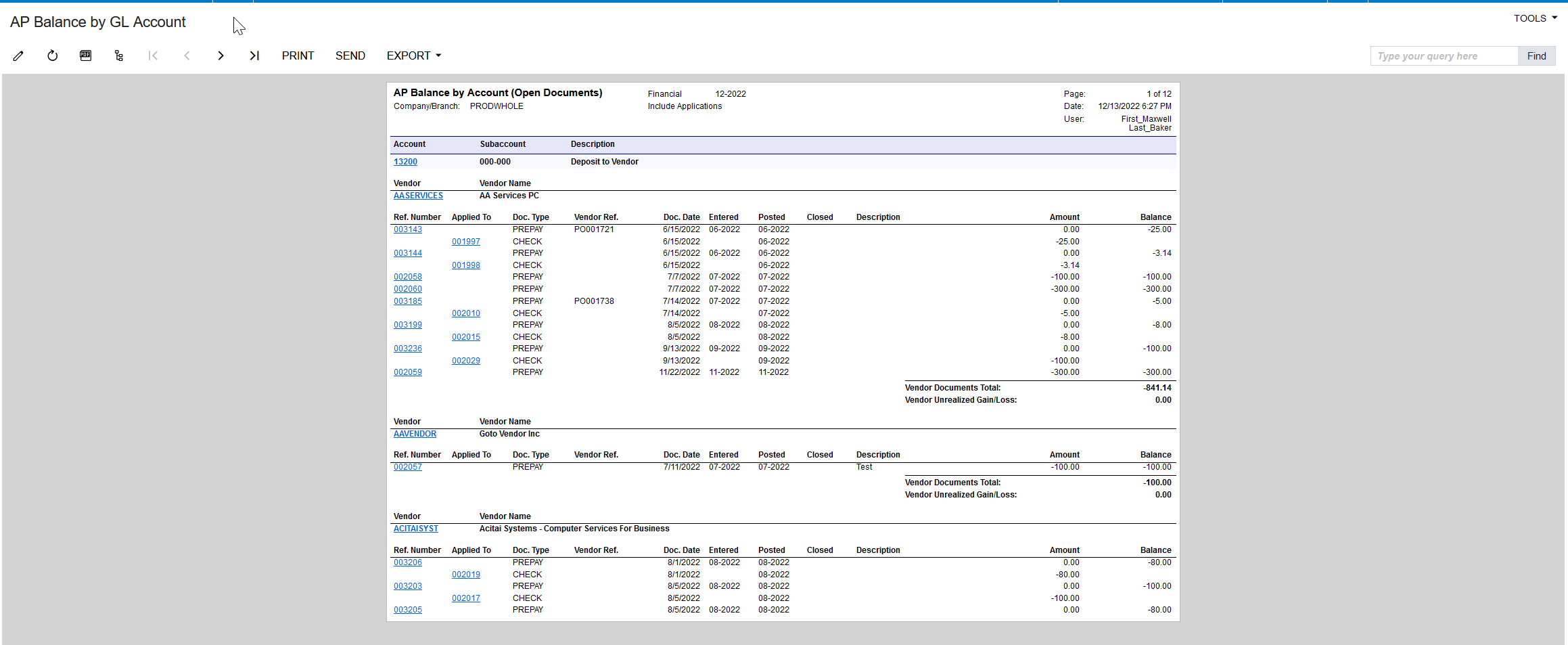
Please try the "AP Balance by GL Account (AP632000)" report. This report shows the AP account balances for the selected period. Documents are grouped by account, subaccount, and vendor.


10 replies

Laura03
Captain II
Forum|alt.badge.img+20
  • Captain II
  • December 8, 2022

Hello,

I can’t answer your question but want to draw previously posted idea to your attention so you may vote :


meganfriesen37
Captain II
Forum|alt.badge.img+13

Have you looked at the AP Aged Period Sensitive Report?  This will allow you to run as of a historical point in time and include documents that were open then and are closed now.  I’m not sure how it handles retainage but that’s the one to use for Month End Reconciliations.  The other ones are “Aged as of Date” but are only looking for items that are currently open.


ChrisWeidner
Varsity I
Forum|alt.badge.img
  • Author
  • Varsity I
  • December 9, 2022

AP AGED Period Sensitive won’t work for auditors. They need to see the retainage broken out.

I am not sure how to accomplish this. When I view the AP Open Documents by vendor it matches exactly to current period. But when I look at a period sensitive report there is a discrepancy.. I assume Acumatica is still trying to figure out how to handle retainage in reporting


Kandy Beatty
Captain II
Forum|alt.badge.img+18
  • Captain II
  • December 9, 2022

Hi @ChrisWeidner 

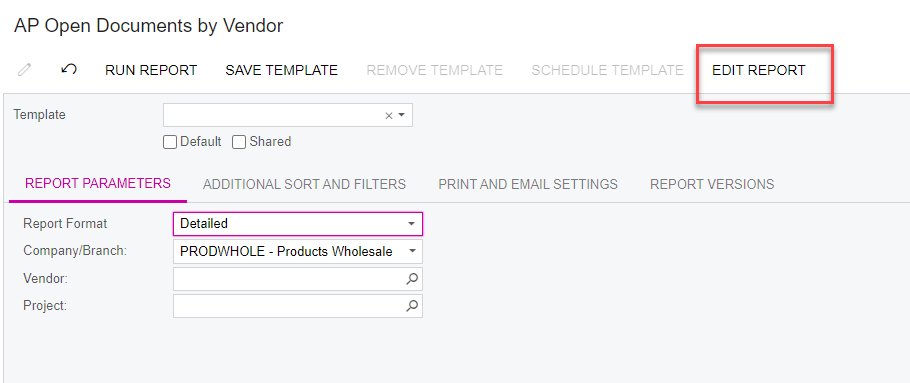
Not sure how good you are with report writer but you could make a copy of the AP Open Documents by Vendor and just make it by period instead. 

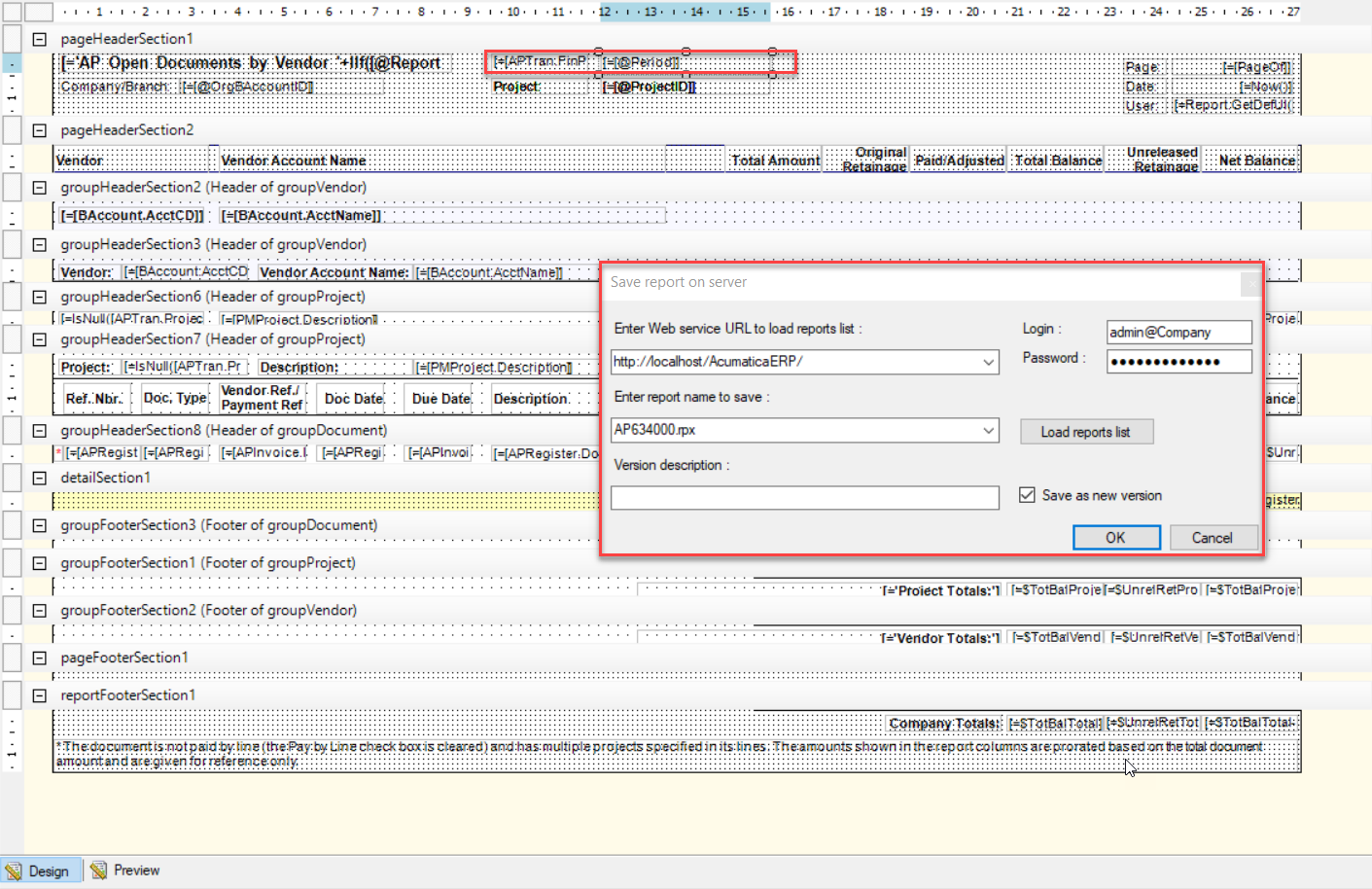
If you click Edit Report, you can make a new version.

Change the Vendor to the Financial Period and save the report to the server:


ChrisWeidner
Varsity I
Forum|alt.badge.img
  • Author
  • Varsity I
  • December 9, 2022

@kandybeatty49  I have tried this but I do not get the intended result. I know the report is only displaying Open documents, but if some documents were paid in a future period then it would fall off the report. 


I tried to add filters to the build schema: 

Open documents ( Post Period = 12-2022 or earlier)

Closed documents (w/ post period 12-2022 or earlier, but only ones closed in 01-2023)


I may just need to make period specific & then manually add documents that were closed in the future period. Not ideal at all


Kandy Beatty
Captain II
Forum|alt.badge.img+18
  • Captain II
  • December 9, 2022

@kandybeatty49  I have tried this but I do not get the intended result. I know the report is only displaying Open documents, but if some documents were paid in a future period then it would fall off the report. 


I tried to add filters to the build schema: 

Open documents ( Post Period = 12-2022 or earlier)

Closed documents (w/ post period 12-2022 or earlier, but only ones closed in 01-2023)


I may just need to make period specific & then manually add documents that were closed in the future period. Not ideal at all

It’s not very ideal unfortunately. You could possibly submit it as an idea for a future release for Acumatica to create the report. 


Yasas Withanage
Acumatica Employee
Forum|alt.badge.img+5
  • Acumatica Employee
  • Answer
  • December 13, 2022

@ChrisWeidner 

Please try the "AP Balance by GL Account (AP632000)" report. This report shows the AP account balances for the selected period. Documents are grouped by account, subaccount, and vendor.


ChrisWeidner
Varsity I
Forum|alt.badge.img
  • Author
  • Varsity I
  • December 13, 2022

@YasasWithanage76  , Yes that will work but leads to manipulation for the end user. Thank you. 

It doesn’t show retainage on the documents unfortunately. I may have to work to customize this or just manually add that column.

It would be very nice to have an (out of box) AP retainage report that shows original retainage


  • Freshman II
  • August 13, 2026

I use the roll-forward reconciliation method for identifying the source of an AP-to-GL variance in Acumatica.

The steps for the this is listed below.

  1. Start with the last balanced trial balance (TB) period.
    At that point, the AP balance in the TB agrees with the AP Aged Period Sensitive report for the previous period.
  2. Roll the AP balance forward.
    Take the previous-period AP Aged report and add the new AP transactions recorded after that period.
  3. This gives you an expected AP balance:

    Previous-period AP Aged balance + new AP transactions = expected current AP balance

  4. Compare two reports:
    • The AP balance derived from the TB + new transactions
    • The current-period AP Aged Period Sensitive report
  5. Identify the vendors with differences.
    By comparing the two reports at the vendor level, you can isolate which vendors are responsible for the variance.
  6. Drill down from the vendors to the individual transactions.
    Once the problematic vendors are identified, review their AP documents, payments, adjustments, voids, applications, and GL postings to find the specific entries causing the difference.

In short, the method is:

Last balanced period → roll forward new AP activity → calculate expected AP → compare to current AP Aged → identify vendor differences → drill down to transactions.


  • Freshman II
  • August 13, 2026

The same method I used for the retainage reconciliation as well.