Question

Bulk Update for 'Completed (%)' in Revenue Budget when Invoicing Projects

  • September 16, 2026
  • 4 replies
  • 47 views

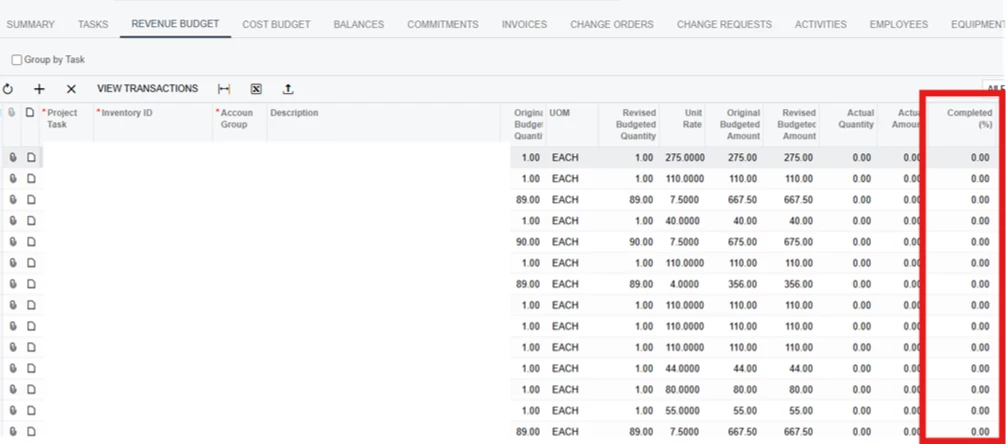
As a part of our current process we need to individually type “100” for each line before we can “Run Billing” to generate the ProForma Invoice.

Is there a way to have an action button that could complete this or a way to enter into one cell and copy to all of the others?


Any Recommendations.

Thanks!

4 replies

Forum|alt.badge.img+3
  • Captain II
  • September 16, 2026

@Avishka 

If the Completed (%) value needs to be set to 100 for every applicable Revenue Budget line before running Project Billing, a small customization with an action button can be added to the Project screen.

The action can loop through the Revenue Budget lines and set Completed (%) = 100 for the applicable records in one operation. The user can then proceed with Run Billing as usual.

Below is the sample code:

public class PMProjectEntryExt : PXGraphExtension<ProjectEntry>
{
public PXAction<PMBudget> SetCompleted100;

[PXButton(CommitChanges = true)]
[PXUIField(DisplayName = "Set Completed to 100%")]
protected virtual IEnumerable setCompleted100(PXAdapter adapter)
{
foreach (PMRevenueBudget budget in Base.RevenueBudget.Select())
{
if (budget == null) continue;
budget.CompletedPct = 100m;
//logic
}
return adapter.Get();
}
}

Hope it helps!


Forum|alt.badge.img+6
  • Jr Varsity II
  • September 16, 2026

Hi ​@Avishka ,

DAC Field Defaulting (Auto-fill 100 when lines are added)

If you want the field to automatically be 100% whenever a revenue budget line is created (instead of 0%):

Option 1) Via Customization Project (No-Code DAC Customization)

  1. Open your Customization Project.
  2. Go to Data Access →→ Click + and add PX.Objects.PM.PMRevenueBudget.
  3. Locate the field CompletedPct.
  4. Click Customize Attributes.
  5. Replace or add the default attribute:
     

    [PXDefault(TypeCode.Decimal, "100.0")]

  6. Save and publish the customization.

Option 2) Via C# Graph Extension (FieldDefaulting Event)

If you prefer code in a ProjectEntry graph extension:

public class ProjectEntry_Extension : PXGraphExtension<ProjectEntry>

{

protected virtual void _(Events.FieldDefaulting<PMRevenueBudget, PMRevenueBudget.completedPct> e)

{

// Defaults new budget lines to 100%

e.NewValue = 100.0m;

}

}


Hope above helps!!


Eric Ratté
Jr Varsity I
Forum|alt.badge.img+1
  • Jr Varsity I
  • September 16, 2026

Hi, did you look at the Automated Revenue Percentage Calculation functionnality? You may not need customization.

Progress Billing: Automated Revenue Percentage Calculation

Acumatica ERP automatically calculates the recommended completion percentages for revenue budget lines by using predefined rules. You can select the rule the system uses for these calculations: actual costs versus the revised budgeted amount, actual costs versus the projected costs at completion or actual quantity versus the revised budgeted quantity. You can also create your own rules to match your business workflows.


Steve Milner
Varsity III
Forum|alt.badge.img+2
  • Varsity III
  • September 16, 2026

@Avishka you can do this without code, using the upload icon at the right end of that Revenue Budget toolbar.

Click Export to Excel on the same toolbar and put 100 in the Completed (%) column on every row. Leave Project Task, Inventory ID and Account Group exactly as exported. That's how the upload matches each row to its existing line, and a row that doesn't match can come in as a new budget line. Then click Load Records from File, choose the file, set Mode to Update Existing, and accept the column mapping.

I tested this on 2026 R1. The lines updated in place with no duplicates, and Pending Invoice Amount recalculated just like it does when you type 100 by hand. Nothing is stored until you save, so check those amounts, save, and run billing as usual.

If you'd rather have a one-click button, that's what the customizations above give you.

Eric's pointer is worth a look too. Update Completion % arrived in 2026 R1, and it isn't on the toolbar in your screenshot. The predefined rules work the percentage out from actual costs or quantities, so they only reach 100 when the actuals say the work is done.