

Answer

Unable to "Download Package" to Update System - Apply Updates

  • September 18, 2023
  • 2 replies
  • 86 views

Hi Everyone, 


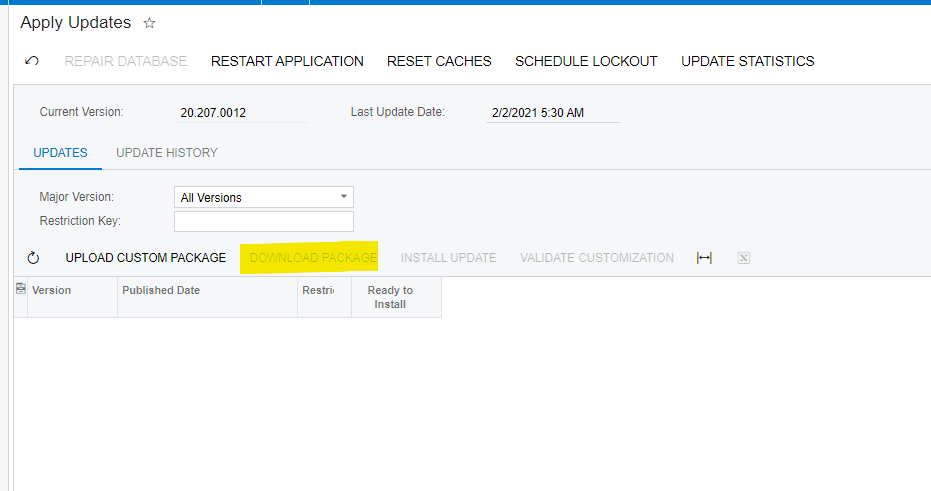
For some reason I don't have the option to “download package” in the apply updates screen.

How can I update this site to the 2023R1? Is there another method through the material wizard? 

Could i potentially just create a new site/instance?
 

Best answer by marilizevanzyl

You can upgrade Acumatica by using the Configuration Wizard, below is the link to for the Help Guide to do this:

Acumatica

2 replies

Forum|alt.badge.img
  • Jr Varsity II
  • Answer
  • September 19, 2023

You can upgrade Acumatica by using the Configuration Wizard, below is the link to for the Help Guide to do this:

Acumatica


Kandy Beatty
Captain II
Forum|alt.badge.img+17
  • Captain II
  • September 19, 2023

Hi @BobbySandhu 

Are you hosted by SaaS or on premise? Do you also have admin rights?

If you are hosted by someone else such as Acumatica or your partner, they will need to upgrade you. If you are hosted on your own server, you will need to download the newest build of Acumatica from http://acumatica-builds.s3.amazonaws.com/index.html?prefix=builds/23.1/

