Answer

Sales Demo data for 24_114_0020

  • February 5, 2025
  • 3 replies
  • 225 views

ejmillar
Varsity II
Forum|alt.badge.img+1

I’m looking for sales demo for a SAAS environment.

I’ve looked at https://acumatica-builds.s3.amazonaws.com/index.html?prefix=builds/zip/salesdemo/2024R1/ but the sales demo isn’t available for the version which we currently have. Does anyone know where I can get it?

Best answer by pallikasharma11

Hello ​@ejmillar 

Unfortunately, SalesDemo snapshot is not available for download for this version.

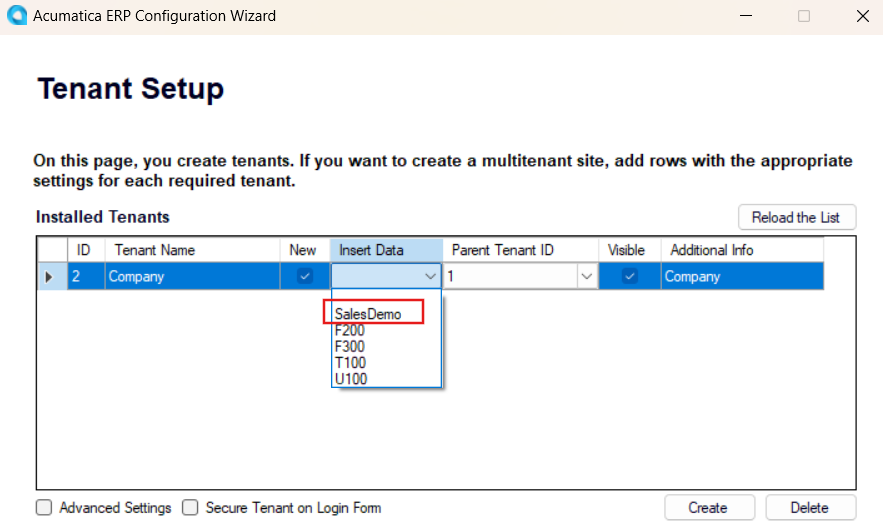
But you can install the 24.114.0020 update in your local and select SalesDemo under Insert Data in Tenant Setup.

Then a snapshot can be exported from the Tenants screen.


Hope this helps!


https://community.acumatica.com/supported-releases-67/acumatica-2024-r1-update-14-build-24-114-0020-26955

3 replies

Forum|alt.badge.img+2
  • Acumatica Employee
  • Answer
  • February 5, 2025

Hello ​@ejmillar 

Unfortunately, SalesDemo snapshot is not available for download for this version.

But you can install the 24.114.0020 update in your local and select SalesDemo under Insert Data in Tenant Setup.

Then a snapshot can be exported from the Tenants screen.


Hope this helps!


https://community.acumatica.com/supported-releases-67/acumatica-2024-r1-update-14-build-24-114-0020-26955


DipakNilkanth
Pro III
Forum|alt.badge.img+13

Hi ​@ejmillar,

You can use the ERP Configuration Wizard you can select the Sales Demo data when creating a new tenant. You could use a snapshot them to take this data if you need to restore it in to another tenant

Hope, it helps


ejmillar
Varsity II
Forum|alt.badge.img+1
  • Author
  • Varsity II
  • February 7, 2025

Thanks all.


I downgraded my local Acumatica version. Installed the Acumatica version which matched the SAAS version and installed sales demo. I then created a snapshot on my local instance and restored the snapshot to the SAAS environment. Bit of of a faff but got there in the end.