Answer

Not able to reset user password

  • June 3, 2024
  • 6 replies
  • 260 views

I’m having an issue resetting user passwords as the admin.  We keep getting the error as if the password does not meet the complexity requirements but that password does meet them and I also turned off the requirement all together and it’s still not allowing the passwords to be reset.

Best answer by nhatnghetinh

Hi @ddozer38 

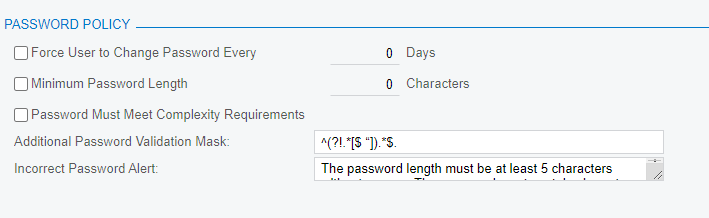
Try clearing “Additional Password Validation Mask” & “Incorrect Password Alert” as my screenshot.

and create User Test and test on this User Test.


Best Regards,

NNT

6 replies

DipakNilkanth
Pro III
Forum|alt.badge.img+13

Hi @ddozer38,

If you have access of an database then you can perform an below database query to change the password.


UPDATE Users SET Password = '123', LockedOutDate =null WHERE Username = 'admin'


If you need to change password for particular tenant then below link will help you.


https://asiablog.acumatica.com/2015/12/reset-user-password.html


  • Author
  • Freshman I
  • June 4, 2024

Hi @Dipak Nilkanth unfortunately we don’t have direct DB access.  The user tried to reset their own password and got the same message indicating it didn’t meet complexity requirements.  What’s weird is that we have the password requirements completely turned off.


nhatnghetinh
Captain II
Forum|alt.badge.img+11

Hi @ddozer38 

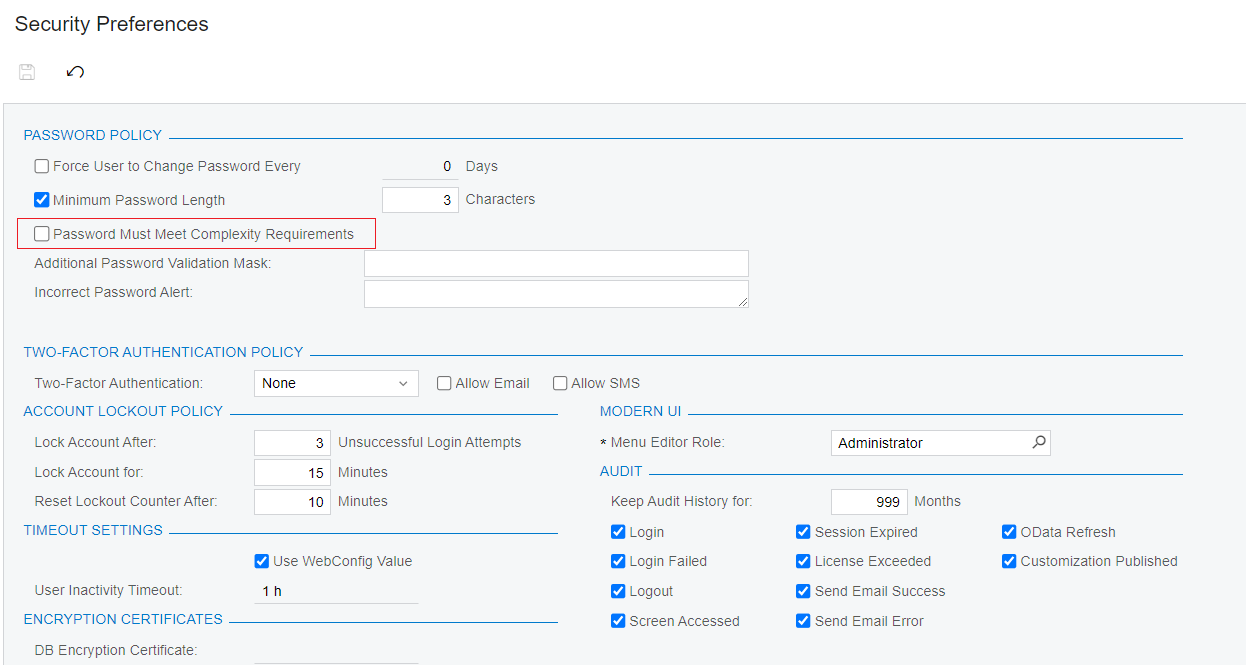
Please check the Security Preferences screen again and make sure “Password Must Meet Complexity Requirements” is not checked.


You create a User Test and reset the password for this User Test, then try Sign In with this User Test to check the results.


Best Regards,

NNT


  • Author
  • Freshman I
  • June 7, 2024

Hi @nhatnghetinh that’s what is baffling.  Here is how we have it set:


I’m wondering if the additional password mask needs cleared as well like in your screenshot?


nhatnghetinh
Captain II
Forum|alt.badge.img+11
  • Captain II
  • Answer
  • June 10, 2024

Hi @ddozer38 

Try clearing “Additional Password Validation Mask” & “Incorrect Password Alert” as my screenshot.

and create User Test and test on this User Test.


Best Regards,

NNT


  • Author
  • Freshman I
  • June 10, 2024

Hi @ddozer38 

Try clearing “Additional Password Validation Mask” & “Incorrect Password Alert” as my screenshot.

and create User Test and test on this User Test.


Best Regards,

NNT

That worked!