Answer

Locking Down Credit Release on SO

  • April 23, 2025
  • 5 replies
  • 139 views

I’m not sure if it just isn’t possible or if I’m doing something wrong. I’ve read through documentation and other posts on the forum but I can’t get my requirement to work. 

I’ve configured the setting for the role from the Access Rights by Screen and validated it under Access Rights by User:
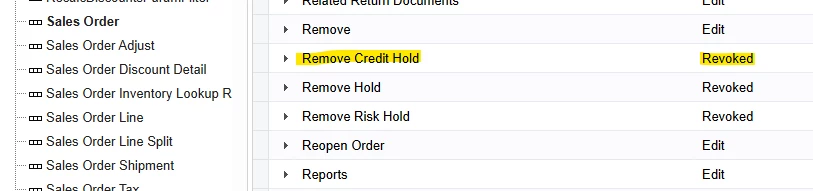
Screen shot of access rights by user demonstrating the remove credit hold function has been removed.

The user “testorder” only belongs to this role which allows access to sales order functionality but revokes the remove credit hold function. But logging in as testorder I can still release any credit held order with the button.


Best answer by rena98


​​​See the attached for the instructions we used to do this same thing for our customer. I could not paste the reply here due to character limit. Hope this helps!

5 replies

ed.goodman
Acumatica Employee
Forum|alt.badge.img+4
  • Acumatica Employee
  • April 23, 2025

@rmlounsbury 

Go into access rights by screen and check access to the Sales Order node.  Make sure it is defined (not set to Inherited).  If it is set to Inherited, the Revoked access to the Remove Credit Hold function will not be recognized.

If access to the Sales Order node is defined, go back to access rights by user.  Drill into the Remove Credit Hold node as you are showing in the screenshot above.  Click View Roles and see if there are conflicting roles causing this issue.

Hope this helps.

Ed


  • Author
  • Freshman I
  • April 23, 2025

@ed.goodman -- Thanks for the repsonse.


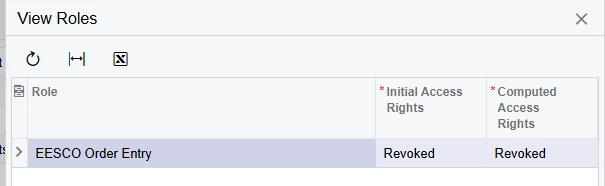
The Sales Order node is set to granted and all the functions are edit except for the remove credit hold function which I have set to revoked. The view rights indicates that the initial rights are revoked, and the computed rights are revoked:

Image showing the view roles function and both rights calculated as revoked.

But my test user can still release credit holds from the sales order screen. This is the only role the test user is a member of.


Chris Hackett
Community Manager
Forum|alt.badge.img
  • Acumatica Community Manager
  • July 2, 2025

Hi ​@rmlounsbury were you able to find a solution? Thank you!


Forum|alt.badge.img
  • Jr Varsity III
  • Answer
  • July 15, 2025


​​​See the attached for the instructions we used to do this same thing for our customer. I could not paste the reply here due to character limit. Hope this helps!


  • Author
  • Freshman I
  • July 15, 2025

I think I was missing the top-level setting access rights not being set to inherited. But following your steps I got the desired results in the end. 

Thank you for posting this note!

@Chris Hackett, I can confirm what ​@rena98 posted did work.