

Solved

Load Records From File - Column Mapping

  • Aug 7, 2024 2:26 PM UTC
  • 6 replies
  • 278 views
  • Translate All

Forum|alt.badge.img

How are cells in an excel file mapped so that when you “load records from file” Acumatica knows which cell to map to which field in Acumatica?

The values don’t appear on the dropdown menu to select the mapping so I suspect there is config in the backend that needs changed to enable this to work. 


As an example

PO Screen

 

Excel file:

 

Load records: 

When I try to import the file again with the edits, I get as far as here then most of the columns aren't mapped and you can see from the dropdown the only ones which are
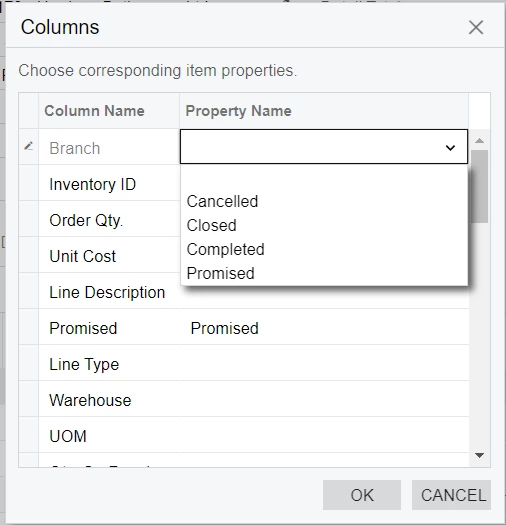


Where do I go within Acumatica to configure this?

Best answer by chrisross

I am embarrassed to say it but after a bit more thinking about this and being able to have it work when creating a new PO, I realised when exporting & trying to import that I was forgetting the order had to be “on hold” to get this to work. 


It is now working :-D

View original

6 replies

dcomerford
Captain II
Forum|alt.badge.img+16
  • Captain II
  • Aug 7, 2024 2:56 PM UTC

There is no configuration it reads the 1sr row ffom your spreadshhet. Do you have multiple tabs on the spreadsheet.

Translate

Forum|alt.badge.img
  • Author
  • Freshman II
  • Aug 7, 2024 3:12 PM UTC

No, single tab on the excel file & a direct export of the order from Acumatica to edit in excel and import the same file that I exported. 

Translate

dcomerford
Captain II
Forum|alt.badge.img+16
  • Captain II
  • Aug 7, 2024 3:19 PM UTC

@chrisross Can you share the excel file


Translate

meganfriesen37
Captain II
Forum|alt.badge.img+13

Is it possible there are hidden tabs on your spreadsheet?  I’ve had that happen before and really throw me off.  It will always read from the first tab of the spreadsheet (Visible or Hidden) and you must have column headers in the first row (starting at cell A1).  With how your columns are named, it should automatically map any that have the exact same name/description.

Translate

Forum|alt.badge.img
  • Author
  • Freshman II
  • Answer
  • Aug 8, 2024 7:47 AM UTC

I am embarrassed to say it but after a bit more thinking about this and being able to have it work when creating a new PO, I realised when exporting & trying to import that I was forgetting the order had to be “on hold” to get this to work. 


It is now working :-D

Translate

Chris Hackett
Community Manager
Forum|alt.badge.img
  • Acumatica Community Manager
  • Aug 8, 2024 4:44 PM UTC

Thank you for sharing your solution with the community @chrisross!

Translate


