Solved

How to setup an automation on AR Aging report to fire on a specific day every week?

  • May 18, 2026
  • 2 replies
  • 26 views

Forum|alt.badge.img

Hello all,

i have been trying to setup an automation that should fire & email the report every Wednesday. Since the Ar Aging report as As of date parameter which takes the system’s date, but how can I set the same under automation & mail template → Attached report tab?

Thanks.

Best answer by aiwan

@Harry 


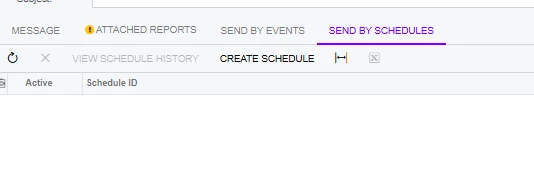
I think that you should navigate to the report, then go to the email notifications tab:

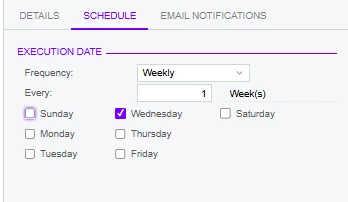
Hopefully, you have a email template set up! Then press Schedule Report and in your email template set the automation schedule to run ‘Weekly’ on a ‘Wednesday’:


2 replies

Forum|alt.badge.img+9
  • Captain II
  • Answer
  • May 18, 2026

@Harry 


I think that you should navigate to the report, then go to the email notifications tab:

Hopefully, you have a email template set up! Then press Schedule Report and in your email template set the automation schedule to run ‘Weekly’ on a ‘Wednesday’:


Yasas Withanage
Acumatica Employee
Forum|alt.badge.img+5

Hello ​@Harry 


A similar kind of community post. Please check this.

https://community.acumatica.com/reports-and-generic-inquires-115/report-automation-19372?tid=19372&fid=115


Thanks