

Answer

How to create Cases based on subject line or keywords within email body

  • March 14, 2024
  • 2 replies
  • 166 views

Forum|alt.badge.img

First, I think I know the answer to this question, but I need confirmation.

IF I want to setup where I create a Case in Acumatica with a specific Case Class based on incoming emails with certain Subject Line headings or even Keywords in the email body, *must* I use and enable the Service Management Module/Feature?

Or can I do that without Service Management, and if so where do I set that sort of configuration?

Thank you,

Jeff
Best answer by darylbowman

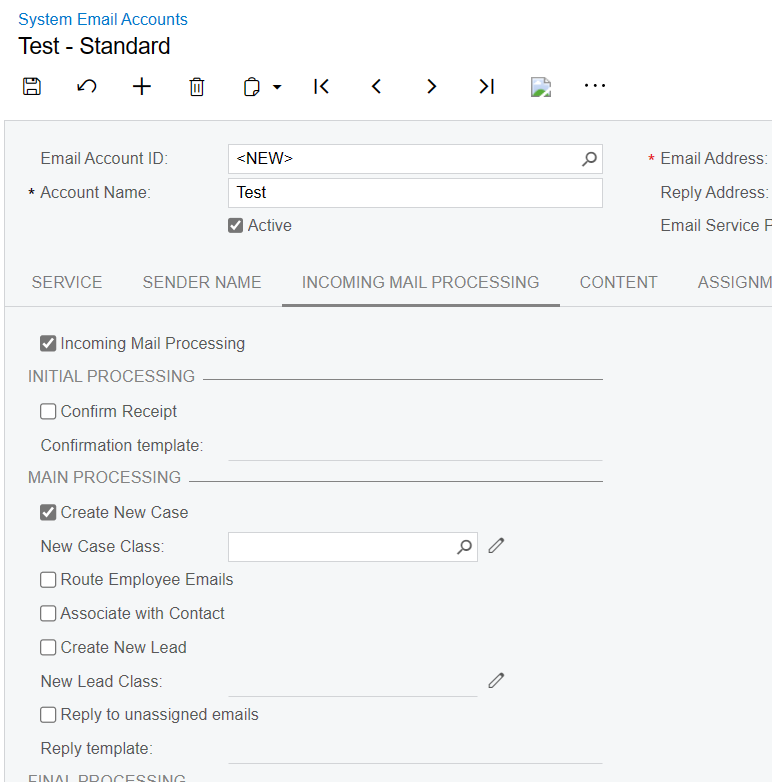
Acumatica allows creating Cases from emails to a certain email account, if the email isn’t already tied to a Case, using System Email Accounts:


You possibly could also achieve something like this using Business Events, which would allow more specific rules.

2 replies

darylbowman
Captain II
Forum|alt.badge.img+15
  • Answer
  • March 15, 2024

Acumatica allows creating Cases from emails to a certain email account, if the email isn’t already tied to a Case, using System Email Accounts:


You possibly could also achieve something like this using Business Events, which would allow more specific rules.


Forum|alt.badge.img
  • Author
  • Semi-Pro II
  • March 15, 2024

@darylbowman Thank you Daryl.  I knew about that, however, that is only based on the recipient “TO” email address.  This particular client wanted to create a case based on the Subject line, (for example).  I did not think there was a method to do that other than using the service module.

