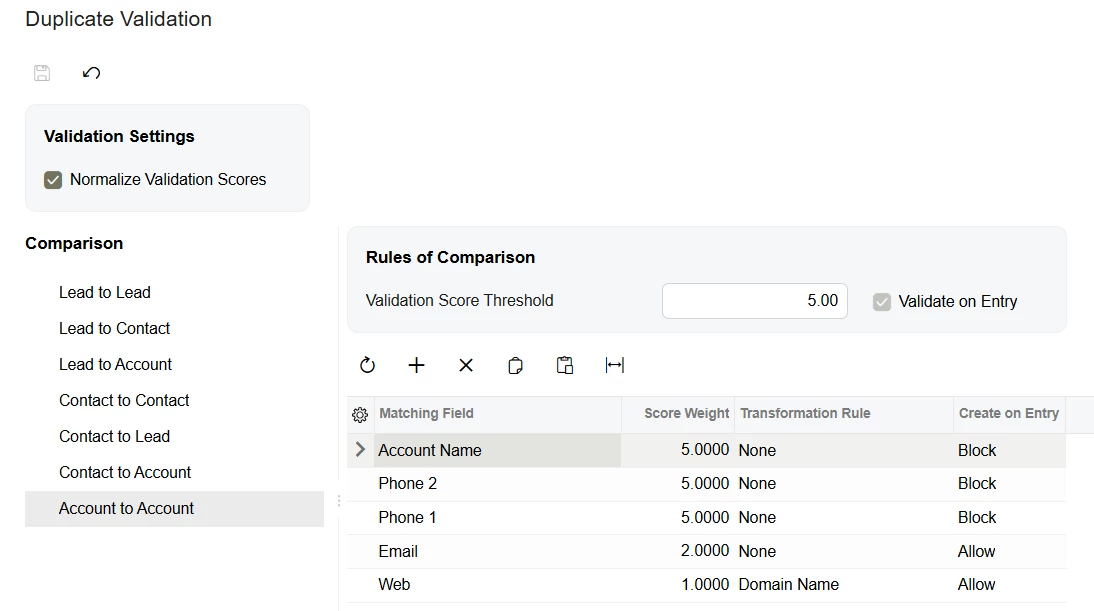
Anyone with an idea on how to prevent creation of duplicate customer profiles, I tried configuring the validation settings of Account to Account as shown in screenshot below, but it still allows users to create duplicates on the customer profile.
Best answer by suejohnson10
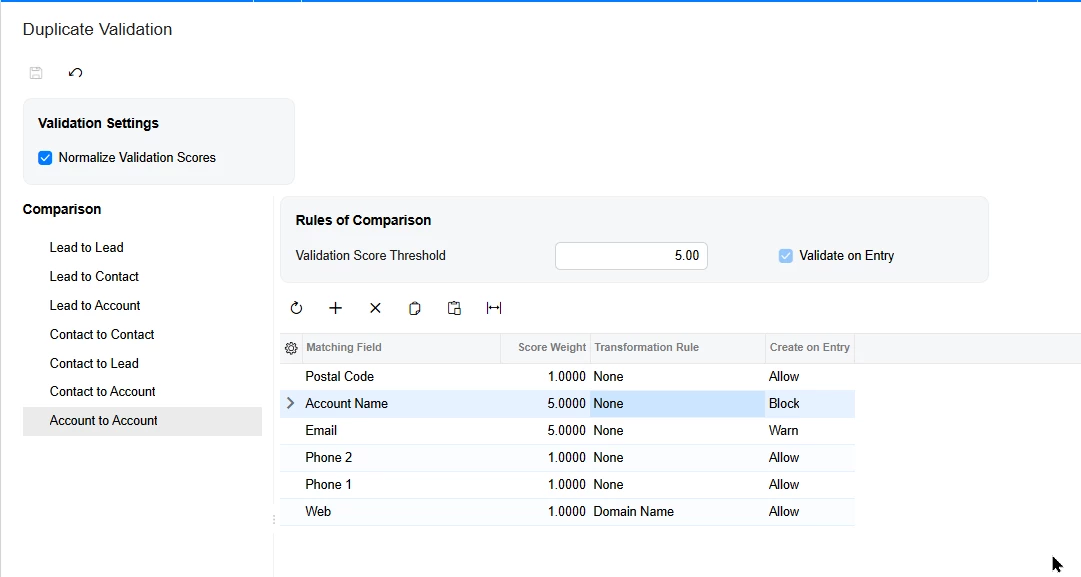
Hi @lorach, I reproduced this in a 2026 R1 sandbox and your Duplicate Validation setup is fine. The problem is where the check runs, not how it's configured.
This is the Duplication Validation Rule I used:
What I found:
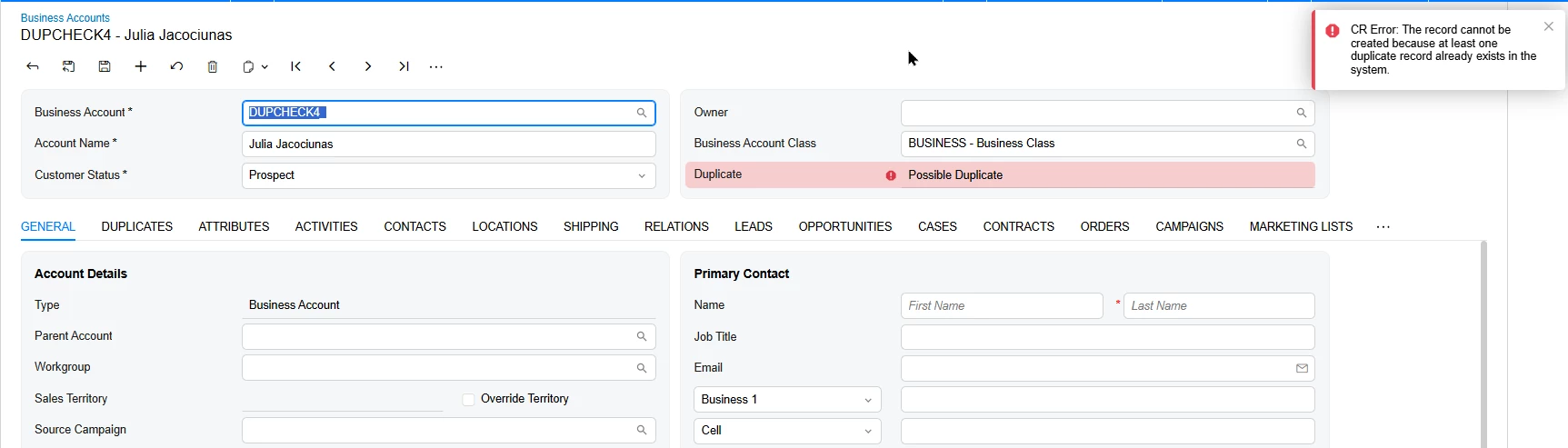
Business Accounts (CR303000): Add a new account with the exact Account Name of an existing customer, Save → hard error: "The record cannot be created because at least one duplicate record already exists in the system." Block works and it does compare against customer records.
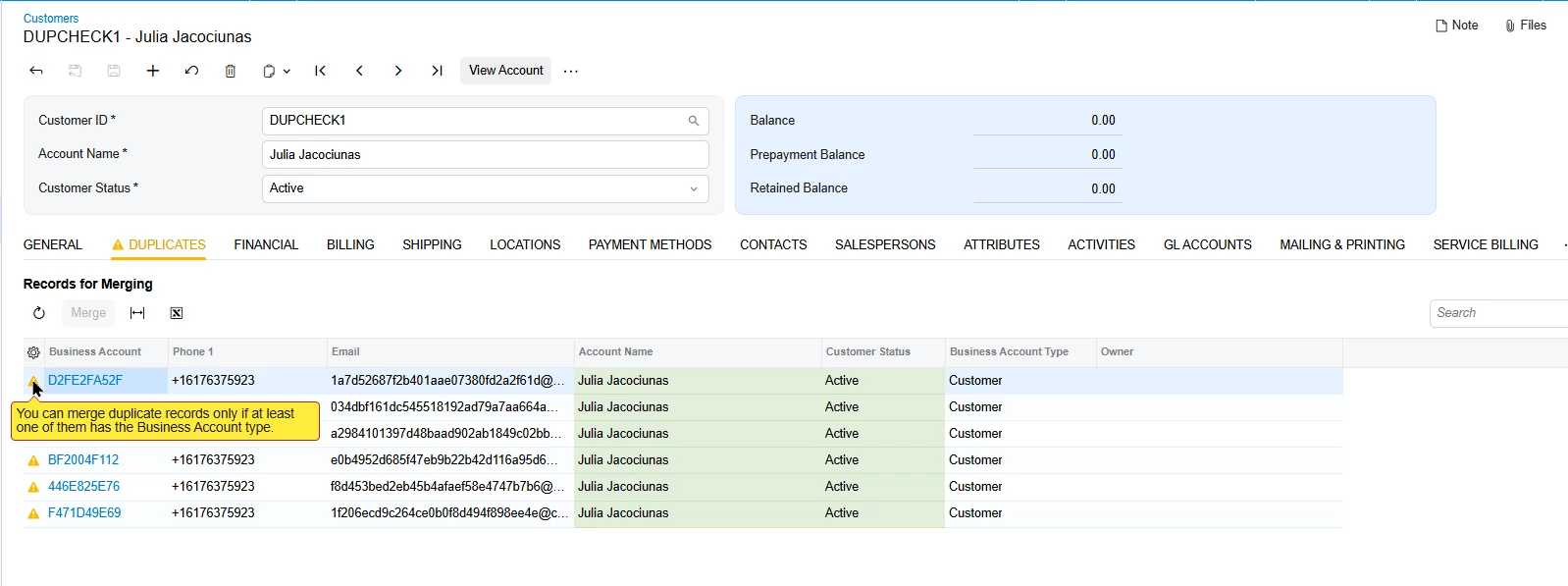
Customers (AR303000): Add a new customer with the exact Account Name of an existing customer, Save → saves with no error, no warning.
Check for Duplicates on the Customers form does find the matches, so detection works but a block on first save does not
Two customers cannot be merged. Merge is only enabled when one of the pair is a Business Account that hasn't been extended as a customer or vendor. Customer-to-customer duplicates have to be cleaned up manually, which is a strong reason to stop them at creation.
A process that might work for you:
Prevent new duplicates:
Create new customers on Business Accounts (CR303000), not on the Customers form. Block on save fires there and it checks against existing customers.
Extend the business account to a customer afterwards (More menu → Extend as Customer).
Restrict insert on Customers (AR303000) through access rights for the roles that shouldn't create customers directly, so the only route is via Business Accounts.
If your users must create directly on the Customers form, a small customization is the only way to hard-block there.
Find the duplicates you already have:
Run Validate Records (CR503430). Select Validate All Records the first time so every existing customer is checked, then Process All. The Type column shows which rows are customers; you can filter the grid on it if you only want to review those. Don't interrupt the run — it can't be resumed, and it can take a while on a big database.
Practical way to work the results:
Check the CR503430 grid - filter on Duplicate column = Possible Duplicate and Type column = Customer — that's your working list.
Check the Duplicates tab on each one to see what it matched and decide to keep or inactivate.
Or you could also add a Generic Inquiry on BAccount, grouped by Account Name (and Phone 1 or Email if you use them), with a count > 1 condition. That gives you an always on duplicates list without depending on validation status, and you can attach a business event to it if you want a notification when a new one appears.
Clean up:
Where the duplicate pair is a customer and a prospect business account, use Merge on the Duplicates tab.
Where both are customers, pick the one to keep, set the Status on the unwanted one to Inactive. Close open documents on the unwanted customer, create matching open documents on the one you want to keep so that the customer balances are correct.
Version note
Tested on 2026 R1 - AI Assisted - Tested/verified by me (human)
customization can be implemented in Acumatica to check for duplicate email addresses when a new customer is created. This validation can be configured based on the customer class.
We can also identify how many existing customer records share duplicate email addresses. After reviewing the results, the duplicate records can be validated and cleaned up as needed.
@lorach You could look at using the Duplicate Validation if you have CRM but it only works with Leads/Contacts and Business Accounts. You would need to do a customisation to do it on the customer record.
There may be some limitations with the low-code approach; however, we have used it for the following:
User enters Customer Name & clicks [SAVE] │ ▼ RowPersisting event fires │ ▼ Does another Customer / Account exist with this Name? / \ YES NO / \ ▼ ▼ [ABORT & BLOCK SAVE] [SAVE TO DATABASE] Show red error on screen: Record is created successfully. "Customer name already exists!"
Can you try below event-
using PX.Data; using PX.Objects.AR; using PX.Objects.CR;
namespace PX.Objects.AR { public class CustomerMaint_Extension : PXGraphExtension<CustomerMaint> { // Runs right before saving to the database protected void _(Events.RowPersisting<Customer> e) { if (e.Row == null || string.IsNullOrWhiteSpace(e.Row.AcctName)) return;
// Check if any other account already has this exact name BAccount existing = PXSelect<BAccount, Where<BAccount.acctName, Equal<Required<BAccount.acctName>>, And<BAccount.bAccountID, NotEqual<Required<BAccount.bAccountID>>>>> .Select(Base, e.Row.AcctName.Trim(), e.Row.BAccountID);
if (existing != null) { // Block save and show error on Customer Name e.Cache.RaiseExceptionHandling<Customer.acctName>( e.Row, e.Row.AcctName, new PXSetPropertyException("Customer name already exists on Account: {0}", PXErrorLevel.RowError, existing.AcctCD)); } } } }
Hi, I’m noticing that on the screen capture you shared, the Create on Entry rule is Allow for the email. If you changed it to Block, could this resolve a part of the problem?
Hi @lorach, I reproduced this in a 2026 R1 sandbox and your Duplicate Validation setup is fine. The problem is where the check runs, not how it's configured.
This is the Duplication Validation Rule I used:
What I found:
Business Accounts (CR303000): Add a new account with the exact Account Name of an existing customer, Save → hard error: "The record cannot be created because at least one duplicate record already exists in the system." Block works and it does compare against customer records.
Customers (AR303000): Add a new customer with the exact Account Name of an existing customer, Save → saves with no error, no warning.
Check for Duplicates on the Customers form does find the matches, so detection works but a block on first save does not
Two customers cannot be merged. Merge is only enabled when one of the pair is a Business Account that hasn't been extended as a customer or vendor. Customer-to-customer duplicates have to be cleaned up manually, which is a strong reason to stop them at creation.
A process that might work for you:
Prevent new duplicates:
Create new customers on Business Accounts (CR303000), not on the Customers form. Block on save fires there and it checks against existing customers.
Extend the business account to a customer afterwards (More menu → Extend as Customer).
Restrict insert on Customers (AR303000) through access rights for the roles that shouldn't create customers directly, so the only route is via Business Accounts.
If your users must create directly on the Customers form, a small customization is the only way to hard-block there.
Find the duplicates you already have:
Run Validate Records (CR503430). Select Validate All Records the first time so every existing customer is checked, then Process All. The Type column shows which rows are customers; you can filter the grid on it if you only want to review those. Don't interrupt the run — it can't be resumed, and it can take a while on a big database.
Practical way to work the results:
Check the CR503430 grid - filter on Duplicate column = Possible Duplicate and Type column = Customer — that's your working list.
Check the Duplicates tab on each one to see what it matched and decide to keep or inactivate.
Or you could also add a Generic Inquiry on BAccount, grouped by Account Name (and Phone 1 or Email if you use them), with a count > 1 condition. That gives you an always on duplicates list without depending on validation status, and you can attach a business event to it if you want a notification when a new one appears.
Clean up:
Where the duplicate pair is a customer and a prospect business account, use Merge on the Duplicates tab.
Where both are customers, pick the one to keep, set the Status on the unwanted one to Inactive. Close open documents on the unwanted customer, create matching open documents on the one you want to keep so that the customer balances are correct.
Version note
Tested on 2026 R1 - AI Assisted - Tested/verified by me (human)
Thank you for your thorough explanation 🤗. I believe the workarounds you suggested are practical and well thought out, especially the option of having users create business accounts first and subsequently extending them as customer accounts.