Solved

How can I setup incoming mail processing?

  • February 25, 2025
  • 7 replies
  • 302 views
  • Translate All

Forum|alt.badge.img

Hello all,

I am trying to setup the incoming mail processing where if a mail is received it should be forwarded to an employee.

Under the Incoming Mail Processing tab, we have the option to Routing the mails. How to setup this?
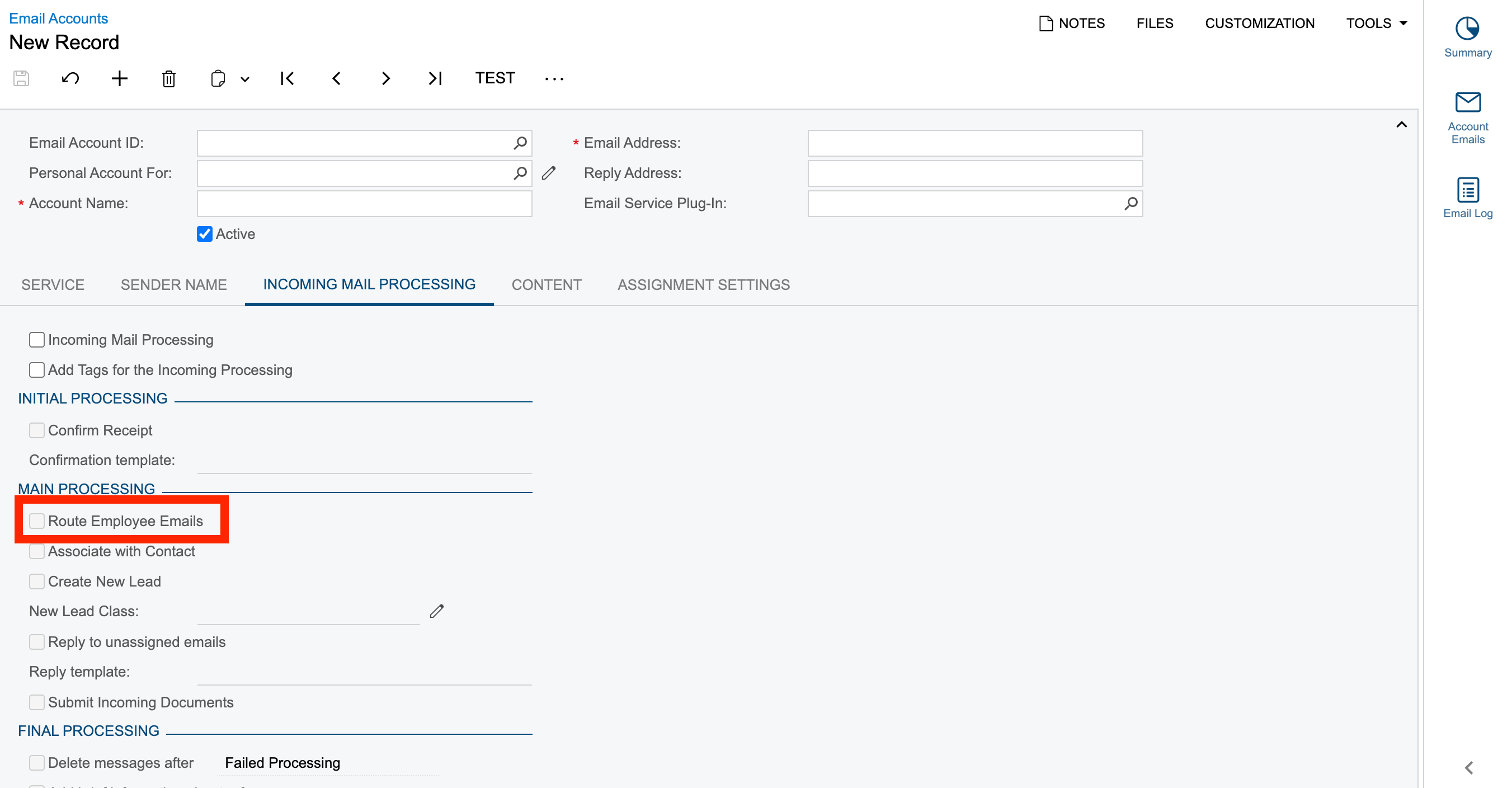
Thanks in advance.

Best answer by CJayalath49

Hi ​@Harry ,

With regards to your initial question, you need to activate incoming email processing and route to employee functionality.

This phrase “emails intended for a particular employee should be routed from the system email account to the employee's email address” means Acumatica forwards a copy of the reply email to the direct mailbox of the user who sent the original email in the thread.

About the third scenario, you can submit a case to Acumatica support.

Hope this helps.


View original

7 replies

hdussa
Jr Varsity I
Forum|alt.badge.img+2
  • Jr Varsity I
  • February 25, 2025

Hello ​@Harry ,
 

I would try the below for routing employee emails.

https://help.acumatica.com/(W(9))/Help?ScreenId=ShowWiki&pageid=cc8b8172-254f-4dbc-9897-a0493554fe27


Translate

Forum|alt.badge.img
  • Author
  • Semi-Pro III
  • February 25, 2025

Hello ​@Harry ,
 

I would try the below for routing employee emails.

https://help.acumatica.com/(W(9))/Help?ScreenId=ShowWiki&pageid=cc8b8172-254f-4dbc-9897-a0493554fe27


Hey ​@hdussa , thanks for your prompt suggestion. I tried by sending out a mail to the reply address & system mail account where incoming mail processing & route emails are setup as stated. Still it is not getting forwarded to the intended routing mail.

Translate

Forum|alt.badge.img
  • Author
  • Semi-Pro III
  • February 25, 2025

Also ​@hdussa , I am kinda getting confused at this point:
“emails intended for a particular employee should be routed from the system email account to the employee's email address”


For my scenario, I have a separate mail address - abc@test.com and the reply address is xyz@test.com

So now, a mail is sent out it will sent out from anc@test.com whereas when the recipient replies to the same mail it comes under xyz@test.com and then this incoming should be automatically redirected to route emails option, which upon activating the route emails checkbox and for the same employee record it is not getting routed.

What m I missing here?


Translate

hdussa
Jr Varsity I
Forum|alt.badge.img+2
  • Jr Varsity I
  • February 26, 2025

Hi ​@Harry ,

The email account configuration needs a detailed review. Please raise a case with Acumatica.

Good luck!


Translate

Chris Hackett
Community Manager
Forum|alt.badge.img

Hi ​@Harry were you able to find a solution? Thank you!

Translate

Forum|alt.badge.img+1
  • Acumatica Employee
  • Answer
  • June 11, 2025

Hi ​@Harry ,

With regards to your initial question, you need to activate incoming email processing and route to employee functionality.

This phrase “emails intended for a particular employee should be routed from the system email account to the employee's email address” means Acumatica forwards a copy of the reply email to the direct mailbox of the user who sent the original email in the thread.

About the third scenario, you can submit a case to Acumatica support.

Hope this helps.


Translate

  • Freshman I
  • October 13, 2026

Has anyone ever had issues with the display name using incoming processing?  It has been a huge pain point for us and I feel like if everyone else had our issue, there would be more threads on it. 

We have been working on this off and on for years and we have a case open with Acumatica that is in engineering as well. 

The basic problem is the display name is overwritten and shows as support@Ourcompanydomain.com no matter who sends it.  I don’t want to open a huge can of worms, just curious if anyone has had this issue at all and knows of some combination of email account settings or MS365 settings that would let us see who is emailing.  

The latest theory was that RouteEmailProcessor was writing it correctly (which it appears to be) but the GAL was finding support@ as an existing listing and overwriting the name. I removed that from the GAL and confirmed it is gone for my org, but the issue persists.  We tried a custom SMTP relay and that worked for outbound messages sent from the case only, then broke when email threads started rolling again.  

Our current workaround is to use a simple signature in Acumatica so we know who the sender is.  This does not work when a customer replies from a case and has no signature. 

I do think this is an Exchange side issue, but I am open to any feedback at this point.

Thanks,


Translate