Question

Getting Error while Publish package on multiple tenant

  • Nov 19, 2026 7:37 AM UTC
  • 5 replies
  • 26 views
  • Translate All

[2026-11-18 13:13:21.728] REPORT#QC609000.RPX
[2026-11-18 13:13:21.774] REPORT#QC609002.RPX
[2026-11-18 13:13:21.825] REPORT#QC609003.RPX
[2026-11-18 13:13:21.873] REPORT#QC609005.RPX
[2026-11-18 13:13:21.999] REPORT#QC609010.RPX
[2026-11-18 13:13:22.025] REPORT#QC609011.RPX
[2026-11-18 13:13:22.072] Batch ScreenWithRights
[2026-11-18 13:19:31.970] Batch SiteMapNode
[2026-11-18 13:23:54.221] System.Threading.ThreadAbortException: Thread was being aborted.
   at PX.Data.PXDBLocalizableStringAttribute.EnsureTranslations(Func`2 tableMeet) in C:\build\code_repo\NetTools\PX.Data\Descriptor\Attributes\DBFieldAttribute.cs:line 1909
   at Customization.CstEntityBase.UpdateDatabase(PointDbmsBase target)
   at Customization.CstEntityBase.BatchUpdateDatabase(PointDbmsBase target, IUpdateDatabase[] batch)
   at Customization.CstWebsiteStorage.UpdateDatabase(CstDocument doc, PXPublishOptions opt, ICustomizationLogger logger)
   at Customization.CstWebsiteStorage.PublishWebsiteFiles(CstDocument doc, PXPublishOptions opt, ICustomizationLogger logger)
   at Customization.CstWebsiteStorage.UpdateCustomization(CstDocCollection merged, String login, ICustomizationLogger logger, PXPublishOptions options)
   at PX.Web.Customization.Controls.Publish.DoPublish(Int32 hashCode, HttpResponse response)
[2026-11-18 13:23:54.226] An error has occurred. Please report this error to the technical support and attach the information provided above.

5 replies

Forum|alt.badge.img+5
  • Varsity III
  • Nov 19, 2026 7:51 AM UTC

Hi ​@jchawda80 ,

Is this the first time you’re getting this error? If yes, can you try to restart the IIS server and then try to republish again.


Hope this helps!!

Translate

KrunalDoshi
Pro II
Forum|alt.badge.img+9
  • Pro II
  • Nov 19, 2026 12:42 PM UTC

Hi ​@jchawda80,

This seems to be timeout error while publishing. It is normal mostly when you are trying to publish in multiple tenants in SaaS environment.

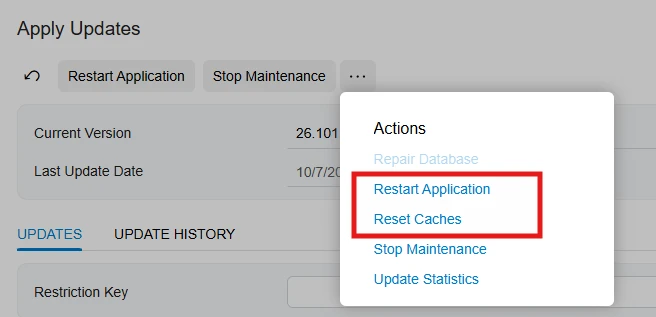
You can Reset Cache on Apply Update screen (SM203510), put the site in maintenance mode and then try to publish it again. You might have to Restart Application if Reset Cache does not work.

If none of this works, then you will have to increase the timeout in web.config. In SaaS environment, you need to submit support ticket.

Hope this helps!


Translate

Forum|alt.badge.img+5

​@jchawda80 Can you please share the log of this error we can try to identify the exact issue.

Translate

mohammadnawaz51
Varsity I
Forum|alt.badge.img+8

​@jchawda80 


There are few reason for Customization failure.

Please try the following steps to help identify what’s causing the Acumatica package publishing failure.

  1. Publish the packages one at a time. If a specific package fails on its own, please share the package name and the exact error so we can review it and determine what needs to be fixed.
  2. Check whether the failure occurs during a larger publish. If the packages publish individually but fail when published together or across multiple tenants, the process may be timing out. Packages with large database scripts, multiple generic inquiries, reports, or attachments can take longer to publish. In that case, please open a case with Acumatica Support so they can review the logs and confirm whether the publishing timeout needs to be increased.
Translate

Steve Milner
Varsity III
Forum|alt.badge.img+7

My replies are created in part with the help of proprietary AI, built with my AI skills, curated and maintained myself. Most replies are tested on local instances before they go up, and all are reviewed before posted.

@jchawda80 the EnsureTranslations line is just where the publish happened to be when its thread was stopped. A ThreadAbortException is raised by something outside the code it lands in, so it doesn’t point at a translation or site map problem in your package.

I’d hold off on raising the web.config timeout, though. Publish sets its own request timeout to 10 hours (Server.ScriptTimeout = 36000) before the database steps start, so the 300-second executionTimeout never applies to it. With several tenants selected, those database steps run one tenant after another inside that same request.

To see what stopped it, open System Monitor (SM201530), go to the System Events tab, and set the dates to cover the failure time. If there’s a “The site is shutting down” entry, the site restarted under the publish, and the reason is printed at the end of that line. If it’s “A request has been terminated,” Acumatica’s Resource Governor cut the request.

Harshita’s restart and retry can work if that was a one-off. Krunal’s maintenance mode fits the retry either way, since Acumatica recommends locking users out during a publish. Back up the database first too. Canceling a publication doesn’t revert the database changes it already made.

Translate