Solved

Error when importing Snapshot in Local Environment

  • Feb 26, 2024 1:43 PM UTC
  • 2 replies
  • 424 views
  • Translate All

jionymacabuhay
Varsity I
Forum|alt.badge.img

Hello!

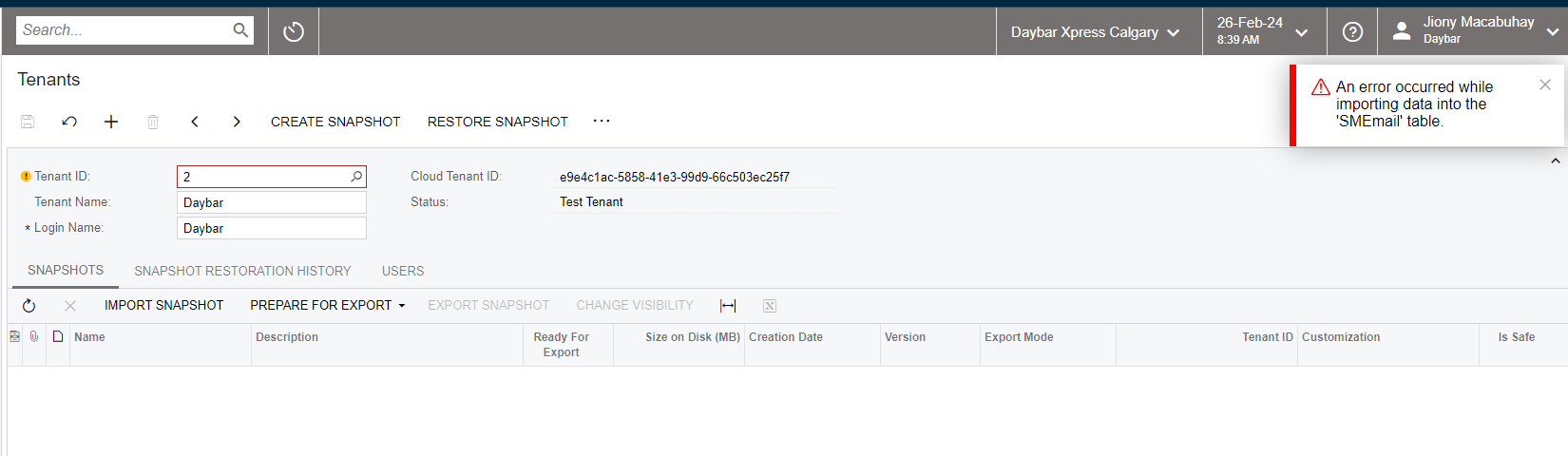
Need your inputs, I’m receiving this error while trying to import a Snapshot from Production to our Local Acumatica environment. Is it because the size of the Snapshot? 
 

Best answer by jionymacabuhay

Yes, I was able to resolve this just now. The issue is on the SMEmail table. Clean it up and was able to import and restore the Snap shot.

View original

2 replies

Manikanta Dhulipudi
Captain II
Forum|alt.badge.img+16

Hi @jionymacabuhay https://community.acumatica.com/everything%2Delse%2D119/failed%2Dimport%2Dsnapshot%2D11958


This is also similar to space issue

Please try to reimport after validating the below steps


process on Snapshot Activities.


1. Clean the Old snapshots to increase the space.
2. Truncate the audit history and custom Sync logs to increase the space.
3. Optimize the database to clear the orphan records.
4. Keep the Instance in Maintenance Mode
5. Create a Snapshot and export it.


Restore Snapshot.


1. Clean the Old snapshots to increase the space.
2. Truncate the audit history and custom Sync logs to increase the space.
3. Optimize the database to clear the orphan records.
4. Keep the Instance in Maintenance Mode
5. Delete old customization and Import new customization published in the taken snapshot.
6. Publish the customization to match
7. Restore Snapshot

Translate

jionymacabuhay
Varsity I
Forum|alt.badge.img
  • Author
  • Varsity I
  • Answer
  • Feb 26, 2024 3:28 PM UTC

Yes, I was able to resolve this just now. The issue is on the SMEmail table. Clean it up and was able to import and restore the Snap shot.

Translate