

Solved

can't create new instance using AcumaticaERPInstall (26.100.0175)

  • April 17, 2026
  • 8 replies
  • 61 views

Forum|alt.badge.img+2

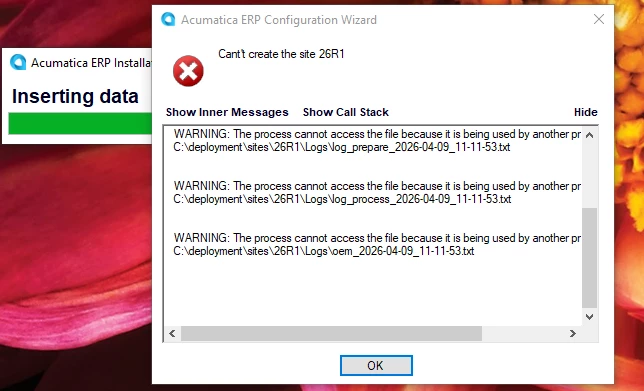
Every single time that I try to create a new instance of 26R1 (even after rebooting my machine), I get these errors right away and the installer stops:
Even if I press OK, I get more log errors:
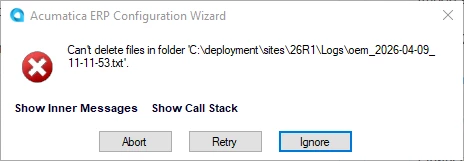
If I press ignore, I just get more of these errors about the other log files that the installer created.

I’ve deleted the log files and restarted the install but the log files just get recreated with the same access errors.

Question: how to get past these log errors so I can create a new instance?


Here’s the full error:

Cant't create the site 26R1
 --------------------------------------
 Inner Exception:
 Exception occurred while deploying the site files.
  --------------------------------------
  Inner Exception:
  Exception occurred while backing up the files from 'C:\deployment\sites\26R1\' directory. Try to do it manually.
   --------------------------------------
   Inner Exception:
   
   WARNING: The process cannot access the file because it is being used by another process.
   C:\deployment\sites\26R1\Logs\log_prepare_2026-04-09_11-11-53.txt
   
   
   WARNING: The process cannot access the file because it is being used by another process.
   C:\deployment\sites\26R1\Logs\log_process_2026-04-09_11-11-53.txt
   
   
   WARNING: The process cannot access the file because it is being used by another process.
   C:\deployment\sites\26R1\Logs\oem_2026-04-09_11-11-53.txt

   

Best answer by bpgraves

These log file errors are the direct result of trying to install the Acumatica tools and the instance on the same folder.  When you first run installer and it asks you for the folder location, do NOT choose where you want your instance: this is actually the location of the TOOLS which can’t co-exist on the same folder with the instance since the instance install will attempt to delete the location where the tools are installed.

8 replies

mohammadnawaz51
Jr Varsity II
Forum|alt.badge.img+6

Forum|alt.badge.img
  • Jr Varsity I
  • April 20, 2026

@bpgraves Please refer the attached guide it can help you to install the acumatica and create a new instance

few prerequisites is that use to enable :

1. IIS and make sure whatever the checkbox is enabled that you have to be enable
2. Install SQL and then SQL Studio and then create a database to connect with acumatica
3. Connect your database with Acumatica wizard and after that it will automatically install the Rabbit MQ and then it start creating your instance and it will create.


Forum|alt.badge.img+3
  • Pro III
  • April 20, 2026

@bpgraves 

The installer fails because the log files inside C:\deployment\sites\26R1\Logs\ are locked by IIS or a background process.
To fix this, restart IIS, delete the Logs folder manually, make sure no related files or folders are open, and then try creating the instance again.


Forum|alt.badge.img+2
  • Author
  • Semi-Pro II
  • April 20, 2026

@bpgraves 

The installer fails because the log files inside C:\deployment\sites\26R1\Logs\ are locked by IIS or a background process.
To fix this, restart IIS, delete the Logs folder manually, make sure no related files or folders are open, and then try creating the instance again.
 

This is a new instance so it shouldn’t matter.  What I did was remove the 26R1 folder and I was able to create an instance on my root folder C:\deployment\sites\ which isn’t what I want.  So it has something to do with putting a new instance on a new subfolder.


Forum|alt.badge.img+2
  • Author
  • Semi-Pro II
  • April 20, 2026

I don’t have an issue connecting to the database which was already updated to version 26.1


Forum|alt.badge.img+2
  • Author
  • Semi-Pro II
  • April 20, 2026

I think I created the 24R1 subfolder myself in Explorer when I was getting the log errors but when I did it through the installer right now, I didn't get the errors.


Forum|alt.badge.img+2
  • Author
  • Semi-Pro II
  • April 20, 2026

I had to uninstall and now the log errors are back.  😡


Forum|alt.badge.img+2
  • Author
  • Semi-Pro II
  • Answer
  • April 20, 2026

These log file errors are the direct result of trying to install the Acumatica tools and the instance on the same folder.  When you first run installer and it asks you for the folder location, do NOT choose where you want your instance: this is actually the location of the TOOLS which can’t co-exist on the same folder with the instance since the instance install will attempt to delete the location where the tools are installed.
