



Hi,
We have a business event on a custom data-entry screen. The requirement is to send one consolidated email per task when multiple detail records are changed and saved together.
Business requirement
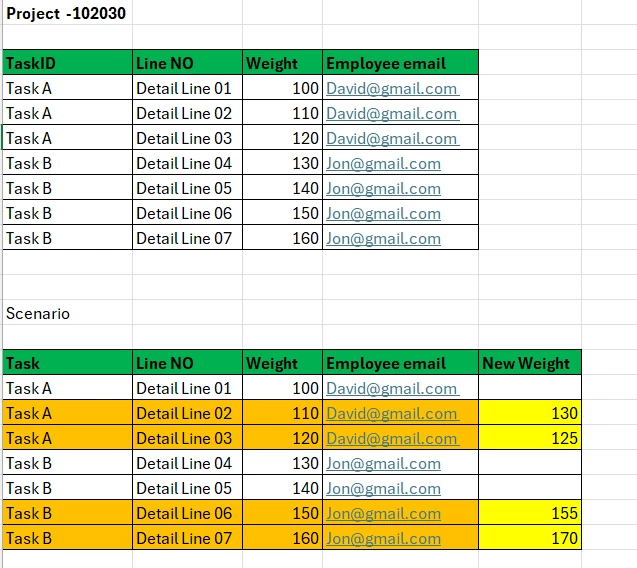
Project 102030 contains seven detail records in a custom table. Each record is linked to a task, and each task is assigned to an employee:
-
Task A: Detail Lines 01–03, assigned to David@gmail.com.
-
Task B: Detail Lines 04–07, assigned to Jon@gmail.com.
When a user updates several detail records and saves once, the system should identify only the changed records, group them by Task ID, and email each task’s assigned employee.
Example scenario
The user makes these changes and saves the document once:
| Task | Detail line | Original weight | New weight |
|---|---|---|---|
| Task A | Detail Line 02 | 110 | 130 |
| Task A | Detail Line 03 | 120 | 125 |
| Task B | Detail Line 06 | 150 | 155 |
| Task B | Detail Line 07 | 160 | 170 |
Expected behaviour
The system should generate exactly two emails:
-
David@gmail.com: One email containing the changes to Detail Lines 02 and 03.
-
Jon@gmail.com: One email containing the changes to Detail Lines 06 and 07.
Each email should include the project, task, detail-line identifier, original value and updated value. Unchanged lines must be excluded.
The recipient should be retrieved dynamically from the task’s assigned employee. If both tasks have the same employee, separate emails should still be generated for each task.
Current configuration
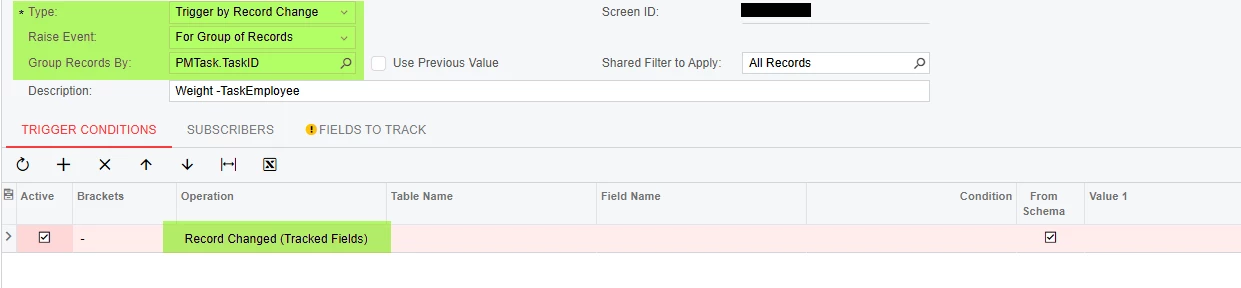
The GI-based business event is configured as follows:
-
Type: Trigger by Record Change.
-
Trigger condition: Record Changed (Tracked Fields).
-
Raise Event: For Group of Records.
-
Group Records By: PMTask.TaskID.
-
Recipient: The task assignee’s email address.
-
Email body: A repeating table row using
data-foreach-view="".
The GI now returns one row per panel detail without duplicates. We have also added the missing key fields identified by the business-event warning.
Actual behaviour
With the current setup, the business event triggers successfully when one detail record is changed and saved. However, when multiple detail records are changed and saved together, the business event does not trigger, even though all changes are saved successfully and appear in the refreshed GI.
We have tested changes to two records belonging to the same task. Switching between For Each Record and For Group of Records has not resolved the issue.
Assistance requested
Could you please investigate why multiple-record updates do not trigger the event and confirm:
-
Whether standard business events support the required consolidated notification per task for changes made in one save.
-
Whether additional GI keys, tracked fields or configuration are required.
-
Whether the custom screen’s multi-row save logic must meet specific requirements for business-event change detection.
-
How to display the original and updated values for each changed line in the grouped email.
Regards



