Hi everyone,
I am currently setting up multiple Email Accounts (Exchange Online SMTP/IMAP/POP3) for a client in Acumatica 2025 R1.
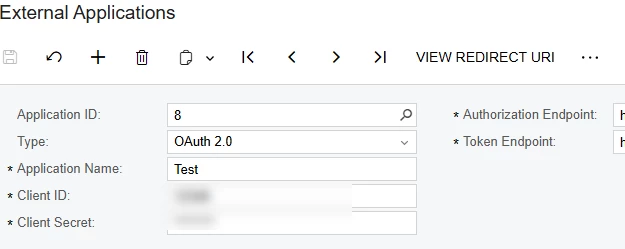
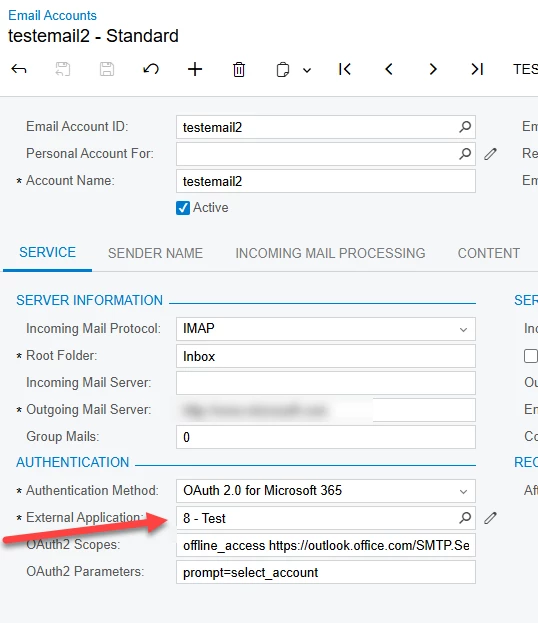
I have noticed a significant change in how the system handles External Applications (SM206540). When I create an External Application and link it to my first Email Account, that specific External Application completely disappears from the selector when I try to configure the second Email Account.
It appears the system is now enforcing a strict 1:1 relationship between an Email Account and an External Application. In previous versions, it was standard practice to use a single Azure AD App Registration (i.e., one External Application record in Acumatica) to authenticate multiple mailboxes under the same tenant.
My Questions:
-
Is this strict 1:1 mapping an intended security design change in 2025 R1, or is it a known bug?
-
If this is the intended behavior, what is the recommended best practice for setting up 20+ email accounts? Creating 20 separate External Applications in Acumatica seems highly redundant. Is there a configuration to bypass this and allow a 1-to-many relationship?
Any insights would be greatly appreciated. Thanks!