Question

Access rights to Acuamtica/site logo

  • March 3, 2026
  • 6 replies
  • 40 views

The acumatica/company logo stopped showing on our Portal.
I was wondering what accessrights do I need to have to see the logo?

 

6 replies

mohammadnawaz51
Jr Varsity I
Forum|alt.badge.img+6

@jaco60 can you confirm if the Logo is Uploaded in the company's screen with the suggested size?


mohammadnawaz51
Jr Varsity I
Forum|alt.badge.img+6

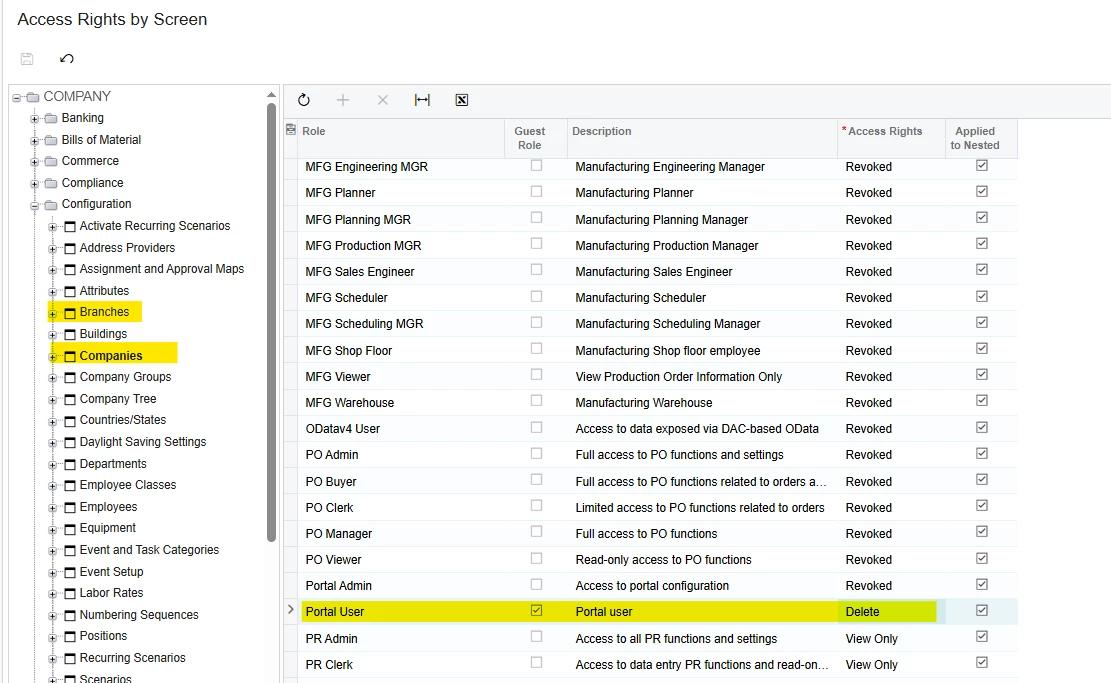
@mohammadnawaz51 We had a case related to such an issue and it was related to the branch security settings. It appeared that the Access Role was set on the Companies form, and users NOT having this role has no access to this company (branch) data and so, had no access to the custom logo.


palbores
Jr Varsity I
Forum|alt.badge.img+1
  • Jr Varsity I
  • March 3, 2026

Check the Access Rights > Configuration > Companies if set to Delete, and also users NOT having this role have no access to this company's (branch) data and so have no access to the custom logo.


  • Author
  • Freshman II
  • March 3, 2026

@jaco60 can you confirm if the Logo is Uploaded in the company's screen with the suggested size?

Yes the size is correct 

Check the Access Rights > Configuration > Companies if set to Delete, and also users NOT having this role have no access to this company's (branch) data and so have no access to the custom logo.


I gave the portal user(role) access to;
 

still the logo is not showing. any other ideas?


palbores
Jr Varsity I
Forum|alt.badge.img+1
  • Jr Varsity I
  • March 3, 2026

@jaco60 , maybe it was deleted; try to re-add the logo.


mohammadnawaz51
Jr Varsity I
Forum|alt.badge.img+6

@jaco60 can you show me the Logo in the company's screen, It seems to be the file is deleted. please re add.