Question

2026 R2: Reminder popup window in showing in Classic UI mode on landing page but Modern UI on other screens

  • Nov 3, 2026 6:06 PM UTC
  • 7 replies
  • 65 views
  • Translate All

thomassherman51
Jr Varsity III
Forum|alt.badge.img

2026 R2 (26.200.0334)

After logging on or returning to to the landing page the Reminder popup window is displayed in Classic UI with the deprecation message. 
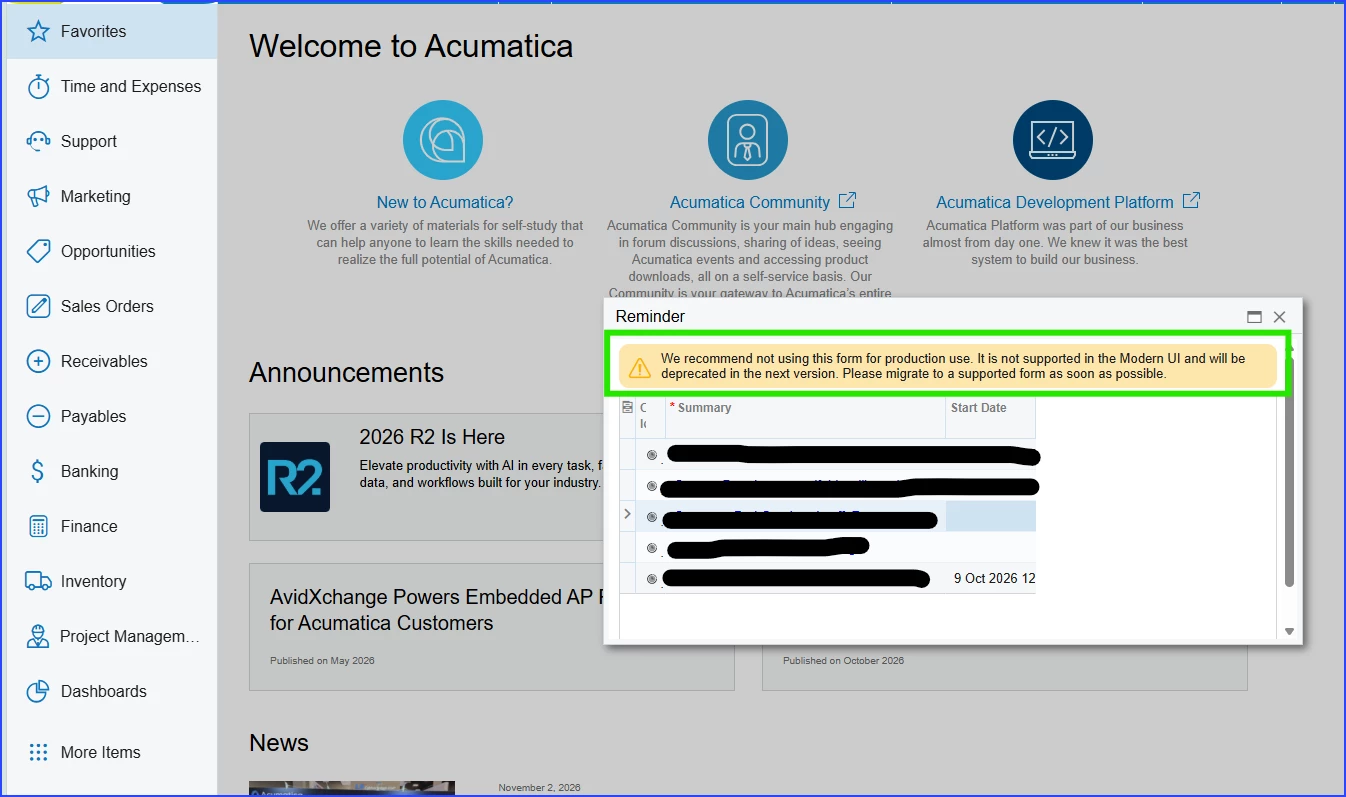
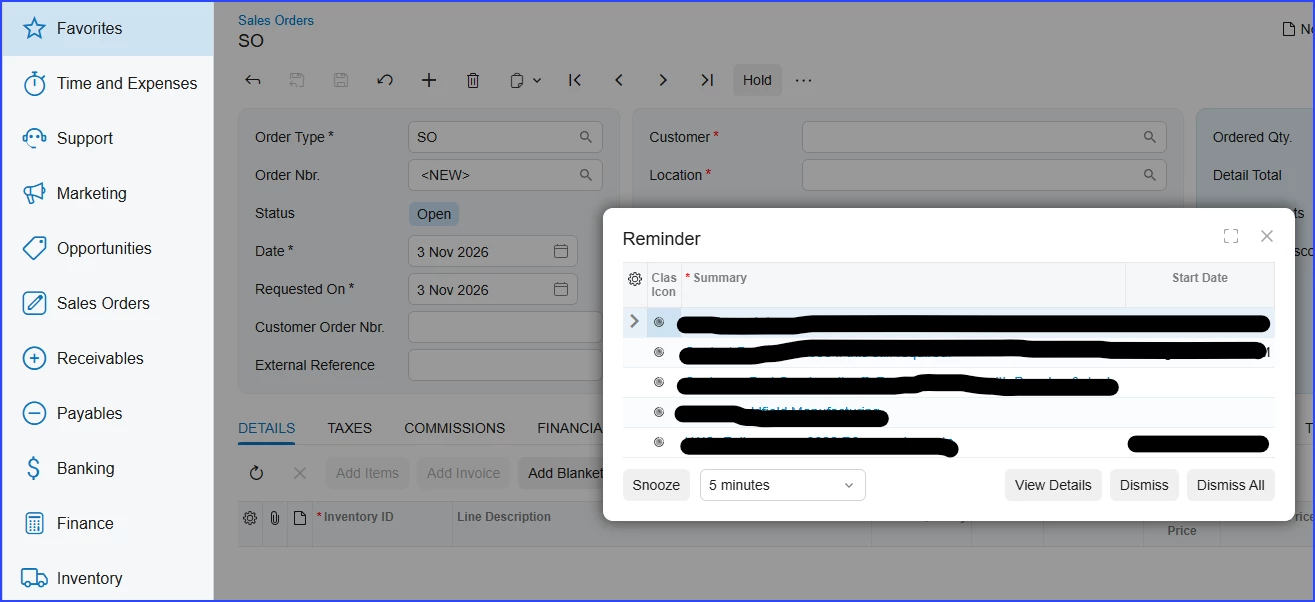
However, on other native pages/screens, which are all Modern UI,  the Reminder popup window displays in the Modern UI.


7 replies

Forum|alt.badge.img
  • Varsity II
  • Nov 4, 2026 3:10 PM UTC

What is the setting for the Reminders screen on the site map? You could try specifying modern UI there rather than the Default. I could see that being an issue if the default UI isn’t specified on Site Preferences form. 


Translate

thomassherman51
Jr Varsity III
Forum|alt.badge.img

What is the setting for the Reminders screen on the site map? You could try specifying modern UI there rather than the Default. I could see that being an issue if the default UI isn’t specified on Site Preferences form. 


Hello ​@dgranger70, thanks for responding.

 I did check that but the UI column is not available the  site map view, which has all fields set to visible. Please note that this is a 2026 R2 (26.200.0334) environment.


Translate

Forum|alt.badge.img
  • Varsity II
  • Nov 5, 2026 5:14 PM UTC

Oh right, my mistake. If you have access to the DAC schema browser, I would still check the SiteMap DAC and the PreferencesGeneral DAC to see if the SiteMap.SelectedUI and PerferencesGeneral.DefaultUI fields still exist in the database. If so, I would check the Source Data and see what their values are. If they don’t exist, you will likely need to file an Acumatica support case. Unfortunately, I do not have access to a 26R2 environment yet to test this myself. 

Translate

thomassherman51
Jr Varsity III
Forum|alt.badge.img

Oh right, my mistake. If you have access to the DAC schema browser, I would still check the SiteMap DAC and the PreferencesGeneral DAC to see if the SiteMap.SelectedUI and PerferencesGeneral.DefaultUI fields still exist in the database. If so, I would check the Source Data and see what their values are. If they don’t exist, you will likely need to file an Acumatica support case. Unfortunately, I do not have access to a 26R2 environment yet to test this myself. 

I will check out your suggestions and let you know. 

Translate

thomassherman51
Jr Varsity III
Forum|alt.badge.img

Oh right, my mistake. If you have access to the DAC schema browser, I would still check the SiteMap DAC and the PreferencesGeneral DAC to see if the SiteMap.SelectedUI and PerferencesGeneral.DefaultUI fields still exist in the database. If so, I would check the Source Data and see what their values are. If they don’t exist, you will likely need to file an Acumatica support case. Unfortunately, I do not have access to a 26R2 environment yet to test this myself. 

I will check out your suggestions and let you know. 

I checked the fields you suggested directly on the database:

  • SiteMap.SelelctedUI value for the Reminder screen (EP.50.60.00) is ‘D’  
  • PerferencesGeneral.DefaultUI has a value of ‘T’

Internet research says that the value ‘T’ indicates "Try Modern UI" (or "Temporary" / "Test" mode). This state means that the screen is conditionally flagged to attempt rendering in the Modern UI, but it retains a built-in safety net or fallback protocol.

Translate

Forum|alt.badge.img
  • Varsity II
  • Nov 11, 2026 2:23 PM UTC

​@thomassherman51 That is interesting. I thought that maybe the reminder screen was intentionally set to classic in 26R1 and the upgrade to 26R2 missed changing the setting for that specific screen. I am guessing ‘D’ is to use the site default, so this isn’t it. Unfortunately, I think this needs a support case or someone from Acumatica to take a look at it. I haven’t heard about deprecation of the Reminder feature for 26R2+ but it wouldn’t surprise me if they were to stop supporting it. If so, I hope they replace it with something similar/better as it is a useful feature. 

Translate

thomassherman51
Jr Varsity III
Forum|alt.badge.img

​@thomassherman51 That is interesting. I thought that maybe the reminder screen was intentionally set to classic in 26R1 and the upgrade to 26R2 missed changing the setting for that specific screen. I am guessing ‘D’ is to use the site default, so this isn’t it. Unfortunately, I think this needs a support case or someone from Acumatica to take a look at it. I haven’t heard about deprecation of the Reminder feature for 26R2+ but it wouldn’t surprise me if they were to stop supporting it. If so, I hope they replace it with something similar/better as it is a useful feature. 

​@dgranger70 ,  the Reminder window appears to take its UI settings from the page/window that spawns/triggers it. I have found that Acumatica landing page (ScreenId=00000000) and the Wiki pages (ScreenId=ShowWiki&pageid=……..) are in Classic UI mode. Therefore, when you are on any of them the Reminder window will appear in Classic UI mode.  

Translate